6

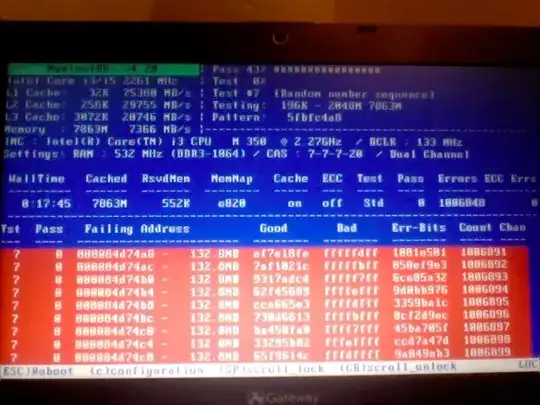
I have been having issues with this computer, and since MemTest said that there were errors on my RAM, I figured replacing it would fix them... However, after replacing the old stick of RAM, I am coming up with the same errors at the same addresses in MemTest, as far as I can see.

I have a Gateway ID49CU with (now) 8GB of RAM (from G.Skill). I've attached a picture of the memtest errors (just paused it at random and took a pic). I'm unsure if this is A. Indication that this brand-new ram is also bad, B. Indication that some other hardware in my computer is bad, C. Some other issue that I can't guess at.

This memtest is the one built into Ubuntu 12.10.

Image of the screen is as follows:
1

Karan
  • 55,947
  • 20
  • 119
  • 191
PhoenixCodes
  • 73
  • 1
  • 6
  • You have two memory modules, right? Did you check them separately? – week Dec 05 '12 at 01:47
  • 3
    Could the motherboard itself be bad? Testing the ram on another system would be an option. – Journeyman Geek Dec 05 '12 at 01:54
  • 1
    Reset all BIOS settings to their defaults and test again. This problem is commonly caused by someone "optimizing" their BIOS settings for a particular RAM set and then changing the RAM without undoing the "optimized" settings. – David Schwartz Dec 05 '12 at 08:54
  • please user the answers section for **answers** only, not to comment. I've merged your account with the previous unregistered account, you should be able to comment – Sathyajith Bhat Dec 07 '12 at 07:49
  • @Sathya: thanks for that, was unable to comment at all. Relatively new here and still learning the ropes. – PhoenixCodes Dec 09 '12 at 18:38
  • @Journeyman_Geek, is that a guess, or something that could for sure cause this? If its just a guess, can someone else confirm or deny it? – PhoenixCodes Dec 09 '12 at 18:40
  • @Week Checked both the slots seprately, and both sticks seprately. Same issues no matter how I set it up. – PhoenixCodes Dec 09 '12 at 18:43
  • @David_Schwartz, the standard BIOS for this model doesn't have any real options, aside from boot sequence. Good suggestion though! – PhoenixCodes Dec 09 '12 at 18:45

3 Answers3

11

This is a known bug with the Memtest86+ v4.20 distributed with several Linux distributions, caused by a change in the compiler (gcc) used to compile Memtest86+. Unfortunately, this means that the Memtest86+ included on the Ubuntu 12.10 (Quantal) ISO contains this bug.

A fixed Memtest86+ for Quantal should soon be available through the repository. In the meantime, you can add a non-bugged Memtest86+ v4.20 to your GRUB boot selection via the following commands (this assumes that you have Ubuntu installed):

sudo apt-get install grub-imageboot
sudo mkdir -p /boot/images/
wget http://www.memtest.org/download/4.20/memtest86+-4.20.iso.gz -O - | \
gunzip | \
sudo tee /boot/images/memtest86+-4.20.iso > /dev/null
sudo update-grub2

This will download Memtest86+ from the official website and include it in GRUB through the grub-imageboot utility. Once you reboot, you will find the new option Bootable ISO Image: memtest86+-4.20 in GRUB.

Vincent Yu
  • 492
  • 4
  • 15
  • This answer looks great, however I'm running into an issue with the instructions. apt-get worked to install grub-imageboot, and I was able to mkdir /boot/images/ just fine. However, the wget is giving me a number of issues, even with C/P (and removing the extra line break). First off, I suppose I need to be asking whether gunzip is standard, or do I need to get gunzip as well? – PhoenixCodes Dec 09 '12 at 23:20
  • Hmm... I think `gunzip` is included by default. In any case, I'm not sure why that's not working, but we just want to get the Memtest86+ ISO into the `/boot/images/` directory, so here's another way: Download the `memtest86+-4.20.iso.gz` file normally through your web browser, and open the directory containing it. Right click on the file and select 'Extract here'. Now run `sudo cp /path/to/download/mt420.iso /boot/images/memtest86+-4.20.iso` to copy the extracted file into the `/boot/images/` directory. Then follow up with `sudo update-grub2`. Let me know if you run into problems. – Vincent Yu Dec 10 '12 at 00:17
  • I got that 'basically' done via downloading the file and uncompressing it, then `cp`ing it into the correct directory, and `chown`ing it to root (wasn't sure if that was needed or not, but figured it wouldn't hurt), and finally doing the `sudo update-grub2` as well... which showed me that what I had tried worked. It's been running overnight, so far so good. – PhoenixCodes Dec 10 '12 at 13:35
1

Adding to Vyu's answer, based on comments and how I managed to tweak his answer to work for me:

In terminal, do the following. This will download the proper program for running an iso from the same screen that MemTest normally runs from, and create a folder that is needed.

sudo apt-get install grub-imageboot
sudo mkdir -p /boot/images/

Then, outside terminal, follow the following instructions.

download the file at http://www.memtest.org/download/4.20/memtest86+-4.20.iso.gz
unextract the .iso from the file you just downloaded

Back in terminal, run the following. This will copy the file to the correct folder, then update the program from line 1. Note that 'PathToDownload' should be replaced with the path to where you have the iso that you unextracted.

sudo cp PathToDownload/mt420.iso /boot/images/memtest84+_4.20.iso
sudo chown root:root /boot/images/memtest84+_4.20.iso
sudo update-grub2
PhoenixCodes
  • 73
  • 1
  • 6
  • `sudo cp` will set root as the owner of the copied file, so the `chown` is not necessary (but it was a good idea). Note, though, that `sudo mv` will _not_ set root as the owner of the moved file. Also, instead of `sudo chown root`, you would usually want `sudo chown root:root` to set both the user and group ownerships to root. – Vincent Yu Dec 10 '12 at 19:55
0

Processor or software bug? (Yes, CPUs can have bugs!)

The memory is probably okay. The fact that the failing test involves a random number sequence suggests that there is either a problem with the instructions used for generating random numbers or a bug in Memtest86+ itself.

An older (or newer, if available) version of Memtest86+ might not be subject to this bug.

bwDraco
  • 45,747
  • 43
  • 165
  • 205