0

I made a backup of one of my external drives to another. They are both NTFS filesystems. I moved ALL disk contents into a folder called a and right clicked to get file/folder/size count. They are exactly the same.

However windows reports J having 1.33gb (backup) and Q: as 521mb.

Now I think maybe its because of hardlinks, I must have more on J then Q. How might I figure out how many hardlinks I have in a drive?
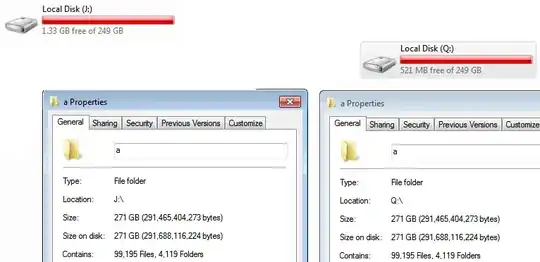
enter image description here

  • Instead of counting the number of hard links, have you seen the related [How can I check the actual size used in an NTFS directory with many hardlinks?](http://superuser.com/questions/217773/how-can-i-check-the-actual-size-used-in-an-ntfs-directory-with-many-hardlinks) thread yet? – Karan Dec 01 '12 at 04:35
  • @Karan: I havent but taking a sec to think about it wouldnt i still get different sizes because it will ignore hardlinks on one drive and count everything in the other? –  Dec 01 '12 at 04:40

1 Answers1

0

See this other answer from me but replace *.* with J:\** and Q:\**. If I understand finddupe's help correctly this will list all files recursively with a hardlink count and other names/locations.

Limer
  • 430
  • 3
  • 9