8

I have two HDDs (5900 RPM) in RAID 1 (mirror). I know, I know, it's painfully slow. I'm currently in the process of replacing them with faster drives, hence this question while I'm testing things.

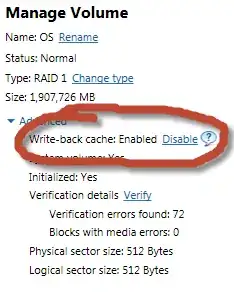
For some reason, disabling write-back caching in the Intel RST options gives me much faster write speeds, and vice versa. From what I know, I'd expect write speeds to decrease with write-back caching disabled. Is that correct? Is this just a bug in the monitoring program?
enter image description here

Caching enabled:

enter image description here

Caching disabled:

enter image description here

Intel RST system report:

System Report

System Information
OS name:  Microsoft Windows 7 Professional 
OS version:  6.1.7601 Service Pack 1 7601
System name:  (redacted)
System manufacturer:  MSI
System model:  MS-7673
Processor:  GenuineIntel Intel64 Family 6 Model 42 Stepping 7 3.401  GHz
BIOS:  BIOS Date: 08/01/12 15:53:14 Ver: 04.06.04, ALASKA - 1072009

Intel® Rapid Storage Technology
Kit installed:  10.5.0.1007
User interface version:  10.5.0.1007
Language:  English (Australia)
Intel RAID controller:  Intel(R) Desktop/Workstation/Server Express Chipset SATA RAID Controller
Number of SATA ports:  6
RAID option ROM version:  10.5.0.1034
Driver version:  10.5.0.1007
ISDI version:  10.5.0.1007

Device Information
Name:  Array_0000
Size:  3.6 TB
Available space:  0 GB
Disk data cache:  Enabled
Number of volumes:  1
Volume member:  OS
Number of disks:  2
Array disk:  5YD2V3WZ
Array disk:  5YD2VEPK

Name:  OS
Status:  Normal
Type:  RAID 1
Size:  1.8 TB
Data stripe size:  64 KB
Write-back cache:  Enabled
System volume:  Yes  
Initialized:  Yes  
Verification errors found:  72
Blocks with media errors:  0
Physical sector size:  512 Bytes
Logical sector size:  512 Bytes
Parent array:  Array_0000
Number of disks:  2
Array disk:  5YD2V3WZ
Array disk:  5YD2VEPK

Disk on port 0
Port location:  Internal
Status:  Normal
Type:  Hard disk
Usage:  Array disk
Size:  1.8 TB
Serial number:  5YD2V3WZ
Model:  ST2000DL003-9VT166
Firmware:  CC32
System disk:  No
Password protected:  No
Disk data cache:  Enabled
Native command queuing:  Yes  
SATA transfer rate:  6 Gb/s
Physical sector size:  512 Bytes
Logical sector size:  512 Bytes

Disk on port 1
Port location:  Internal
Status:  Normal
Type:  Hard disk
Usage:  Array disk
Size:  1.8 TB
Serial number:  5YD2VEPK
Model:  ST2000DL003-9VT166
Firmware:  CC32
System disk:  No
Password protected:  No
Disk data cache:  Enabled
Native command queuing:  Yes  
SATA transfer rate:  6 Gb/s
Physical sector size:  512 Bytes
Logical sector size:  512 Bytes

(redacted other disks)
Bob
  • 60,938
  • 25
  • 191
  • 216
  • 1
    I've just transferred the array over to 7200RPM drives. Sequential read is ~150MB/s with and without the write cache, while sequential write speeds increase from ~90 to ~150 MB/s if I *disable* the cache. In other words, same as the previous (slower) drives. – Bob Nov 25 '12 at 21:47
  • Update RST? You're using 10.5 and we're up to 12.5 now. Keep in mind they've dropped support for a lot of older chipsets. Maybe work backwards to find the newest version that works on your chipset. RST has a bad habit of significantly altering performance characteristics between versions. – Dom Aug 22 '13 at 07:01
  • 1
    @Dom Unfortunately, that would require my motherboard manufacturer to release an updated BIOS with an updated RST option ROM (I think?). I've bugged them about it before, with no reply - and I'm not going to try a custom BIOS just yet; I'd rather have a working system for now. Can you confirm that it's different/fixed in newer versions? If so, I'll just call it a bug and move on. – Bob Dec 18 '13 at 15:42
  • I think? Just download the drivers from the intel website and try them. If they support your chipset/BIOS combo they'll install. If they don't they won't. – Dom Dec 18 '13 at 22:18
  • I have similar results on Raid0. But overall system responsiveness is better with writeback cache enabled. – Unknown Aug 17 '14 at 11:24
  • You might be able to check to see if windows thinks write back caching is on. `start`->`control panel`->`device manager`->`disk drives` then right-click the raid1 array and click properties. Then go to policies. I no longer use my intel raid for my raid array (upgraded to a dedicated Adaptec card) so I'm not 100% sure if Windows will show this info or not. – Cliff Armstrong Jul 16 '17 at 03:02
  • @CliffArmstrong IIRC the Windows caching is independent of (and on top of) the Intel caching. But I no longer use that board so it's difficult to check. – Bob Jul 16 '17 at 05:08

1 Answers1

1

In Write-Back caching, the controller sends a data transfer completion signal to the host when the controller cache has received all the data in a transaction.

In Write-Through caching, the controller sends a data transfer completion signal to the host when the disk subsystem has received all the data in a transaction.

Write-Back caching has the following drawbacks:

  • If block is to be replaced, write to main memory only if update bit is set
  • I/O must access main memory through cache

References

Paul Sweatte
  • 729
  • 5
  • 16