I have installed VNC server on CentOS 5.8 and it is running, but I cannot connect to it using VNC viewer. I get the following error message:
connect: Connection timed out(10060)
What could be the problem?
I have installed VNC server on CentOS 5.8 and it is running, but I cannot connect to it using VNC viewer. I get the following error message:
connect: Connection timed out(10060)
What could be the problem?
Here how to add a firewall exception (you'll need to open ports 5900 and 5800).
Linux is not my strong side, so I hope this picture helps...
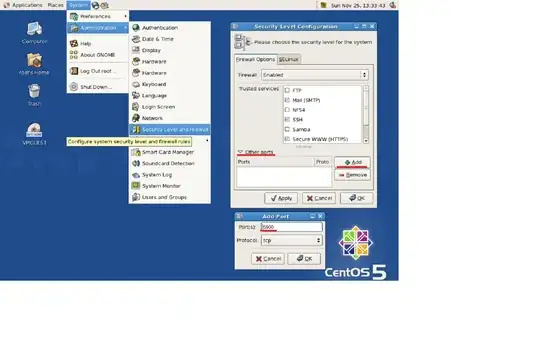

You will need to do:
vi /etc/sysconfig/iptables
Then, you will find a file as follows:
# Firewall configuration written by system-config-firewall
# Manual customization of this file is not recommended.
*filter
:INPUT ACCEPT [0:0]
:FORWARD ACCEPT [0:0]
:OUTPUT ACCEPT [0:0]
-A INPUT -m state --state ESTABLISHED,RELATED -j ACCEPT
-A INPUT -p icmp -j ACCEPT
-A INPUT -i lo -j ACCEPT
# <add the line for eth>
-A INPUT -m state --state NEW -m tcp -p tcp --dport 22 -j ACCEPT
# <add the line for ports>
-A INPUT -j REJECT --reject-with icmp-host-prohibited
-A FORWARD -j REJECT --reject-with icmp-host-prohibited
COMMIT
With your correct eth in ifconfig, add the following lines to your iptables:
-A INPUT -i eth1 -j ACCEPT
-A INPUT -m state --state NEW -m tcp -p tcp -m multiport --dports 5801:5803,5901:5903,6001:6003 -j ACCEPT
After the file is saved:
sudo service iptables restart
sudo service vncserver restart
You can have more information at: http://wiki.centos.org/HowTos/VNC-Server. However, you will see that they do not state: 5801:5803, which I have to add in order to get the VNCViewer working.
Regards,

There will be some firewalld permission denied from port where vncserver running (e.g., 5901, etc.), so make an exceptional rule with it, only port 5901 accept tcp. That's it. You must start firewalld first and then make an exceptional rule, don't forget to reload firewalld and daemon, like below command on Linux box:
systemctl start firewalld
firewall-cmd --zone=public --permanent --add-port=5901/tcp
firewall-cmd --reload
systemctl daemon-reload
Give it a try.


