I have a very slow Internet connection and don't want Live Tiles using up my bandwidth for updates.
Is there a way to shut them off?
I've changed the Show updates for Tiles in the settings but still they show up.
I have a very slow Internet connection and don't want Live Tiles using up my bandwidth for updates.
Is there a way to shut them off?
I've changed the Show updates for Tiles in the settings but still they show up.
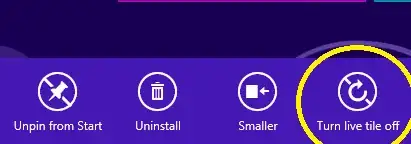
You can disable live update for each tile by right-clicking it and choosing "Turn live tile off":

In the interface, you do not have an option to change a live tile’s update frequency. There might be some registry hack to do it.
An easier way would be: To turn off individual tiles, right-click the tile on the Metro startpage, and select the turn live tile off option on the bottom toolbar.

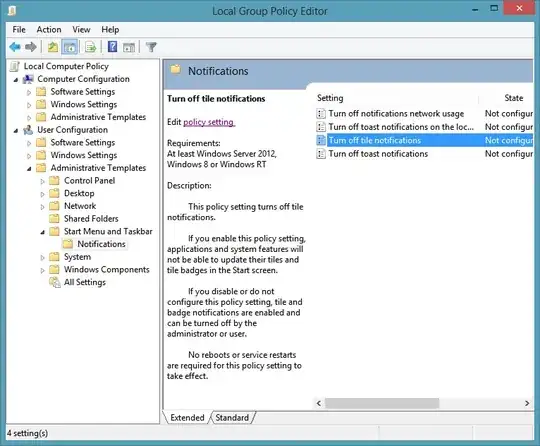
If you don't want to do this on a per-app basis, you can disable Live Tile notifications, Toast messages, and communications with the Windows Push Notification Service in the following Local Group Policy branch:
User Configuration\Administrative Templates\Start Menu and Task Bar\Notifications

If you don't want to use the Metro interface with live tiles then you can install Classic Shell which is available at http://classicshell.sourceforge.net/ This will remove the Metro interface being default and will default you to the regular desktop with a Start menu.