If I right-click any .EXE file, it has the Pin to Start option:

But, if I right-click any file, it doesn't have the Pin to Start option:
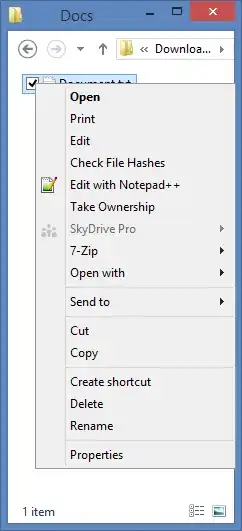
Is there any trick/workaround to pin files to the Start Screen?
If I right-click any .EXE file, it has the Pin to Start option:
But, if I right-click any file, it doesn't have the Pin to Start option:
Is there any trick/workaround to pin files to the Start Screen?

Here is a solution
Make a shortcut to the file
Navigate to C:\ProgramData\Microsoft\Windows\Start Menu\Programs
Place your shortcut in the folder
Press Windows Key+Q and search the name of your shortcut
Right click on the file and select "Pin to Start"
Good Luck!

I found a great utility called Start Screen Pinner which lets you pin files, folders, libraries and even special folders to the Start Screen.
For folders, the Pin to start option still exists without installing any additional software
For individual files, you will probably have to use additional software like that recommended by @Root. Full details on pinning to the start screen are covered in the article linked.

Right click on the file you want to pin and select "Create Shortcut"
Right click the short-cut and select "Pin to Start"
Related link: How to pin a control panel item to start?


