34

Most mobile devices like tablets or smartphones have an orientation sensor that signals the OS to rotate itself when the device is rotated.

But having installed Windows 8 on a desktop (or virtual machine), how do I rotate the screen? Obviously, this feature should be present in Windows 8 as it can be run on a tablet.

Vladimir Sinenko
  • 2,685
  • 6
  • 26
  • 33

3 Answers3

29

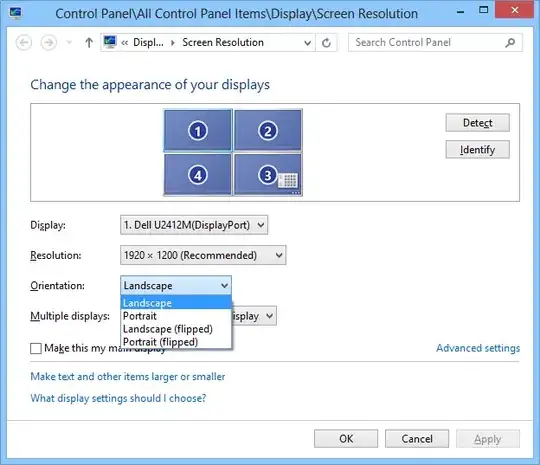
Right-click the desktop and click Screen Resolution.
You will then see an Orientation dropdown:

enter image description here

SLaks
  • 7,944
  • 2
  • 36
  • 59
  • 1
    @SLaks: nope, there is no such thing: [http://imgur.com/MpAuf](http://imgur.com/MpAuf) – Vladimir Sinenko Oct 29 '12 at 16:49
  • 2
    @VladimirSinenko Update your graphics drivers. – Elmo Oct 29 '12 at 16:50
  • 2
    @VladimirSinenko - Then your video adapter, or the current driver maybe, doesn't support rotation. This is how it's done (and note that this is exactly like it was in 7 and Vista) – Shinrai Oct 29 '12 at 16:50
  • I see, thanks. I believe my question should be "how do I rotate the Windows desktop under virtual machine". – Vladimir Sinenko Oct 29 '12 at 16:53
  • 1
    I thought all conforming video drivers had to offer that feature. – Joey Oct 29 '12 at 17:01
  • 2
    @Joey: Nope, don't think so. Have come across a few Win7 systems at least (don't remember exactly which cards/chipsets though, but they had WHQL-approved drivers from Win Update) that were missing this option as well. – Karan Oct 29 '12 at 17:15
  • 1
    I remember reading something like that on some MSDN blog, but I could be mistaken. But my Dell Latitude XT2 was also missing "landscape (flipped)" which, for a convertible Laptop/tablet is quite a stupid thing to leave out :-) – Joey Oct 29 '12 at 18:38
  • 2
    @blachniet: That's a feature of Intel's video drivers, not Windows. – SLaks Oct 13 '13 at 00:16
18

To rotate the display, hold down ctrl+alt and either Up, Down, Left, or Right to orient the screen as each of the four orientations.

glenviewjeff
  • 1,724
  • 4
  • 18
  • 34
  • 3
    This only works if your video adapter's driver/utility provides it (most commonly this is provided by Intel's graphics drivers, for Intel's graphics adapters). – Ƭᴇcʜιᴇ007 May 18 '15 at 14:56
3

"Orientation" setting is sometimes removed by computer manufacturer through modified drivers. If there is no such setting on your notebook, try installing driver from graphic chip manufacturer (Intel, nVidia or AMD) instead of from your notebook manufacturer.

Eg: HP 250 G2 notebook was missing this setting. After HP-supplied driver was uninstalled and replaced with authentic driver (obtained directly from Intel website), the "Orientation" setting appeared, as on SLak's screenshot.

Agent_L
  • 1,750
  • 12
  • 14