21

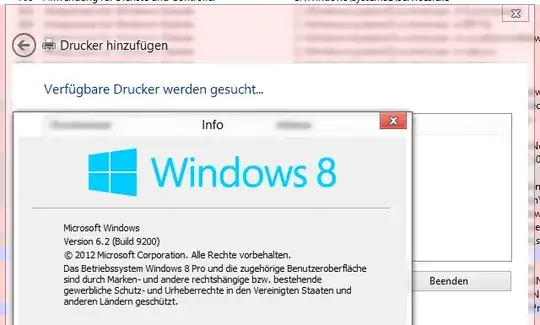
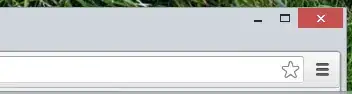
While I'm really liking Windows 8, I do miss having the semi-transparent borders round my windows, like with Aero Glass in Windows 7.

I note that the taskbar in Windows 8 is semi-transparent...

enter image description here

Is there a way to change windows border opacity, to restore Aero Glass or even just so that it looks like the taskbar?
enter image description here

Thanks for any help.

Django Reinhardt
  • 4,434
  • 8
  • 52
  • 85

2 Answers2

16

Not really. Windows no longer adds transparency to their windows. Therefore, officially there is no way to do it. You could try this guide:

http://www.intowindows.com/enable-aero-glass-in-windows-8/

However, I am not sure if that works in the latest build. There also might be some third party apps, I'll try to find one after I'm done writing. Good luck.

EDIT:

Alright, you can look at this third party app as well. I can not vouch for it's security though. I have never tried it. Here is an article showing it off.

http://www.addictivetips.com/windows-tips/aero8tuner-get-a-hint-of-the-old-aero-glass-effect-back-in-windows-8/

Josiah
  • 1,764
  • 3
  • 13
  • 24
5

Aero Glass can be enabled with a DLL available for free here:

Reimplemented Windows Blur effect

This DLL is loaded via AppInit into the DWM.exe and Explorer.exe and and hooks the functions SetWindowCompositionAttribute and DwmEnableBlurBehindWindow and implements them again to enable the Glass effect again in Windows 8.

Now you can work with Windows 8 without getting headache because of the ugly Theme :)

magicandre1981
  • 97,301
  • 30
  • 179
  • 245
  • Nice! I'd certainly like to see that. It's still in Beta and apparently has warning boxes that appear periodically to remind. When it's finished, I'll check it out! http://glass8.berlios.de/ – Django Reinhardt Jul 18 '13 at 11:42
  • Ah, I've got some freebie reputation points, so I can now comment instead of editing. The link you provided does not explain clearly what to do with this DLL (I failed to make it work following instructions), so I changed it to installer link. Please consider to review your answer and provide correct instructions on how to install it correctly. – Danatela Jul 25 '13 at 04:26
  • don't link to **UNOFFICIAL** installers. The readme.txt explains how to use it. If you can't follow the steps, don't use the DLL! – magicandre1981 Jul 25 '13 at 04:30
  • @Django Reinhardt the DLL is now finished and Version 1.0 is released. donate a few bucks to get a license key. – magicandre1981 Aug 31 '13 at 05:32
  • The link is dead =/ – That Brazilian Guy Apr 17 '16 at 23:25
  • @ThatBrazilianGuy I fixed the link. – magicandre1981 Apr 18 '16 at 04:12
  • I have the "Your DWM is incompatible" messages. How do you let Aero Glass to know location of required function inside DLL? – yoonghm Oct 03 '18 at 09:30
  • I did this `set _NT_SYMBOL_PATH=srv*DownstreamStore*https://msdl.microsoft.com/download/symbols` from a cmd prompt as I do not know I should set it to force aerohost.exe to load relevant symbols from microsoft. – yoonghm Oct 03 '18 at 09:54
  • I set `_NT_SYMBOL_PATH` environment variable to `srv*DownstreamStore*https://msdl.microsoft.com/download/symbols` and reinstall aero glass. My current build of windows 10 is supported by aero glass but is still show the DWM incompatible issues. – yoonghm Oct 03 '18 at 10:00
  • 1
    @yoonghm set it to `srv*C:\AeroGlass\Symbols*` so Symbols folder inside your AeroGlass folder – magicandre1981 Oct 03 '18 at 14:14