Possible Duplicate:
Remove USB device from command line
Win7 laptop is in recovery mode where only DOS prompt is available for issuing commands. Is there a cmd.exe command that does the same as this to eject a thumb drive? 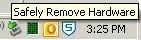
Possible Duplicate:
Remove USB device from command line
Win7 laptop is in recovery mode where only DOS prompt is available for issuing commands. Is there a cmd.exe command that does the same as this to eject a thumb drive?
Not from recovery mode, but as long as there are no active I/O processes, you should be fine to just pull it.
unless you're livebooting, then NEVER PULL IT unless told to by the live OS.


