I love the new start menu of Windows 8 but I would like to be able to organize my icons into sections. How do I organize my app icons in Windows 8?
Asked
Active
Viewed 1,710 times

1 Answers
13
It's actually pretty easy. Groups are created by dragging an icon in between two other groups (drag up to start the move on tablets):
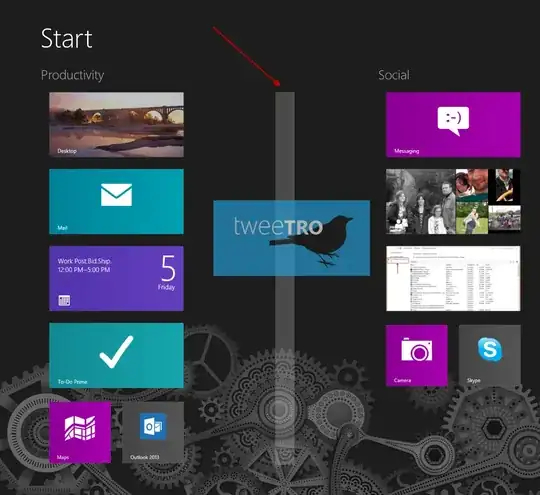
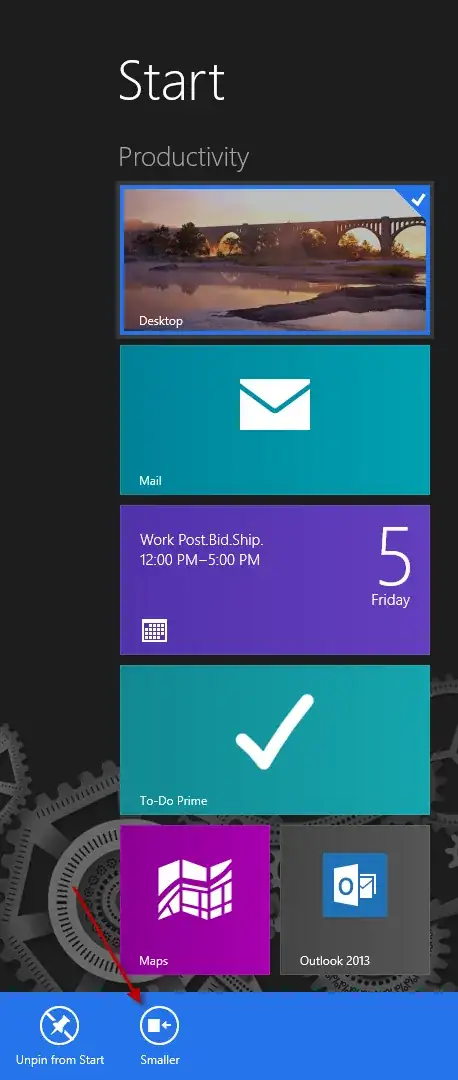
Simply organize your icons into the groups that you want. If you're looking to make the icons smaller you can do that by right-clicking (press and hold or swipe down on tablets) on the icon and select Smaller:
Finally to name groups you have to zoom out (Ctrl+Scroll or Pinch Zoom) and then right click (swiping down) on the group and Select "Name Group":

There you have it! A quick and easy way to organize your apps on the "Modern UI".

Zhaph - Ben Duguid
- 930
- 8
- 20

James Mertz
- 26,224
- 41
- 111
- 163
-
1You can also click the - button in the bottom right to zoom out :) – Graham Wager Oct 24 '12 at 16:03