How to turn off Facebook notifications on Mac OS X Mountain Lion?
Asked
Active
Viewed 1.7e+01k times
54


-
1FYI you can turn off notifications from within Facebook by going to **Notification -> Settings -> Desktop and Mobile** (good for older OSX versions that don't have a Notifications Center) – Yarin Dec 19 '15 at 02:12
-
1I would add that @Yarin's answer is general, whereas the answer by Daniel Beck is specific to Mountain Lion (it does not work on El Capitan because the Notifications system preferences panel is completely different). Yarin's comment ought to be made into an answer, and should be the accepted answer. – jvriesem Dec 20 '15 at 17:53
4 Answers
71
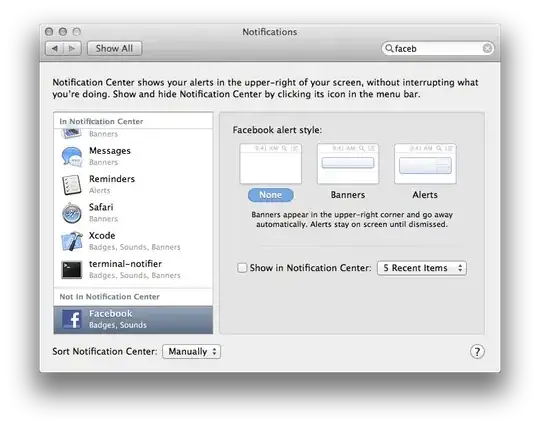
Open System Preferences, select the Notifications preference pane at the top right, and disable it there.

Daniel Beck
- 109,300
- 14
- 287
- 334
-
lol wow i don't have a notifications center on my macbook pro, its running 10.7 too...where did you get that from? – pneumatics Sep 28 '12 at 22:06
-
-
-
Just for a reference, a solution (**for El Capitan**). If you click on the padlock in the address bar next to *http://www.facebook.com*, you can change the permissions of the site quickly. n.b you can change any permissions of a site even if its not a padlock, just click on the icon to the left of the address. – Matt Le Fleur Jan 05 '16 at 08:47
18
If the above answer didn't work for you because Facebook was already disabled in System Preferences and you use Google Chrome, you may be mistaking Chrome's notifications as OS X notifications. You can disable Google Chrome Notifications by following the instructions here
- In the upper right corner of the browser window, click the Chrome menu.
- Click Settings > Show advanced settings.
- In the "Privacy" section, click Content settings.
- In the dialog that appears, go to "Notifications" and configure your desired settings

Cory Klein
- 1,602
- 2
- 17
- 21
-
Thank you! I was mystified by this and didn't realize it could have been Chrome. – nyarasha Jan 06 '16 at 16:49
-
1Turning off OS X notification for FB was obvious but this finally solved my problem. – Joe Huang Jan 14 '16 at 00:58
-
2
Option+Click the Notification Center menu bar icon, it will turn grey when disabled To re-enable Notifications, just option+click the menu bar icon again. It will turn black to signify that it’s active again.
If you’re less of a keyboard fan and more of a gestures person, you can also hush notifications directly from the panel itself.

Lavanya Sethi
- 37
- 1
1
For El-Capitan:
press Ctrl+Space, type "Notifications", choose "Facebook"
Just select the top-left icon "None" instead of "Banners" or "Alerts"


Kokizzu
- 1,715
- 3
- 16
- 26