5

From this article I have learnt, that DWM is enabled only with AERO:

Let’s recall: without Aero turned on, the DWM is deactivated, so there’s also no more 2D acceleration, either (this applies equally to Windows 7 as it does to Vista)

What is the easiest way to tell whether AERO / DWM on Win 7 is enabled / disabled? With some themes it is (visually) obvious, but with some others not (especially not when using remote access like VNC).

Is there some dialog where I can see that AERO / DWM is enabled / disabled?

Horst Walter
  • 1,899
  • 7
  • 27
  • 46
  • 2
    If there is no window transparency, then aero/dwm is disabled – Moab Sep 26 '12 at 01:05
  • Is there no other way to tell than just he visual impression. Because if you use remote tools, this can be misleading / hard to tell. Also, when you start with an AERO theme, but change it, does this disable AERO or not? Basically I need something to certainly tell whether DWM is on / off. – Horst Walter Sep 26 '12 at 07:26
  • Another method is if aero peek is working or not, looks like Horst Walter has another method. – Moab Sep 26 '12 at 14:52

4 Answers4

2

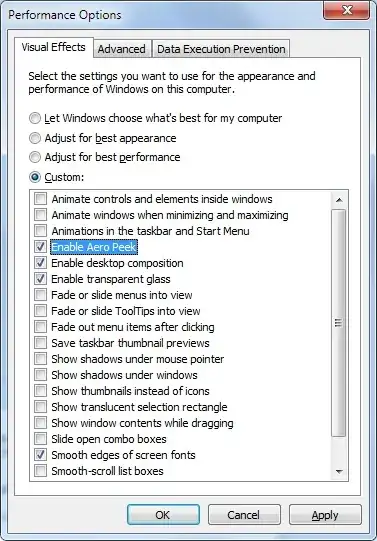
Run SystemPropertiesPerformance.exe, options 4-6 in the long checkbox list of visualfx

PerformanceOptionsDialog

riQQ
  • 147
  • 1
  • 13
user312500
  • 49
  • 2
2

There is a corresponding service UxSms (Desktop Window Manager Session Manager- Provides Desktop Window Manager startup and maintenance services).

This starts a process dwm.exe. With this started, AERO is enabled (if stopped AERO is disabled). So basically if the process dwm.exe runs, AERO is enabled (read the comments, this means that AERO themes might, but not necessarily have be used. However, without DWM no AERO).

Horst Walter
  • 1,899
  • 7
  • 27
  • 46
  • 5
    `dwm` can also run without Aero, for example with the Basic theme. The Basic theme looks much closer to what you'd expect from Windows XP (though not identical), lacks transparency/effects, but still uses the same underlying graphics pipeline as Aero, since `dwm` is running. – allquixotic Sep 26 '12 at 14:49
  • verified, applied basic theme on my W7 laptop, no aero features but dwm is still running. – Moab Sep 26 '12 at 15:09
  • Very good. Especially since it explains why I have asked the question. Just by looking at the theme you cannot always tell whether DMW is enabled or not! – Horst Walter Sep 26 '12 at 15:17
1

According to Raymond Chen:

A quick way to check whether desktop composition is enabled is to hit Alt+Tab and see whether windows get the Aero Peek effect when you select them. Aero Peek is a feature that is provided by the desktop compositor.

Glorfindel
  • 4,089
  • 8
  • 24
  • 37
Karan
  • 55,947
  • 20
  • 119
  • 191
  • 2
    This only shows whether you really have an AERO theme. However, if I use an AERO theme, change some settings towards a basic look and feel, this does not work anymore (reliably). See allquixotic's comment above. Nevertheless a good hint +1 – Horst Walter Sep 26 '12 at 16:46
0

For me it was the following setting in the performance options:

"Use visual styles on windows and buttons"

After A LOT of trying out of combinations, it boiled down to this one setting. If I disable it, it doesn't matter what else is checked: I get tearing.

Sounds strange and I still think it can't be, but it works reliably.