3

Unlike my old Windows Boxes and Linux Boxes, I do not have access of something similar to a BIOS on my MacBook Pro.

I want to disable Intel i7's HyperThreading (so 4 cores look like 4 cores and don't try to simulate extra ones).

There are solutions for disable HT via developer tools temporarily, but I need something to do it permanently (one that does not reset on reboots).

This is for a MacBook Pro 15" Retina.

CyberSkull
  • 1,465
  • 4
  • 17
  • 31
Sid
  • 234
  • 2
  • 3
  • 8

2 Answers2

3

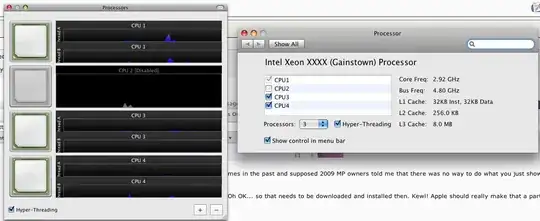
Download and install Xcode. It includes a Processor.prefPane (not sure where it's located exactly) that allows you to disable hyperthreading.

With Xcode installed, you can also disable hyperthreading using the following terminal command:

hwprefs cpu_ht=false

I don't believe this setting is retained after restarting your Mac, so you might want to create an AppleScript to run that command on startup.

Kale Muscarella
  • 1,168
  • 2
  • 9
  • 24
  • This method is disabled on sleep as well, thats why I asked a permanent method. – Sid Aug 30 '12 at 20:36
  • 1
    These no longer work on Yosemite: the hwprefs command is gone and the Processor.prefPane panel no longer loads. – J. Peterson Feb 14 '15 at 01:56
2

Any luck with the following? Requires a reboot to take.

$ sudo nvram SMT=0

Might be something you can put in boot-args as well but I couldn't find it.

$ sudo nvram boot-args=""

Ref: Technical Q&A QA1141 Disabling Processor Cores on a Multi-Core System

Brian
  • 8,896
  • 23
  • 37