5

I'm setting up Sublime to run with NodeJs on my Mac. I get the error below
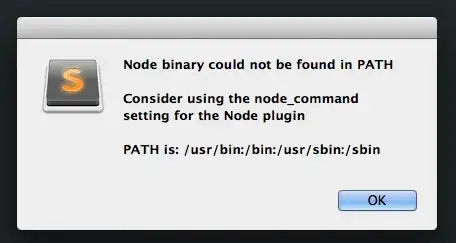
enter image description here

However, looking at my Path variable, /usr/bin/local is in the Path (I assume these are different?). I'm interested to know why the Node plugin isn't pulling the same $PATH as I get in terminal.

enter image description here

bad_coder
  • 643
  • 1
  • 7
  • 16
LiamB
  • 259
  • 2
  • 12
  • Duplicate: [Setting environment variables Mac 10.6](http://superuser.com/questions/182402/setting-environment-variables-mac-10-6) — you need to set a different PATH for GUI. – slhck Jul 13 '12 at 13:35
  • Has anyone found a solution to applications (Sublime Text in this case) having different PATH than what you get in the Terminal? None of the links here or elsewhere works on OS X El Capitan. – jpsecher Nov 29 '16 at 18:09

2 Answers2

3

Quick Workaround:

Just launch SublimeText2 via your Terminal by typing: subl Then the Plugin has the PATH that is otherwise not really initialized.

Bijan
  • 261
  • 1
  • 5
2

For GUI applications in Mountain Lion you need to set the PATH variable in /etc/launchd.conf. You cannot append to the existing PATH variable because this file doesn't have access to the environment variable. So you must overwrite the existing PATH variable. Also a restart is required every time you edit /etc/launchd.conf.

setenv PATH /usr/bin:/bin:/usr/sbin:/sbin:/usr/local/bin

Source: Overwatering Blog - Setting the PATH on OS X Mountain Lion

wonea
  • 1,817
  • 1
  • 23
  • 42
mowzy
  • 25
  • 6