7

In the image below, you can see two rectangles with some text inside. If you take a closer look you will notice a difference in spacing between lines. The spacing between the first and the second lines is smaller than the spacing between the second and the third.

The last line is always separated. If you have 10 lines of text, the spacing between all the lines will be OK except the spacing between the next to last and the last line of text. The font is the same (in every aspect) accross the lines (except the title), and there are no custom paragraph properties set.

Why does this happen and how to solve this?
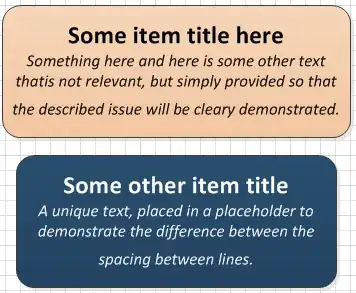
Last row separated

Kornelije Petak
  • 2,062
  • 3
  • 21
  • 24

2 Answers2

9

The last line is separated because their is a blank character at the end of the bottom line that is the default font size. Highlight any blank spaces at the end of the bottom line and then change the font size to match the others and it will go away.

  • In my case, it looks like it was maybe a special paragraph-end character. Just using the arrow keys showed that I didn't have any "normal" whitespace characters (eg spaces), but when I put the cursor at the end of my text and did shift + left arrow, it highlighted _something_ that was size 12. I changed it to size 6 (the same as the rest of my text) and the extra gap disappeared, – Paul Walker Oct 05 '16 at 16:21
2

I was able to highlight all the text (Control + A), right click on the highlighted text, select Format Text, select a size 12 font, even though it said it was already size 12, then click OK and it got rid of the space.

Canadian Luke
  • 24,199
  • 39
  • 117
  • 171