What are some things you can in Windows 7 that you couldn't do in previous versions of Windows? Don't limit your answers to a single feature, I want to learn as much as possible.
Asked
Active
Viewed 2,639 times
28


-
1Why does this question have an accepted answer? Was that what you wanted? – Troggy Jan 18 '10 at 05:52
-
@Troggy: No this isn't what I wanted, no offense to JP. I set up a bounty to get more attention, which requires an accepted answer. Personally I think jay's answer should be the accepted one, but it wasn't posted during the bounty and now I can't change it. – Kredns Jan 18 '10 at 23:35
-
That is ok, it was an older question, so I was just checking up on it. Thanks for the info. – Troggy Jan 18 '10 at 23:52
-
7**Please double-check before voting to close as *not constructive*. It involves facts!** – Daniel Beck Sep 27 '11 at 04:46
-
I know the comments I'm replying to are almost two years old, but: Now that the bounty system has been revamped, I believe you can un-accept the answer, and that doing so won't screw up the bounty. – Pops Sep 27 '11 at 18:30
13 Answers
30
Rearrange taskbar buttons.

Daniel A. White
- 4,038
- 2
- 26
- 30
-
4
-
1This is a great out-of-the-box feature for windows 7, would always have to install 3rd party tools on previous versions. – Nick Josevski Oct 01 '09 at 08:49
25
Drag window against the left or right edge to fill half the screen, top edge to maximize.
Grab a maximized titlebar and pull to restore.
Shake the titlebar to minimize everybody else.

Aidan Ryan
- 1,536
- 3
- 17
- 19
-
-
You can also for some reason resize a window to the top/bottom of the screen to fill the height. – Jay Wick Jan 18 '10 at 11:28
-
3Great on a touchscreen. On the other hand, with the keyboard, Win+up, Win+down, Win+left, Win+right do fill half the screen, maximize, restore, minize. – RamyenHead Feb 16 '11 at 20:10
24
Some other great additions:
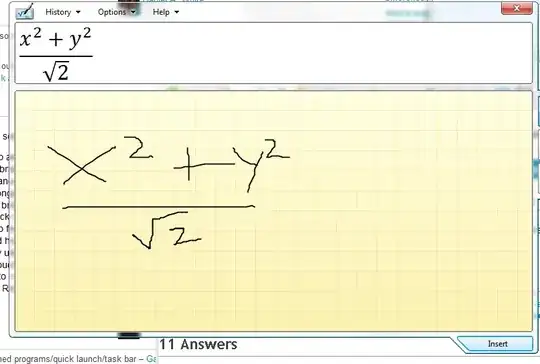
Math input panel quite simply because it can read my handwriting better than humans.
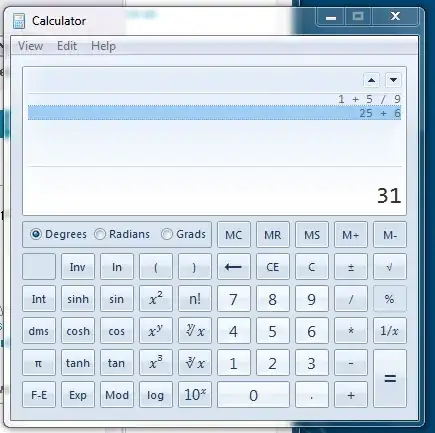
Better Calculator with history of recent calculations and a myriad of new advanced functions for statistics and programming. Also worksheets for day-to-day calculations such as fuel economy, date calculations, unit conversions.
Ribbon Interface in the old accessories such as WordPad, Paint etc. These incorporate the new UI introduced by Office 07 and hide a few new additional features.
Whole screen Magnifier Pressing Windows + (Plus) magnifies the entire screen. (Awesome if you want to monitor downloads from a far). Also has other view options.
Libraries are a new folder system which contain folders from various locations. For example Music library can contain folders from e:\music, c:\users\me\music, d:\downloads\music, and deal with all the files together.
Homegroups vastly simplifies sharing files on a home network.
Searching is looks way more cleaner with highlights and the new 'Content' view.
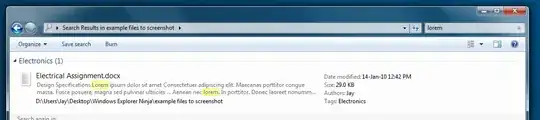
Federated Search allows for custom search providers (in example below YouTube) from Explorer. This is especially useful for desktop programs which have searchable content like OneNote, Stickies etc.

However by far the best feature would have to be XP Mode!
XP Mode allows you to install and run programs in a virtual machine running XP. This is awesome if you have programs that only work on XP. What's more it allows for seamless integration as you can see below, XP's IE6 running besides Firefox on 7 on the same machine.


15
Some of mine and some from 7 Reasons to Upgrade to Windows 7:
- Faster startup and shutdown times (Technically not a new feature, but very nice still)
- Windows 7 Libraries (I really like these ones myself).
- Desktop enhancements like Aero Peek, Aero Shake, a nice Wallpaper slideshow feature and gadgets no longer being restricted to a gadget bar.
- The new and brilliant taskbar with jump lists and previews. Also lets you pin programs so it is like a combined quick launch bar and task bar.
- A home group feature which makes it super simple to share files in your home network (seriously, I was surprised how easy it actually was to set up!)
- Better battery utilization.
- Support for touch and multi-touch.
- Much easier to connect to wlan hot spots.
- A very handy Resource Monitor

Svish
- 38,310
- 61
- 136
- 181
-
12that taskbar STILL does not span multiple monitors. What an epic wall of FAIL!!! – NoCarrier Jul 27 '09 at 17:09
-
-
-
2
-
@NoCarrier try UltraMon http://www.realtimesoft.com/ultramon/tour/smart_taskbar.asp – Jay Wick Jan 18 '10 at 11:30
-
@NoCarrier: I agree, but I really wouldn't call that an "epic wall of FAIL" though. The improved task bar is still a whole bunch more awesome than it was in previous versions of Windows. Even without spanning multiple monitors. – Svish Jan 18 '10 at 17:16
12
There are a whole bunch of cool new keyboard shortcuts. (Not sure if that counts as mind blowing tho =) And I love the magnifier -- use that constantly.

JP Alioto
- 6,450
- 29
- 29
-
The magnifier seems similar to WinXP's magnifier: http://www.microsoft.com/enable/training/windowsxp/magnifierturnon.aspx Not sure if it's a new feature. – Travis Jul 27 '09 at 17:28
-
-
@tpo: Try it with Aero enabled. Otherwise it will revert back to previous behavior. – Joey Mar 11 '10 at 16:05

7
Wikipedia has a fairly comprehensive list of new features in Windows 7. I like that it has a lot more video codecs built in so I can watch my collection of video files without having to install anything extra. Jump lists are pretty useful as well.

tbreffni
- 885
- 9
- 9
5
The rearranging taskbar buttons is nice, I only recently learn you can do the same thing with tray icons! No more going into the stupid customize dialog to get show/hide a tray icon.

heavyd
- 62,847
- 18
- 155
- 177
5
The ability to mount and create VHD natively using the Disk Manager. Also the ability to boot of a VHD.
VHD = Virtual Hard Disk created by either Virtual PC or Hyper-V

BinaryMisfit
- 20,643
- 10
- 67
- 76
2
Much more versatile animated boot screen :) How do I change the Windows 7 boot animation? Finally!


2
You can play a game of Solitaire, leave it mid-game, close the program, then open it back up in the same state. I haven't tried it with the other games, but I think that is a cool feature.

AlbertoPL
- 528
- 2
- 8
- 16
-
4
-
1This was introduced by Vista. I don't think the games have changed at all in Windows 7 (AFAIK). – SLaks Sep 15 '09 at 01:29
-
@Slaks, they removed Inkball from W7, my favorite, dirty rats. I tried to copy is from Vista, but it won't run, dirty rats again....http://en.wikipedia.org/wiki/InkBall – Moab Jan 20 '11 at 22:57
-
Ohhhhh, a workaround to make it run, oh joy!...http://thetechcorner.net/2009/01/11/inkball-on-windows-7/ – Moab Jan 20 '11 at 22:58
2
There seems to be a bit more support for touch interfaces.
For example, clicking a taskbar icon and dragging upward will bring up that icon's context menu/jump list (the same as right clicking). Similarly, clicking on IE's address bar and dragging downward will open up your history. Dragging to open a context menu makes sense because in a "touch only" scenario you wouldn't have the equivalent of a right-click.
I haven't confirmed that this "drag to open" feature affects all ComboBoxes but it wouldn't surprise me if it does.

Matt Hamilton
- 353
- 3
- 9
