4

Sometimes when printing PDFs on my Windows XP with an HP photosmart 2410 printer the text becomes gibberish. It's kind of hard to describe, so I've scanned in an affected page below:
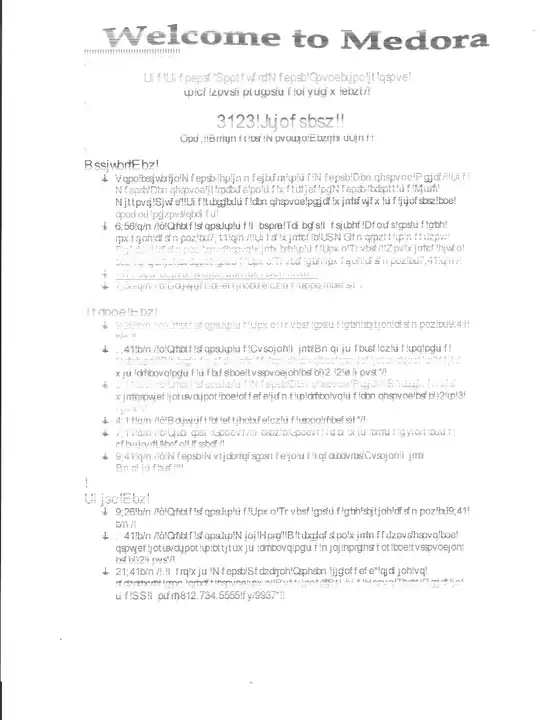
pdf page (not very good scan quality, I don't think my scanner was quite working right and the page was faded to begin with)
EDIT: Here is the original: http://www.nlcbsa.org/files/d/usr/16/Medora%20Itinerary%202012.pdf

There is no consistency in when it happens.
EDIT: It seems to only happen when printing multiple copies. Sometimes it will start out like that, other times it will switch halfway through, and more often nothing happens.

EDIT #2: Figured out what the "gibberish" is. The binary code for each changed character is exactly one more than the code for the proper character (i.e. 0x20 (space) becomes 0x21 (exclamation point) ). Now to figure out why that happens...

(using Adobe Reader X)

Nate Koppenhaver
  • 3,641
  • 4
  • 33
  • 56
  • 1
    I think you've answered your own question. I think your scaaner is ***** – Xavierjazz May 11 '12 at 21:14
  • @Xavierjazz it didn't scan in very well, but the page itself was already kinda like that (I need to replace my print cartridge) – Nate Koppenhaver May 11 '12 at 21:15
  • Is everything shifted up by one or is the one bit stuck? – afrazier Jun 25 '12 at 23:07
  • @afrazier everything is shifted up by one (`numbercode = numbercode + 1`) – Nate Koppenhaver Jun 26 '12 at 01:56
  • Could you post one of the files which prints wrongly? I've seen this problem before on a hardcopy but didn't have the original file to play with. – Hugh Allen Jul 30 '12 at 10:42
  • @HughAllen [this](http://www.nlcbsa.org/files/d/usr/16/Medora%20Itinerary%202012.pdf) is the file I posted the screenshot of – Nate Koppenhaver Jul 30 '12 at 15:04
  • I tried Print Preview - it looked normal. I tried Print to File - I didn't know how to view the resulting .PRN file (some binary format, not postscript). I finally tried printing on my mum's HP Deskjet F4185... it looked normal. As you say it's an intermittent problem and I'm reluctant to waste many sheets of paper trying again, and I'm not 100% sure the printout I saw in the recycle bin came from this current printer. – Hugh Allen Jul 30 '12 at 15:51
  • I've seen this sort of thing on quite a few machines over the years - it's not just you. Fascinating that what happens is that 1 is added to the binary code. – ChimneyImp Aug 01 '12 at 00:19

2 Answers2

2

Could you try installing the lastest drivers for your printer and update your PDF reader? It seems either your PDF reader or the printer driver did not process the fonts in the PDF correctly. You may want to try another PDF reader and see if it prints correctly.

If none of these work, you can try converting your PDF to vector graphics and print that instead. Printer cannot do font substituon on graphics, so it should just print what you see on the screen. The easiest way to achieve this is to install a free PDF printer software like PDF Creator and print your PDF to that.

If the file generated by the PDF printer is already gibberish, then it's definitely your PDF reader's fault.

billc.cn
  • 7,099
  • 20
  • 36
1

Have you tried Print as Image (Print dialog -> Advanced)? If the problem still occurred, it would indicate that it was on the PC side not the printer side. If it did not occur it would prove nothing, but at least you would have a workaround.

Hugh Allen
  • 9,820
  • 6
  • 34
  • 42