This seems like a simple concept, yet I can't figure out a way to do it without writing some code. Does Excel have a function that will let me join columns from 2 different csv files (say Orders and OrderDetails) based on a shared ID column and create a composite csv with columns from both?
Asked
Active
Viewed 5,615 times
3


-
Statically or dynamically (i.e., are the CSV files constant or dynamic data)? – kopischke May 06 '12 at 15:42
-
you have already tried something with msquery? You have to build the query in it, but you should be able to do so. – datatoo May 07 '12 at 03:27
-
if it were excel files instead of csv, it would be possible with ms query (see http://superuser.com/a/421493/118860) – Aprillion May 07 '12 at 10:53
3 Answers
2
This is possible in MSQuery although you will have to setup a datasource in ODBC

This isn't a function, but you should find it relatively simple to implement. Help does provide documentation on accomplishing different joins as well
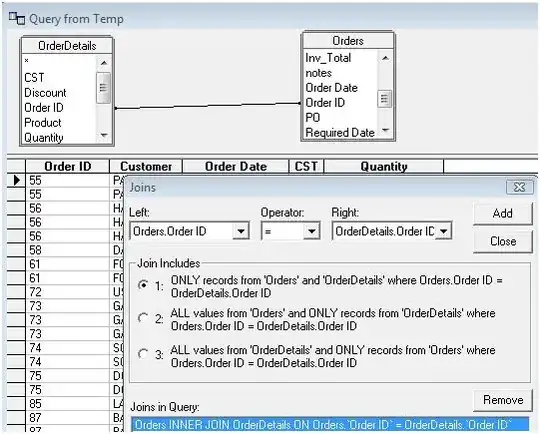
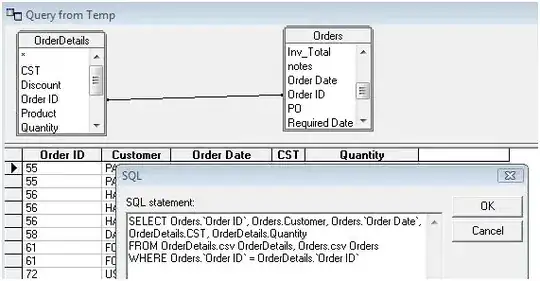
The resultant SQL msquery creates is:

datatoo
- 3,440
- 20
- 31
2
I would not use Excel to accomplish this task. Instead, I would use a command line program called join.exe. This is what is is designed to do. It is apart of UnxUpdates.zip.
The syntax is straight forward:
Usage: join [OPTION]... FILE1 FILE2
For each pair of input lines with identical join fields, write a line to
standard output.  The default join field is the first, delimited
by whitespace.  When FILE1 or FILE2 (not both) is -, read standard input.

  -a FILENUM        print unpairable lines coming from file FILENUM, where
                      FILENUM is 1 or 2, corresponding to FILE1 or FILE2
  -e EMPTY          replace missing input fields with EMPTY
  -i, --ignore-case ignore differences in case when comparing fields
  -j FIELD          equivalent to `-1 FIELD -2 FIELD'
  -o FORMAT         obey FORMAT while constructing output line
  -t CHAR           use CHAR as input and output field separator
  -v FILENUM        like -a FILENUM, but suppress joined output lines
  -1 FIELD          join on this FIELD of file 1
  -2 FIELD          join on this FIELD of file 2
      --help     display this help and exit
      --version  output version information and exit

Unless -t CHAR is given, leading blanks separate fields and are ignored,
else fields are separated by CHAR.  Any FIELD is a field number counted
from 1.  FORMAT is one or more comma or blank separated specifications,
each being `FILENUM.FIELD' or `0'.  Default FORMAT outputs the join field,
the remaining fields from FILE1, the remaining fields from FILE2, all
separated by CHAR.

Important: FILE1 and FILE2 must be sorted on the join fields.
The last line is very important! Inside of this same zip file, includes sort.exe which can sort the files for you. Or you can also sort the files with Excel.

jftuga
- 3,177
- 1
- 19
- 23
2
Yes, there is. It's a little hacky, but a lot better than having to write code.
Example:
- Set1 = Alice, Bob, Charlie, Echo, Foxtrot, Lima
- Set2 = Bob, Charlie, Foxtrot, Lima, Mike, November, Zebra
Put the two sets in separate columns, with a column in between.
  A       B          C
1 Set1    JoinColumn Set2
2 Alice              Bob
3 Bob                Charlie
4 Charlie            Foxtrot
5 Echo               Lima
6 Foxtrot            Mike
7 Lima               November
8                    Zebra
In cell B2, enter this formula
==IF(COUNTIF($A$2:$A$8,C3)>0,C3,"<NULL>")
The first part $A$2:$A$8 is the range of cells from Set1. The $ symbols keep it a static range, so you can copy and paste into new cells and the range stays the same. The C3 is the cell immediately to the right of the current cell that you are joining on.
Copy and paste this all the way down, and (showing formulas for demostration) you will have this:
  A       B                                        C
1 Set1    JoinColumn                               Set2
2 Alice   =IF(COUNTIF($A$2:$A$8,C3)>0,C3,"<NULL>") Bob
3 Bob     =IF(COUNTIF($A$2:$A$8,C4)>0,C4,"<NULL>") Charlie
4 Charlie =IF(COUNTIF($A$2:$A$8,C5)>0,C5,"<NULL>") Foxtrot
5 Echo    =IF(COUNTIF($A$2:$A$8,C6)>0,C6,"<NULL>") Lima
6 Foxtrot =IF(COUNTIF($A$2:$A$8,C7)>0,C7,"<NULL>") Mike
7 Lima    =IF(COUNTIF($A$2:$A$8,C8)>0,C8,"<NULL>") November
8         =IF(COUNTIF($A$2:$A$8,C9)>0,C9,"<NULL>") Zebra
which will actually look like this:
1 Set1    JoinColumn Set2
2 Alice   Bob        Bob
3 Bob     Charlie    Charlie
4 Charlie Foxtrot    Foxtrot
5 Echo    Lima       Lima
6 Foxtrot <NULL>     Mike
7 Lima    <NULL>     November
8         <NULL>     Zebra
A few more steps:
- Copy column B and Paste Special over itself, paste Values
- Delete column A
You now have a simple right outer join
- Sort by column B
- delete the value rows
You have the inner join
I leave it as an exercise to the reader to handle multiple columns tables.
Ok, I'll give you simplest and most inefficient method that occurs to me: do the inner join in both directions, sort each set on the join field, and put the results side-by-side. They should line up. (Note: this would only work if the join column contains unique values)

Abacus
- 361
- 1
- 2
- 6