41

Possible Duplicate:
How to force Windows XP to rename a file with a special character?
how to delete (invalid) files with colon in their name under windows

I want to delete a file named workspaces\google-gson-1.7.1-release.zip Yep, it contains a backslash in the name.

Here it is:

G:\>dir Z_DRIVE
 Volume in drive G is samsung
 Volume Serial Number is 48B9-7E1D

 Directory of G:\Z_DRIVE

04/06/2012  08:09 PM    <DIR>          .
04/06/2012  08:09 PM    <DIR>          ..
05/01/2011  02:21 PM           528,016 workspaces\google-gson-1.7.1-release.zip
           1 File(s)        528,016 bytes
           2 Dir(s)  88,400,478,208 bytes free

The first attempt is to just delete it from the Windows Explorer, but it says it can't find the file.

Then, I tried from the command line:

G:\>del Z_DRIVE\workspaces\google-gson-1.7.1-release.zip
The system cannot find the file specified.

And, after researching a bit in the internets, I also tried the following, with no luck:

G:\>del \\?\G:\Z_DRIVE\workspaces\google-gson-1.7.1-release.zip
The system cannot find the file specified.

Other than booting from some Linux CD, is there a way to get rid of this file?

Update on 6 April 2012: also tried the following combinations, but the error is the same:

G:\>del "\\?\G:\Z_DRIVE\workspaces\google-gson-1.7.1-release.zip"
G:\Z_DRIVE>del workspaces\google-gson-1.7.1-release.zip
G:\Z_DRIVE>del "workspaces\google-gson-1.7.1-release.zip"
G:\Z_DRIVE>del workspaces*google-gson-1.7.1-release.zip

Update on 7 April 2012: Before I go ahead and try from Linux, here's an screenshot that shows some of the attempts based on the answers here. I'm not sure this will be easy to reproduce, and removing the friggin' file from Linux or using Cygwin feels like cheating :)
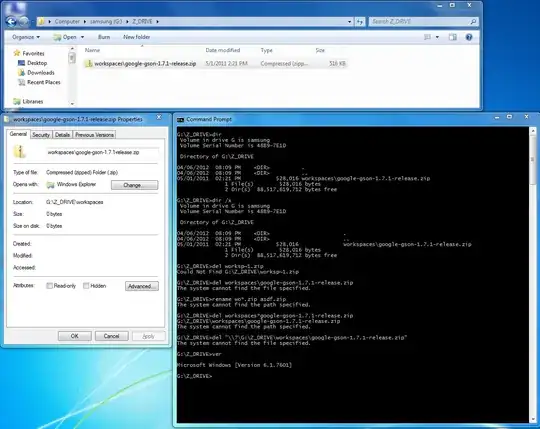
Some of the removal attempts

espinchi
  • 541
  • 4
  • 10
  • Is there anything else in there that starts with workspaces? – Joshua Drake Apr 06 '12 at 18:42
  • Have you tried renaming it to something else and then deleting it? – Alex Apr 06 '12 at 18:42
  • 13
    How did you get such a file? It's a good trick to annoy someone :-) – nalply Apr 06 '12 at 22:11
  • @Moab it's not a duplicate, this one is trickier! – espinchi Apr 07 '12 at 02:49
  • 1
    Delete the folder Z_DRIVE, make a new folder Z_DRIVE? – Konerak Apr 07 '12 at 10:05
  • nalply: They should be creatable with the native APIs of Windows, but I don't have a DDK here to test whether that would work from user mode, too. – Joey Apr 07 '12 at 12:36
  • @espinchi add the possible duplicate link to your question and explain why it is trickier and not a duplicate. – Moab Apr 07 '12 at 17:05
  • @nalply I don't remember how I created it! I'd say it was created by 7zip from a Windows Server 2008, but how the hell did it manage? – espinchi Apr 07 '12 at 20:22
  • It's even more fun when you have file names that contain "*" or "?", because even the WIN32API methods use those characters for file name globing :). – crazy2be Apr 07 '12 at 22:03
  • I have created such file in freebsd, then archived and tried to unpack with 7zip in windows, but 7zip can't create such file. – crea7or Apr 07 '12 at 22:05
  • Also see: [How to force Windows XP to rename a file with a special character?](http://superuser.com/questions/31587/how-to-force-windows-xp-to-rename-a-file-with-a-special-character) – Ƭᴇcʜιᴇ007 Apr 07 '12 at 23:26
  • Hey, do you have [this option](http://support.microsoft.com/kb/121007) as 0 or 1? – crea7or Apr 08 '12 at 10:38
  • I had a system with dual boot. (linux and windows). While i'm in linux I created a huge file in windows partition with a filename that contains a slash. When in windows, it's impossible to do anything with it. It just stays there, using your disk space. solution I found was to do a drive scan while windows boots up. – John Eipe Apr 08 '12 at 13:31
  • I had similar issues deleting files: [How to delete files and folders that cannot be deleted?](http://superuser.com/questions/229563/how-to-delete-files-and-folders-that-cannot-be-deleted). – glenneroo Apr 10 '12 at 19:05
  • @nalply, Just boot into linux to create such files. For example, you can burn puppylinux to a cd, boot from cd, then do a copy file "asd" to a file called "asd\asd" since that's a backslash not a front slash. – Pacerier Mar 11 '17 at 10:58

17 Answers17

30

I would try using short 8.3 naming:

del worksp~1.zip

since that does not seem to work for this specific file, the next thing that I would try is to open a Powershell command prompt then do:

Get-ChildItem G:\Z_Drive\* | Where-Object{$_.Name -Like 'workspaces*'} | Remove-Item -WhatIf

Be sure to play around with the pattern so that you are only matching that one file (not sure if there are other files in there or not). Once you see that it would only try to delete the one file, remove the -WhatIf

EBGreen
  • 9,127
  • 1
  • 36
  • 40
  • 1
    https://en.wikipedia.org/wiki/8.3_filename – Andrew Lambert Apr 06 '12 at 21:23
  • 1
    dir /X shows shortnames with the directory listing. – Rob Apr 06 '12 at 23:15
  • 3
    That's a great suggestion, I was convinced it would work... but it does not! As @Rob has suggested, I've used _dir /x_ to find out the short name but... the short name is **the same** as the long name. Can't believe it! – espinchi Apr 07 '12 at 02:46
  • Care to explain how this works? – Ivo Flipse Apr 07 '12 at 08:54
  • In windows, if a filename is longer than 11 characters (I think), it has a unique SHORTNAME you can use (which is the first 6 characters followed by a ~ and the number that the file is in alphabetical order) – Rob Apr 07 '12 at 11:53
  • 3
    You *might* be able to set the short name for the file manually: `fsutil file setshortname G:\workspaces\google-gson-1.7.1-release.zip google.zip`. See: http://technet.microsoft.com/en-us/library/cc788058%28v=ws.10%29.aspx – Andrew Lambert Apr 07 '12 at 17:47
  • @Amazed fsutil does not manage either: it returns the error "The system cannot find the path specified" – espinchi Apr 07 '12 at 20:26
  • @espinchi It was a longshot :\ – Andrew Lambert Apr 08 '12 at 00:46
  • ShortName is NOT mandatory in NTFS, it is optional and you can disable it in registry. – Dennis C Apr 10 '12 at 11:08
  • I have a file with a forward slash ('/') in it. `dir /X` shows it has a short name, but `cmd.exe` tells me the directory is corrupt and to run chkdsk when I try to delete it via that name. Powershell doesn't see the file at all. – Cameron Jun 05 '17 at 15:06
9

open a cmd, do dir/x and find the short name of the file, and delete that.

johnshen64
  • 4,593
  • 17
  • 11
  • Believe it or not, the output of _dir /x_ is _ workspaces\google-gson-1.7.1-release.zip_. I was convinced that this answer (which coincides with @EBGreen's) would work, though! – espinchi Apr 07 '12 at 02:48
  • Really weird, other than trying to delete the parent dir recursively if you have not tried yet, I am totally stumped. If you can boot a Linux live cd and still see the file, probably you can delete from there. You may have to mount it rw as sometimes mtgs is only mounted ro. Very interesting and I wish I could get to it myself to try. Finally you may have to call Microsoft if all fails. – johnshen64 Apr 07 '12 at 04:14
  • Yeah, it's really weird. I did try deleting the parent folder, it was actually my original objective. – espinchi Apr 08 '12 at 10:14
8

How about running CHKDSK?

There was a similar question here: How to force Windows to rename a file with a special character?, one of the answers to which demonstrated that CHKDSK deletes files with invalid characters in their name.

Anton
  • 195
  • 3
  • A `chkdsk /F` fixed it! It basically deleted the file :) – espinchi Apr 10 '12 at 23:43
  • Had a file with a forward slash in it (was supposed to be a dash but a bit got flipped somewhere). Couldn't delete with explorer, cmd, short name, powershell, or cygwin, but chkdsk removed it from the index then automatically restored it with the correct name. Yay! – Cameron Jun 05 '17 at 15:27
4

did you try with powershell? if not, try :

First move to the folder, then start powershell (typing powershell, enter) then copy it:

ls | ?{$_.name -like "*\*"} | %{$_.delete()}
Lucas
  • 49
  • 2
4

Could you try renaming it?

rename *.zip tmp.zip
Ross Aiken
  • 382
  • 1
  • 10
3

Can you type the first part of the filename and do a tab autocomplete? This often formats the filename in whatever specific way the system requires (double slashes, triple quotes, etc.)

BobT
  • 481
  • 3
  • 3
3

Install cygwin tools from http://cygwin.com

Then ...

rm filename

That should do the trick.

An installation guide is here: http://www.mobilefish.com/developer/cygwin/cygwin.html

oleschri
  • 1,175
  • 9
  • 16
  • It doesn't work either! I tried both with "\\" (as it appears in ls) and with single backslash and quotes. – espinchi Apr 07 '12 at 20:46
2

Try surrounding the file name in double quotes (").

Traveling Tech Guy
  • 9,918
  • 8
  • 35
  • 40
2

try:

del workspaces*google-gson-1.7.1-release.zip

* is a special char that means everything so using this command you will delete

workspaces\google-gson-1.7.1-release.zip
workspacesagoogle-gson-1.7.1-release.zip
workspacesaeiougoogle-gson-1.7.1-release.zip
and so on..

EDIT:

if possibile, move all the files and folder out from Z_DRIVE and then remove directly the directory... then create a new Z_DRIVE and move back the previously moved...

Marcx
  • 717
  • 5
  • 11
  • 26
  • Tried that, but no luck. I updated the original question with this. Good try, anyway :) – espinchi Apr 06 '12 at 18:40
  • updated my answer with a workaround, is not exactly what you want to do, but the final result should be the same... – Marcx Apr 06 '12 at 18:49
2

These types of oddly name files, I believe can only be created and removed from script, application, etc. So, you could create a windows script with WSH and use it there MS reference has the perfect example.

// JScript.
Shell = new ActiveXObject("WScript.Shell");
FSO = new ActiveXObject("Scripting.FileSystemObject");
DesktopPath = Shell.SpecialFolders("Desktop");
FSO.DeleteFile(DesktopPath + "\\test.lnk")

' VBScript.
Set Shell = CreateObject("WScript.Shell")
Set FSO = CreateObject("Scripting.FileSystemObject")
DesktopPath = Shell.SpecialFolders("Desktop")
FSO.DeleteFile DesktopPath & "\test.lnk"
inevio
  • 281
  • 1
  • 5
2

to solve the files there is a working way, install linux-ubuntu or use it with live cd, then go and delete the file... this thing happen to me when i make files with "xxx" on fat drive when i try to open rename or delete it on windows never allow, hope this help

rezx
  • 185
  • 1
  • 2
  • 9
1

Believe it or not, the output of dir /x is _ workspaces\google-gson-1.7.1-release.zip_

Sorry, I think you're looking at the wrong column of the output. The "dir /x" command should display the alternative name for any files with more than 8 characters in the name. Can you display the output of this command in your question like you did for the "dir" command please?

C:\Windows>dir /x
Volume in drive C is OS
Volume Serial Number is 9080-5E4E

Directory of C:\Windows

01/01/2012  18:29    <DIR>                       .
01/01/2012  18:29    <DIR>                       ..
14/07/2009  06:32    <DIR>                       addins
14/07/2009  04:20    <DIR>          APPCOM~1     AppCompat
11/08/2011  18:12    <DIR>                       AppPatch

As you can see, the directory "AppCompat" is the only folder with more than 8 characters so has been given a short name. The 4th column displays the short name (if created).

PhilJ
  • 129
  • 3
  • `dir /x` doesn't *create* short names. That's a feature of the file system and it can be turned off. Fundamentally it's just another hardlink. Also this isn't an answer. – Joey Apr 07 '12 at 10:42
  • 3
    I didn't mean create and I have adjusted the answer. I'm not able to comment on the original question or other people's answers because I only have 1 rep so I have to create an answer to help the OP. I do believe it is a valid answer if the OP was missing the 4th column of the command's output and this helps to solve the problem. – PhilJ Apr 07 '12 at 11:33
0

Try these small but powerful utilities: lockhunter or unlocker.

Oliver Salzburg
  • 86,445
  • 63
  • 260
  • 306
0

Assuming that you are using the Android SDK, you can try to delete it from the Android Shell using the rm command. Here is an example, under the From the Recovery Screen section.

npclaudiu
  • 656
  • 6
  • 5
0

Since Z_DRIVE only contains one thing, just delete the directory and then recreate it.

Graham Borland
  • 321
  • 3
  • 10
0

It sound stupid but you can try Java. I remember I have a few times hit some file like you. And they were created by Java, and removed by java.

Another way to workaround is try to move the folder. Move all the other file away and del the folder recursively, there is some tools to remove folder without iterate the files inside.

Dennis C
  • 431
  • 3
  • 6
  • 17
0

It looks like this drive is associated with Google Workspace or Google Online docs which creates a drive on your desktop. I would suggest finding the App that handles this and deleting the file or folder from the Google Docs interface or uninstalling it, although that might also get rid of other files on the drive folder, so be sure to back up your data first.

Frank R
  • 306
  • 1
  • 3