9

I have two headphones, neither has any amps or volume control, and both have the same problem with this computer. I normally have the volume on 10%, and that is optimal. I'm still very afraid that someday it will be at 100% and i'll accidentally have my headphones on.

I tested how loud it is at maximum volume -- it's earsplittingly loud! In fact, it's so loud that if I lay the headphones down on the table, I can listen to a song perfectly clearly from meters away.

Is there any way to make the volume control more safe for the ears?

jcao219
  • 193
  • 1
  • 1
  • 8
  • 4
    possible duplicate of [Windows 7 Audio Too Loud](http://superuser.com/questions/405178/windows-7-audio-too-loud) – Zoredache Apr 11 '12 at 20:12
  • @Zoredache if you feel that way, please vote to close. – soandos Jun 14 '12 at 04:03
  • @soandos, I already have, a couple months ago when I made the comment. I suspect my [close vote expired](http://meta.stackexchange.com/questions/120896/why-do-close-votes-expire). – Zoredache Jun 14 '12 at 05:12
  • @Zoredache, my apologies, didn't realize the question was that old. – soandos Jun 14 '12 at 05:33

4 Answers4

3

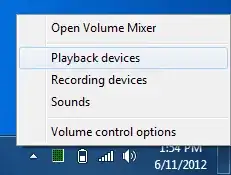
It depends on the soundcard, but laptop adapters usually come with an output limiting function to protect the little speaker(s) they have. It should also limit the output to the earphone jack as well:

enter image description here

enter image description here

enter image description here

Synetech
  • 68,243
  • 36
  • 223
  • 356
  • 1
    My **Speakers Properties** dialog box does not have a **Custom** tab. On my **Levels** tab, my Speakers volume are set to "0", and they are still so loud I can't hear what my coworkers are saying when they ask me something. – jp2code Apr 18 '16 at 20:26
2

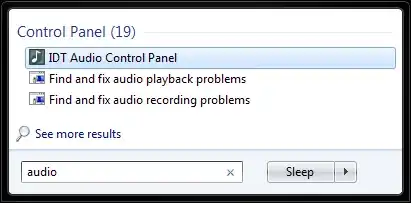
Check the control panel that comes with your third party audio driver. Open the Start menu and type "audio". Something may come up under Programs or Control Panel.

IDT Audio Control Panel

Depending on your software, you may be able to set independent volume levels for the speakers and the headphones.

Hand-E-Food
  • 4,911
  • 1
  • 19
  • 38
  • 2
    Dell had a setting called "Maxx volume" that was making the headphones much too loud. When turned off the sound was a lot better. – AresAvatar Aug 25 '15 at 21:57
2

Maybe something like http://www.amazon.com/Koss-155954-VC20-Volume-Control/dp/B00001P4XH or something similar is what your looking for

1

If your soundcard doesn't come with software to lower the general volume, try this: https://sourceforge.net/projects/equalizerapo/

I installed it and set the gain to -50 dB.

Before I did that, I could only use the volume to between 0 and 2 on Windows' volume dial.

Now I can use the whole range from 0–100, which makes it a lot easier to set the volume correctly.