I can't open folders in nerdtree vim. It won't open the folders, and these funky symbols are being displayed:
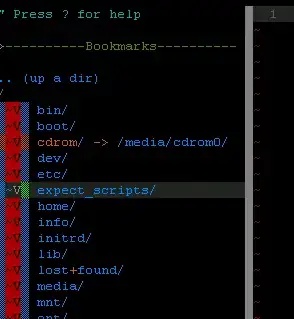
Does anyone have a clue about how to get this working?
I'm running UTF-8.
I can't open folders in nerdtree vim. It won't open the folders, and these funky symbols are being displayed:
Does anyone have a clue about how to get this working?
I'm running UTF-8.


I'm having a similar problem using Vim 7.2 and the latest NERDtree plugin (4.2.0).
The odd symbols are because your terminal does not support the new arrows. You can fix that by putting
let NERDTreeDirArrows=0
in your .vimrc
I'm still working on the the more important issue of it not opening directories though.

I'm aware this is old, but I had a similar problem and the variable names seem to have changed. The following fixed the problem for me with vim 8.0.427 and NERDTree 5.0.0:
let NERDTreeDirArrowExpandable='+'
let NERDTreeDirArrowCollapsible='~'
Though may be due to bug in the nerdtree/plugin/NERD_tree.vim script conditional that deals with setting the arrows based on whether it's a windows system or not. Inverting the conditional (Removing the !) on line 70 to be:
if nerdtree#runningWindows()
did the trick as well.

let g:NERDTreeDirArrows=0
Works for me and it will also fix the open directory issue.
