1

I got an installer for a piece of software via usb from a friend.Now what was weird was that although my friend and I had the same OS, same brand of laptop and I had a newer version (though I don't think this quite matters), the installer was running properly for him but not for me. It just showed a command line window and exited. I ran it via a batch file in which I included "pause" after running it. Here's the screenshot: Weird problem
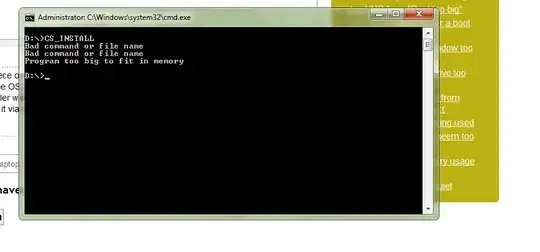
Later my friend called me and told me that it was the USB that was the problem. It had some kind of virus on it and it corrupted every executable or folder on it , and it renamed all the sub_files inside folders to some weird jargon. He had tried using another USB and the installer worked fine. Now the friend has (unfortunately) gone back to his city and I can't get the installer again from him. My question is:

Is there any way to repair the installer executable and run it?

and

Do you think the virus has infected my PC? (I have run a system scan with my antivirus and it showed nothing but still I'm worried)

RedGrittyBrick
  • 81,981
  • 20
  • 135
  • 205
ApprenticeHacker
  • 209
  • 1
  • 4
  • 10
  • 2
    I guess when you write "USB" you mean "USB Flash Drive" and not "USB Printer", "USB Camera", "USB keyboard" or any other USB connected device. – RedGrittyBrick Jan 02 '12 at 17:55
  • Yeah, sorry about that. In my circles "USB" usually means "USB Flash Drive". I've edited it. – ApprenticeHacker Jan 02 '12 at 17:57
  • 1
    Is that for a pirated Adobe CS product? Can you paste te contents of the .BAT file? 64 or 32 bit? What is the software? – Canadian Luke Jan 02 '12 at 18:02
  • Try to copy the installer content to your C: drive, maybe the installer is trying to acess the current directory(the same where the installer is running) and, with a fully Flash card, it is allarming the showed message. – Diogo Jan 02 '12 at 18:03
  • @DiogoRocha sorry, it didn't work. :'( – ApprenticeHacker Jan 02 '12 at 18:05
  • Are you running the cme.exe as a Administrator? – Diogo Jan 02 '12 at 18:07
  • @DiogoRocha yes. I also tried running CS_INSTALL.exe as an admin. – ApprenticeHacker Jan 02 '12 at 18:08
  • 1
    Is your OS 32 or 64?? Is the same architecture as your friend?? (This is the last thing I would think before to thing in a virus or a trully corruption).... – Diogo Jan 02 '12 at 18:11
  • The sad thing is that even though I haven't used `command` in years, I still recognized those two error messages immediately. ☺ What are the odds, do you think, that this "weird jargon" turns out to be 8.3 file and directory names? – JdeBP Jan 02 '12 at 19:09
  • @JdeBP what do u mean? – ApprenticeHacker Jan 02 '12 at 19:10

1 Answers1

2

Is there any way to repair the installer executable and run it?

No.

At least not without much more effort than obtaining a clean installer from elsewhere.

Do you think the virus has infected my PC?

It looks like CS_INSTALL is a batch file and that it failed to run. But see How can I remove malicious spyware, malware, adware, viruses, trojans or rootkits from my PC?

RedGrittyBrick
  • 81,981
  • 20
  • 135
  • 205