51

In my laptop (a Lenovo y470 ) there are three USB ports. One of those is USB 3.0 others are USB 2.0 . I do not know which one is what. When I copy data from my External HDD it transfers at 38MB/s from all of the USB ports. (Which is a good speed for USB 2 transfers, but to low for USB 3).

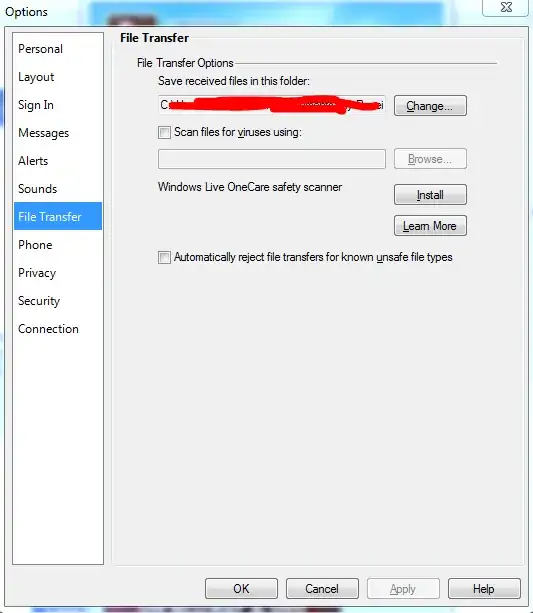
I used the device manager to confirm that I have one USB 3.0 port.

enter image description here

Is there a way a can figure out which port is 3.0 ?

Hennes
  • 64,768
  • 7
  • 111
  • 168
Rakesh Juyal
  • 2,051
  • 7
  • 23
  • 26

9 Answers9

76

They're BLUE!

I believe USB-3 ports should be colored differently (blue)

The use of blue pantone thermoplastics in USB 3.0 connectors is recommended on systems with a mix of USB 2.0 and USB 3.0 ports. For certification, the USB-IF does require that the user be able to clearly and easily distinguish between a USB 3.0 and a USB 2.0 port on a system; however, it is left to the system implementer on how to accomplish this.

(my emphasis)

Also, just because your Computer contains a USB 3 controller doesn't mean it necessarily is presented externally

RedGrittyBrick
  • 81,981
  • 20
  • 135
  • 205
  • 3
    Yup. Powered ports are yellow, USB3 are blue on lenovos – Journeyman Geek Jan 01 '12 at 14:42
  • 1
    I found blue usb port in my laptop :) Thanks. Would you please care to elaborate `Also, just because your Computer contains a USB 3 controller doesn't mean it necessarily is presented externally` ? – Rakesh Juyal Jan 01 '12 at 16:13
  • 1
    This means that although the motherboard is capable of processing USB3.0 signal, a physical port might not be installed (usually, it's the case with desktops). – dnbrv Jan 01 '12 at 16:46
  • 9
    @Rakesh: Sometimes a USB controller exists for *internal* devices (such as a laptop's webcam). – u1686_grawity Jan 02 '12 at 08:35
  • 2
    Yep. This is the best answer. They are almost always colored differently. One exception are modern Macs, as one port can support both USB 2.0 and 3.0. – Josiah Oct 03 '12 at 17:24
  • Not just blue, but Pantone 300C blue! – Dave Sep 20 '13 at 10:38
  • My Dell laptop has blue USB 3.0. This is a very good answer. – Ufoguy Dec 14 '13 at 12:21
  • So clever, how did I never notice that on my ASUS laptop? – alexia Jul 16 '14 at 10:24
  • They are indeed most of the time blue, but not always. @JourneymanGeek, I have a Lenovo as well and my two USB3 ports are red. – Mentos93 Mar 16 '16 at 15:33
  • 1
    @Josiah Any port that supports USB 3.0 can also support 2.0. USB 3.0 ports are backward-compatible to USB 2.0 devices. – Jamie Hanrahan Jan 12 '17 at 23:36
  • 1
    The newer Dells in our workplace have blue USB 3.0 ports but many of the older PCs have black USB 3.0 ports with a small "SS" symbol next to them. – Andrew Stephens Oct 26 '17 at 10:45
31

On my HP laptop, USB 3.0 ports logo/symbol have an "SS" (for Super Speed). USB 2.0 ports only have the typical USB symbol with no "SS".

See the following image: http://www.usr.com/education/periphimg/USB-connectors-edu.png

林果皞
  • 435
  • 1
  • 6
  • 17
Julio
  • 311
  • 3
  • 2
17

According the tech specs

Left side: two USB 3.0 ports, external monitor (VGA DB-15, HDMI), ethernet (RJ-45)

Right side: one USB 2.0 port and one eSATA/USB combo port

14

I have a generic answer for determining if a device is USB 3.0 capable, and if the port you're connected to is USB 2.0 or 3.0. Note that I've only tested this in Windows 8.1 on my Dell N4110 (the only system I have running currently).

Connect the storage device via USB, then go to "Devices and Printers". The first group is called "Devices" and will show any storage devices connected by USB.

If you select a USB storage device, you'll see a small information section at the bottom of the screen that shows the device "Model", "Category", and "Status".

If the device is connected to a USB 2.0 port and the device is USB 3.0 capable, then you will see the status "This device could run faster". Otherwise the status will read "Connected to USB 3.0".

Try every USB port on the device until you get the best result.

I've included a screenshot for clarity.

enter image description here

DavidPostill
  • 153,128
  • 77
  • 353
  • 394
George Ioannou
  • 141
  • 1
  • 3
8

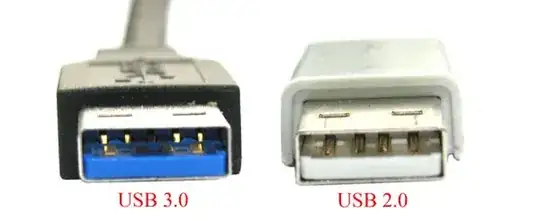
Some of the identifications for a USB 3.0

  • The USB 3.0 insert port has 5 leads (the USB 2.0 has only 4)

  • Some of them are named as SS with the USB symbol, means 'Super Speed'

  • The inserts may be colored with blue sometimes

Comparison picture: enter image description here

matan129
  • 1,940
  • 2
  • 18
  • 24
Jordan
  • 89
  • 1
  • 1
  • 9
    USB 3.0 connectors actually have [**9** contacts](http://en.wikipedia.org/wiki/USB_3.0#Standard-A) (4 + 5) or 11 (for devices that provide power) – RedGrittyBrick Sep 20 '13 at 11:04
7

I realize that your question goes to Lenovo laptop, but for completeness I'd like to mention that on Dell T3600 the ports labeled with SS and a USB icon are USB 3.0 ports. Ports with just the USB icon are USB 2.0 ports.

GregC
  • 454
  • 4
  • 15
2

Most devices that are USB 3.0 compatible will display a message whenever it is plugged into a USB 2.0 port, indicating that the transfer rate would be much faster if plugged into a different USB port. When you don't get the message in some of the USB ports, that is an indication that the port is 3.0 as opposed to those displaying the message, which are 2.0

Bud
  • 29
  • 1
2

For the USB ports on my Dell laptop, the USB 2.0 ports have a USB symbol which is colored white. The 3.0 pots have a USB symbol which is colored red and have "SS" to the left side of the symbol.

Aaron Klap
  • 121
  • 2
2

If you see "SS" ,then the USB is a SuperSpeed USB 3.0. If you do not see the "SS", the USB is the older, slower, USB 2.0.The USB 3.0 ports are probably on the left side

sac
  • 21
  • 1