94

I'm looking for a way to easily pick a color from anywhere on the screen in Mac OS X and get the value as a hex code (like #ACC782 ).

OS X has a built in system "color picker" and I found a standalone "app" that will just run that, but I don't see any way to get the hex code from it.

Firefox and Chrome both have "color picker" extensions but I'm looking for something that I can use on any application.

What can I use for that? It would be really nice if it automatically copied the value to the clipboard, but that may be asking too much :)
enter image description here

music2myear
  • 40,472
  • 44
  • 86
  • 127
cwd
  • 17,668
  • 42
  • 121
  • 159
  • You do realize that you didn't need to register a second account to answer your questions, but can simply answer them with your own account (like e.g. I do)? – Daniel Beck Dec 30 '11 at 08:26
  • I asked a moderator about it; if you want, they could merge your accounts. There is no rule against answering your own questions. (Assuming you are haxie) – Daniel Beck Dec 30 '11 at 08:55

4 Answers4

202

OS X comes with DigitalColor Meter:

Applications > Utilities > DigitalColor Meter.app

It has many options and preferences.

command+shift+c will copy the color under the cursor to the clipboard in many different formats.

broomdodger
  • 3,060
  • 1
  • 16
  • 5
  • 36
    Just to add you can get the output in hex by going to View->Display values->Hexadecimal – donturner Jul 13 '14 at 19:09
  • I tried command+shift+c but it does not copies the values in mountain lion. Update: We have to keep the DigitalColor Meter Selected, I would click on the image expecting the keys to copy the color. – pal4life Aug 08 '14 at 20:53
  • @broom, Where did the color picker go to? – Pacerier Oct 12 '17 at 07:33
  • @Pacerier Digital Color Meter is still available in macOS. I still see it in 10.15.4. – kas May 26 '20 at 01:08
  • Wow this is so cool, it's still available for me as well. I didn't know MacOS came with this, they really did think of everything. – scorgn Mar 22 '21 at 18:58
  • Can't believe I only just found this! – 00-BBB Mar 23 '21 at 16:32
11

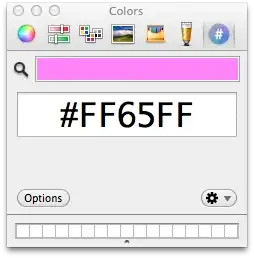
The Mac OS X color picker is extensible.

Use Hex Color Picker to add a tab that provides you the configured color in hexadecimal RGB.

enter image description here

Just run e.g. TextEdit and press Cmd-Shift-C to open the color picker, or run your standalone program.


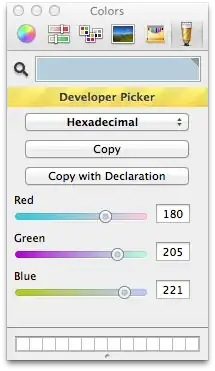
An even more versatile color picker is Developer Color Picker with many different output formats, one of which is hexadecimal.

enter image description here

Pnutus
  • 103
  • 4
Daniel Beck
  • 109,300
  • 14
  • 287
  • 334
3

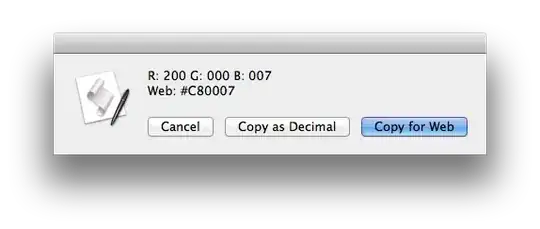
This is easily done with AppleScript. A complete working example of code is available here.

enter image description here

Gaff
  • 18,569
  • 15
  • 57
  • 68
mark
  • 621
  • 5
  • 3
0

I know this is a super old post, but just thought I'd throw this one out there that I've been using for awhile: Sip. Works pretty sweet, and you can get a ton of different color options.

App Store Link: Sip

I have no affiliation with the developer, just think it's a cool little app. And it's Free! :-) Enjoy

Drew
  • 129
  • 5
  • I dun get it..What can Sip do that DigitalColor cant? – Pacerier Oct 12 '17 at 07:34
  • Granted... It works similar to DigitalColor. Where I've found differences is in the how the app functions over all. Sip for instance has a lot more options in terms of what it can capture the color as; NSColor RGB, HSB, OpenGL RGB, Swift NSColor, UIColor RGB, CSS Hex, Java RGB, Android XML etc... just to name a few (30+ options in total). Versus the six options that DC has. Personally, I also like the history palette that stores some of my recent color pics, and that it sits up in the menu bar tucked away neatly. Anyway, yeah, the both do (pretty much) the same thing. I just prefer Sip. – Drew Oct 12 '17 at 16:05