25

Is it possible to regex replace from command line? Right now I'm using notepad++ to do this. In command line I can only use FINDSTR wich can only locate the mached files/lines

EDIT :
Maybe it will be possible to make a VB script and run it from cmd? I just created a file "hi.vbs" with the content

Msgbox "Hi Buddy"

Then cmd allows me to run it directly by typing "hi" from command line.
So if it is not possible with batch script, then i may use a VB script trough batch. Or..?

n.st
  • 1,908
  • 1
  • 17
  • 30
Aziz
  • 597
  • 2
  • 6
  • 13
  • At the end you put an inconclusive sentence and the whole EDIT part isn't pointing to the problem is more like "I create a hello world in vb, can i create something like that in batch? Check the answer posted by @IanPugsley is the easy way to do regex-replace. – mjsr Sep 29 '11 at 11:10
  • @Aziz: has any of these answers worked for you? If so, would you accept that one? That's part of participating in this community; the way we thank one another for help. The reputation points given for an accepted answer help other users assess one another's experience. Thanks. – JRobert Sep 29 '11 at 21:25
  • I was thinking to call somthing like MYVBREPLACE(.vbs) FILENAME REGEXPATTERN REPLACEMENT from command line. – Aziz Oct 05 '11 at 13:00

9 Answers9

29

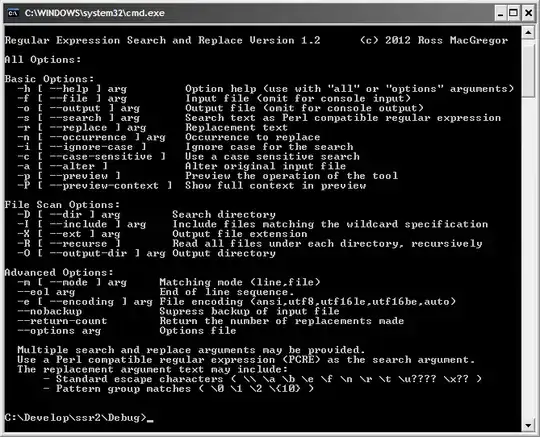
I've written a free command line tool for Windows to do this. It's called rxrepl, it supports Unicode and file search. Some may find it a useful tool.

rxrepl is a Microsoft Windows command line tool to search and replace text in text files using Perl compatible regular expressions (PCRE).

It has the following features:

  • Search using Perl Compatible Regular Expressions
  • Use group matching in replacement text
  • Supports Windows and Unix line endings
  • Unicode support
  • Accepts multiple search/replace arguments
  • Options may be provided in an options file
  • Scan for files
  • Preview mode
  • Line and full file matching modes

enter image description here

nixda
  • 26,823
  • 17
  • 108
  • 156
user2005187
  • 391
  • 1
  • 3
  • 2
  • 4
    This is amazing! If you're like me and need examples, this replaces "foobar" with "foofighters" in a file: rxrepl.exe -f file.txt -a -s "(foo)bar" -r "\1fighters" – Dunc Oct 23 '14 at 15:53
  • +1 this works too `echo foobar | rxrepl -s "(foo)bar" -r "\1fighters"` . It's a great tool 'cos afaik sed doesn't yet have pcre. – barlop Mar 12 '16 at 16:58
  • It appears that this utility is a 16-bit application. Unfortunately my 64-bit edition of windows cannot run it because it only has a compatibility layer for 32-bit applications... – Steztric Jun 28 '16 at 18:33
  • I almost never use commandline utilities for Windows that aren't native, but this looks like exactly the kind of thing I would want on each unit that I use for developing and testing parse-heavy scripts. May I ask, what language/platform did you use to make the tool? I've been tempted to make something similar to this in C for a while now... – kayleeFrye_onDeck Jan 05 '17 at 19:27
  • 1
    Also, would you happen to have the source on something like github? Totally understandable if it's not meant to be open source, but I'm very curious. – kayleeFrye_onDeck Jan 05 '17 at 19:34
  • 1
    @Steztric Really? I'm running 64-bit windows and seem to have no issues running this from `C:\WINDOWS\System32\cmd.exe` – kayleeFrye_onDeck Jan 05 '17 at 19:46
  • Is it possible to use this tool without a replace operation? As in, just a search? If so, how do I do that? I'm having a hard time figuring this one out, as all my attempts have complained about a missing replace option. Right now I'm tacking on `-a -r \1` to get around this by replacing the matching string with itself, like so: `rxrepl -s ("I am the substring") -D "%cd%" -I "*.txt" -R -a -r \1` – kayleeFrye_onDeck Jan 05 '17 at 19:47
  • 1
    Awesome tool! Running without problems under Windows Server Std 2012 R2 x64. Thx! – kwrl Feb 15 '17 at 16:24
  • @Steztric Works fine for me. Easier than `sed` on windows too – dgo Aug 22 '17 at 20:50
  • 2
    Great tool, I hope you're still maintaining it – watery Feb 06 '18 at 10:00
  • Silly question: how do I replace with an empty string (since I want to delete found the found piece of text)? Thank you. – Andrey Kazak Apr 16 '20 at 12:03
15

The Scripting Guy covers how to do this in PowerShell (no additional downloads on most recent Windows OSs, you probably already have it installed).

Start it up, run the following (to replace a * with a @):

(Get-Content C:\Scripts\Test.txt) | 
Foreach-Object {$_ -replace "\*", "@"} | 
Set-Content C:\Scripts\Test.txt

This supports .NET regular expressions, including positive and negative look-ahead, and all manner of things notepad++ did not support with regex before version 6.x (as much as I love notepad++).

Ian Pugsley
  • 432
  • 3
  • 12
12

go here
http://gnuwin32.sourceforge.net/packages.html
scroll down to SED. Download coreutils too while you're at it.

this command will replace a with b globally, and on each line. so not just the first occurrence on the line.

e.g. using sed "s/a/b/g" a.txt

C:\>type a.txt
aaaa
aaa

C:\>sed "s/a/b/" a.txt
baaa
baa

C:\>sed "s/a/b/g" a.txt
bbbb
bbb

C:\>

VBScript does support regular expressions, you can do find and replace with it.

dim re, s
set re = new RegExp

re.Pattern="in"
re.Global=True 'false is default
s="bin din in"
MsgBox re.Replace(s,"xxx")

Displays bxxx dxxx xxx

barlop
  • 23,380
  • 43
  • 145
  • 225
  • Amazing crazy tool!!! This tool was too adwanced. I could not manage to use it yet, but when I read http://www.gnu.org/software/sed/manual/sed.html#The-_0022s_0022-Command I can see that this can do much more than what I could expect. Thanks a lot – Aziz Oct 05 '11 at 12:40
  • New versions of bash can also do regular expressions, sometimes that's enough for simple tasks and there's no need to use even sed. – vtest Nov 24 '11 at 06:13
  • and re what vtest said, in case anybody doesn't know. cygwin has bash. – barlop Jul 29 '15 at 17:53
  • sed sucks with multi-line replaces though – kofifus Mar 19 '16 at 03:57
  • @kofifus I know you know this sentence, but just for the sake of others and clarifying what you are saying - doing a search/replace on multiple lines sed's fine for, as it operates on each line, but where the search string spans across multiple lines, yeah, sed isn't designed for that(since as mentioned, it operates on each line). One can use perl.see my answer here for some examples http://superuser.com/questions/416419/perl-for-matching-with-regular-expressions-in-terminal or probably any language with regex support, though perl is the mother of them. – barlop Mar 19 '16 at 08:48
  • Neither `sed` nor `perl` work well (or at least easily) with Unicode (especially UTF-16) on Windows. – Kenny Evitt Feb 09 '17 at 10:42
  • 1
    @KennyEvitt cmd shell requires a tweak to get it to display and use of chcp for unicode utf8 chcp 65001 (as you say, utf16 encoding.chcp 1200 and chcp 12001 is not supported) http://stackoverflow.com/questions/9321419/unicode-utf-8-text-file-gibberish-on-windows-console-trying-to-display-hebrew Not sure re mintty. Not sure re powershell. But utf-8 is supported ok in cmd or powershell. So long as a supporting font is used like courier new, and so long as it's codepage 65001. There is a cmd /u for a utf16 encoding. – barlop Feb 09 '17 at 16:19
  • +1 sed shipped with git – Sergei Krivonos Aug 15 '18 at 13:41
5

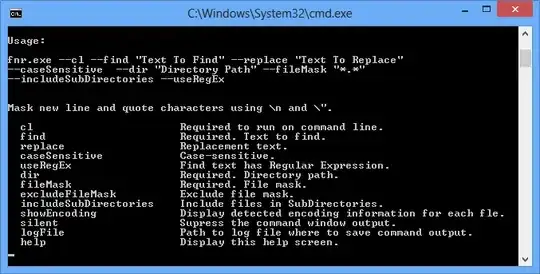
I've found fnr.exe for that. It has GUI and command-line.

An open source tool to find and replace text in multiple files.

Features

  • Single file download - fnr.exe (127kb)
  • Replace text in multiple files using windows application or through command line
  • Find Only to see where matches are found
  • Case-sensitive searching
  • Searching for files in one directory or recursing sub-directories
  • Regular expressions
  • Find and replace multi-line text
  • Generate command line button to create command line text to put in batch file
  • Command line help
  • Unit tests of Find/Replace engine

Viewing command line options

enter image description here

nixda
  • 26,823
  • 17
  • 108
  • 156
Sergius
  • 286
  • 4
  • 8
  • 1
    Pretty nice - you can check your "find" statement in GUI, click "Gen Replace Command Line" and get ready to use command line call. No need to spend time to get familiar with command line syntax. – sarh Jul 27 '15 at 11:57
  • I couldn't manage to get this to exit after making the changes. I have to press enter to close making this not especially useful for scripting – G-. Jan 08 '16 at 15:31
  • @G-. There is no waiting for if it is run from a batch file. – Sergius Jan 11 '16 at 09:12
  • I couldn't find a way to output to a different filename/extension – Rick Nov 11 '16 at 13:35
4

I'm a little late to the party, but JREPL.BAT is a hybrid JScript/batch script based regex utility that runs natively on any Windows machine from XP onward.

Full documentation is built into the script, which can be accessed via JREPL /?, or use JREPL /?? for paged output.

JREPL uses standard ECMA regex that comes with JScript. ECMA regex is not quite as powerful as the .NET regex available to powershell, but it is still pretty darn good. And I think the average user will find this utility easier to use than powershell.

The built-in JREPL options already provide a lot of inherent power, but the ability to inject user supplied JScript really opens up amazing possibilities.

I developed the script because my workplace does not allow downloading of non-standard exe files, but has no restriction on writing batch or JScript scripts :-)

Simply follow the link and copy the script code into a file named JREPL.BAT. Read the subsequent posts from that thread for examples of usage and development history. There are also many StackOverflow answers that use JREPL.BAT.

dbenham
  • 11,194
  • 6
  • 30
  • 47
4

Looks like you can use regex with FINDSTR

findstr [Windows CMD]:

findstr allows to search for text (as specified with pattern in the file file-name. If file-name contains wildcards (* or ?), it searches in all files that match. The option /S searches in the current directory as well as in its subdirectories. If pattern contains spaces, it must be specified like so /C:"some text to be searched". In order to turn pattern into a regular expressions, the /R option must be used. The /I option searches case insensitive.

From FindStr's Help (Findstr /?):

/R - Uses search strings as regular expressions.

Regular expression quick reference:
  .        Wildcard: any character
  *        Repeat: zero or more occurrences of previous character or class
  ^        Line position: beginning of line
  $        Line position: end of line
  [class]  Character class: any one character in set
  [^class] Inverse class: any one character not in set
  [x-y]    Range: any characters within the specified range
  \x       Escape: literal use of metacharacter x
  \<xyz    Word position: beginning of word
  xyz\>    Word position: end of word
p0rkjello
  • 574
  • 3
  • 9
3

Two good choices are either Cygwin which will give you a Unix-like, bash-like environment (alternative to cmd.exe); and Unxutils, Win32 ports of a collection of individual Unix utilities. In either package, see 'sed', 'awk', and 'grep'.

JRobert
  • 6,744
  • 24
  • 28
0

You can also use GSAR to perform command line search and replace. Works with hex and binary as well. It will not do the complex heavy lifting that regex can perform, but for basic search and replace, it does the job quickly and easily.

Sun
  • 6,192
  • 10
  • 34
  • 54
0

You can invoke PowerShell from Batch as well.

Here is an example:

powershell -NoLogo -NoProfile -Command "(Get-Content ACTM.aip) -replace '(?<=<ROW\s+Property=\"ProductVersion\"\s+Value=\")[^^\"]+', '%VERSION%' | Set-Content ACTM.aip"

However, here are some things to be aware of / caveats:

  • You have to escape ^ with ^, so you get ^^
  • Despite PowerShell doesn't require escaping quotes within single-quotes or using the backtick ` for escaping quotes you simple escape quotes with \
  • One thing that is messed up: The batch interpreter also tries to be smart and expects a closing quote for each opening quote within the wrapped-quotes on your command argument. So if your total quotes are odd your command will not execute. (Thank you Microsoft)
Martin Braun
  • 681
  • 2
  • 10
  • 22