Somehow or other I have managed to switch on the print margin lines in Excel 2010. I cannot seem to turn them off. I went to Page Layout->Page Setup->Print Area->Clear Print Area but the lines remain on my screen. Any ideas to get rid of them?
Asked
Active
Viewed 3.8e+01k times


8 Answers
99
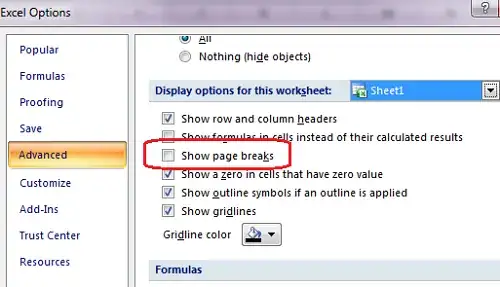
I have Excel 2007 so I'm giving the instructions to hide page break lines for Excel 2007, but it should be applicable to Excel 2010 as well:
- Click on the Office button in the top left corner.
- Select the Excel Options button at the bottom right side of the Office menu.
- Select Advanced in the left column.
- Scroll down to the Display Options for this Worksheet section.
- Uncheck the box marked Show Page Breaks.
- Click OK.

Mehper C. Palavuzlar
- 55,164
- 49
- 193
- 250
-
2Aha page breaks! I thought it was something to do with printing. Worked a treat, thanks v much. – Mark Allison Sep 06 '11 at 13:02
-
3+1 for this. They seem to turn on automatically somehow but I've no idea what I am doing to enable them. Another question, perhaps :) – Mark McDonald Jun 25 '12 at 06:12
-
1Similar option on the Mac version: `Preferences > View > Show page breaks` – Baumr Dec 31 '12 at 16:14
-
1I've been searching how to get rid of those pesky lines for at least 10min, thank you so much ! – MarmouCorp Feb 20 '13 at 10:48
-
1This works in 2010 as well. – enderland Mar 05 '13 at 14:23
-
1They actually turn on after you have went to print once. – RipperDoc Apr 30 '14 at 05:29
-
3Why so difficult. I mean, it's so easy to accidentally create them, and it takes 6 steps to get rid of them!? – Mark Jeronimus Sep 19 '14 at 08:11
-
2Works in Excel 2016 as well. – Ali Khan Oct 15 '17 at 19:38
-
Accidentally clicked one button and the lines start showing but there is no easy way to get rid of them. One has to go through all that just to get rid of them. This is completely non-intuitive and crazy. Normally you would expect a toggle on and off using the same button. Christopher Columbus! – stackoverblown Apr 01 '21 at 09:17
18
You can create a macro and a custom button for your ribbon to toggle them on/off so you don't have to go through the Options every time.
VBA
Sub TogglePageBreaks()

  ActiveSheet.DisplayPageBreaks = Not ActiveSheet.DisplayPageBreaks

End Sub
I created/saved this macro to the Personal.xlsb file (see Copy your macros to a Personal Macro Workbook).
I then added a button to my Excel 2010 Ribbon for the macro (see How to add your own Macros to Excel Ribbon).
Clicking it toggles the page breaks on and off in any spreadsheet you open.


7
For Excel 2010, go to File, Options, Advanced. Then page down to Display options for this worksheet and uncheck Show page breaks. Be sure you are in Display options for this worksheet and not 'this workbook'. That should do it!!

Brad Patton
- 10,540
- 12
- 40
- 68

Dana
- 71
- 1
- 1
-
My Excel 2010 is not showing an "Office" button (step 1 in Mehper's answer), but *THIS* answer worked. – Doug_Ivison Mar 11 '14 at 08:37
-
Really brilliant answer. But just got 1 up-vote. Hence, I have given the second up-vote – Ashok kumar Jun 30 '15 at 12:59
5
In the Immediate console (Alt + F11 -> Ctro + G), execute the following command: ActiveSheet.DisplayPageBreaks = False

Julius Getz Mørk
- 151
- 1
- 1
-
Thanks a lot for explaning how to access the Immediate console! Very handy. I see there is no "DisplayPageBreaks" method for `ActiveWorkbook`, how would you disable page break for all workbooks with the same method? – jeannej Sep 23 '21 at 13:24
4
The fastest way I have found is to simply save your file, close and reopen. The dashed print lines should no longer be displayed.

Rory Simms
- 41
- 1
4
Here are the instructions for Excel 2003:
- Go to the Tools menu and select Options.
- Select the View tab.
- In the Window Options section, uncheck the box marked Page Breaks.
- Click OK.

jjz
- 452
- 1
- 5
- 14
0
Go to View set "Workbook views" from Page Break preview to Normal. This will remove the background Page number" watermark.
Go to Options -> Advanced -> Display options for this worksheet -> Remove "Show page breaks". This will remove the printing dotted lines.

Rajesh Jain
- 21
- 1
-
@fixer1234, you are wrong. This is the only answer that mentions the Workbook Views group on the View tab, which was exactly what I was looking for. If you have downvoted this answer, please remove your downvote. – phenry Sep 03 '15 at 21:21
-
@phenry: Fair enough on the first paragraph. I deleted my comment. None of the downvotes were mine. But I'll upvote to offset the remaining downvote on the chance that my comment attracted a downvote. – fixer1234 Sep 03 '15 at 21:36
0
Excel 2011 for Mac:
1) Go to Preferences (⌘ + ,)
2) In the Authoring section, click View
3) On the right under Window options, uncheck Show page breaks

jlewkovich
- 158
- 1
- 7