9

My new SSD Corsair CSSD-F60 actually works - using it for boot and system disk (Windows 7 64-bit). But when first (cold-) booting the PC it's not properly found by BIOS and Intel ICH9R Controller. The first boot attempt always fails. When I wait for about 1-2 minutes, and retry using CTRL + ALT + DEL it's getting recognized and everything works as expected from now on - until the next boot from a turned-off state. I'm also running a RAID-5 SATA set in this machine, this was my previous system partition.

Some screenshots describe the problem:

  1. Turning PC on, initialization, shows up like this. The problem is: While it's recognized at "Port 00", it doesn't appear in the Physical Disks section:
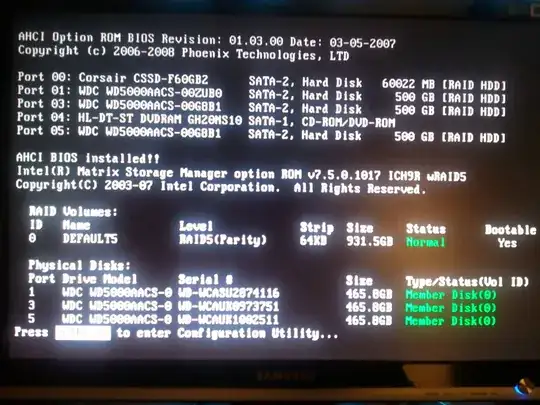
    First attempt: SSD not listed in physical disks section

  2. Error because boot disk was not found:

    Boot fail

  3. When I'd press CTRL + ALT + DEL instantly, the procedure likely will repeat from (1). But after about 1-2 minutes have passed from the first start, it's certain that I get the following screen. From now on, everything works fine! Note that now the SSD appears in the Physical Disks section:
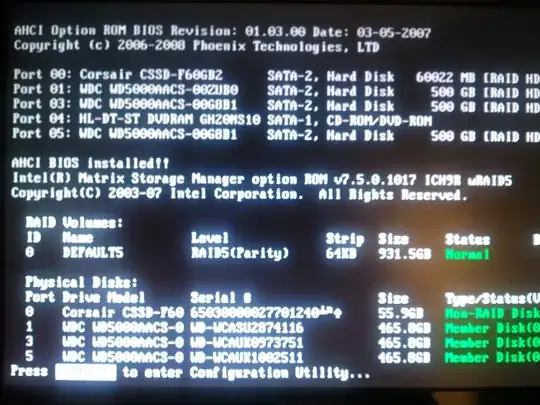
    Now it's working

    Interestingly, when going to BIOS during the first period, I'm not able to select the SSD as my boot device because it simply doesn't appear in the list. After it was recognized, I can select it from the list.
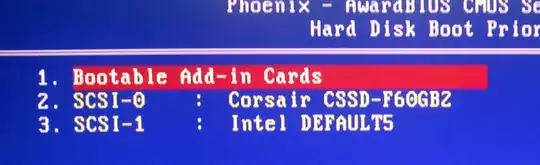
    This is the working version (This is the working version, during the first period there is only my Intel RAID device listed)

Usually, I turn on my PC, wait two minutes and press CTRL + ALT + DEL to get it booted - this always works.

What could this be?

Here some facts:

  • Phoenix BIOS up-to-date (Manufacturer ABIT doesn't provide any support for mainboards anymore, this is the IX38 QuadGT with Intel X38-ICH9R)
  • Storage Controller/Bus running in RAID mode which supposedly include AHCI (have to run in RAID mode because of the existing RAID set)
  • Switching ports (hardware) and exchanging cables didn't help

Any clues?

EDIT 1:

My PSU is the following: Corsair TX650W from summer of 2007.

EDIT 2:

Bad news guys, I've pulled off the power connectors from all three hard disks (Ports 01, 03 and 05) and from the DVD-ROM drive (Port 04) so there was only the SSD plugged in - same effect, I wasn't able to boot from cold start state but minutes later. I also exchanged the port to 04 for a single test, no success.

  • 2
    This might be a power issue. Can you successfully cold-boot without the other hard drives connected? – sblair Jul 28 '11 at 19:27
  • @sblair Thanks, good catch, will try that soon - while my power supply is scaled sufficiently, the hard disks are all hanging on the same cable (for lengths reasons you know.. :). The SSD is not the last one though, its one of the RAID disks. – thomasjaworski.com Jul 28 '11 at 22:38
  • 2
    The order of the drives on the daisy-chained power connector shouldn't matter much, each drive should get the same voltages. If possible, it would be interesting to measure those voltages during the first minute or so after booting. I'm speculating wildly here, but the SSD may be sensitive to even slight voltage dips, whereas the HDDs can ride-through. How old is the PSU? – sblair Jul 28 '11 at 23:08
  • @sblair: That was my first inclination. Power. You should put that is as an answer. – surfasb Jul 29 '11 at 00:06
  • @sblair The order might actually matter. [The more current that flows through the wire, the lower the voltage on the other end](http://en.wikipedia.org/wiki/Ohm%27s_law). – Breakthrough Jul 29 '11 at 02:44
  • You can sometimes find in your BIOS where there is a delay setting to allow devices to get power and boot up. I had some regular harddrives that had this issue. I told the BIOS to allow the sata devices to have a change to boot and then I would be able to do a cold boot without the annoyance of having to reboot – kobaltz Jul 29 '11 at 02:48
  • 1
    @Breakthrough Yes, I'm familiar with Ohm's law :) But, I don't understand what you mean. Each SATA device will be connected to the various voltage rails in parallel. Ignoring the tiny cable impedance, the voltages must be the same for each device, regardless of order, and regardless of current. – sblair Jul 29 '11 at 10:47
  • @sblair Yes, but the more devices you have on that rail, the more current flows along it, and the more the voltage sags at each connection point (moreso after the first junction). While it usually doesn't make a difference, if you have three hard drives going all-out, it could make a difference. It all depends on the cable, though. Either way, I would recommend to not use more then two SATA devices on a single power cable to see if that's the issue here. – Breakthrough Jul 29 '11 at 12:50
  • @kobaltz yes I have such option but unfortunately I can set it up from 0 to 15 seconds only. I've tried that but 15 seconds were not long enough. I have some time on weekend, gonna examine the possible power issues. – thomasjaworski.com Jul 29 '11 at 20:53
  • @sblair See my EDIT 1 regarding the PSU – thomasjaworski.com Jul 29 '11 at 20:58
  • Also, try updating your bios – kobaltz Jul 29 '11 at 22:45
  • @sblair +@Breakthrough Thanks people for the suggestions unfortunately my power connection tests were not successful as described in EDIT 2 – thomasjaworski.com Jul 30 '11 at 10:24
  • 2
    I also have a Corsair SSD (a P3 128GB). Sometimes when I reboot or cold start the computer I experience this issue too. Letting it sit there for a while and then rebooting again always makes it reappear. I've also suspected it to be a power issue, but I have a well-sized PSU (also from Corsair!), but it's been shown not likely. I suggest contacting Corsair. They're usually very personal with their customers. – jesper Jul 30 '11 at 10:54
  • Have you tried a firmware update? – Dumbo Jul 31 '11 at 17:48
  • @Sean87 thanks but it appears that it runs the newest available firmware (2.0). Now I'm trying to update the Intel Chipset drivers if possible... – thomasjaworski.com Jul 31 '11 at 20:16
  • I don't think it is a chipset driver problem since the chipset driver is not going to load while booting. Also check for a new bios for you mainboard. – Dumbo Jul 31 '11 at 20:33
  • I think the problem is in the drive itself. I guess it's possible that your firmware froze up during a cold boot. Maybe it's handling some bad block relocation or maybe some internal configuration got corrupted. You'd better check the SMART info and see if you're low on reserved blocks. – billc.cn Aug 01 '11 at 00:30
  • Unfortunately it looks like I have pretty new drivers everywhere... @billc.cn the SMART status shows all OK. Meanwhile, I've checked the Corsair forums where people seem to have similar, but not exactly the same problem. I'll try to find out more there. Thanks for your suggestions so far, really appreciate it! – thomasjaworski.com Aug 01 '11 at 18:29
  • Have you tried disabling and/or disconnecting your RAID array, changing the controller to AHCI pass-through, and trying to start the system with *only* the SSD connected? – Breakthrough Aug 05 '11 at 10:38
  • @Breakthrough maybe this is worth another try, but which conclusion would you come to if it would work or not work? – thomasjaworski.com Aug 07 '11 at 21:12

2 Answers2

1

It can also be a capacitor issue. Sometimes power delivery on either the device or PSU has almost-but-not-quite working capacitors, so when the system have been powered for a while they work, but it takes some time for them to charge. This is obviously a hardware malfunction issue.

I would cross-test the SSD on some other computer to see whether it's the SSD or your motherboard/PSU that has problems.

Zds
  • 2,449
  • 18
  • 15
0

Some important things you should try:

  • Reset the BIOS using the jumper.

  • Disable any (dynamic) overclocking to ensure that clocks and timings are right.

  • Disable AHCI if possible, note that this could need a OS reinstall.

  • Update the SSD firmware if possible, as it might not be a BIOS problem.

Tamara Wijsman
  • 57,083
  • 27
  • 185
  • 256