3

I've got a couple of partitions on my primary hard drive that I somehow managed to mount quite some time ago. Both partitions are EXT4, and not readable by Windows. (Back when I originally mounted them, they were EXT2, and I had a driver that worked for reading/writing them). Currently they show up in my computer as E:\ and F:. I'd be content to let them stay there, useless, forever, but I will be passing this machine on to another user shortly, and attempting to open the drives results in a "Would you like to format this disk?" dialog, which is obviously dangerous. I want to dismount both drives so that they don't show up in my computer.

How they look:

E and F in my computer

The standard way of dismounting drives like this is through computer management, where one could normally just remove the drive letter. However, that option is not available:
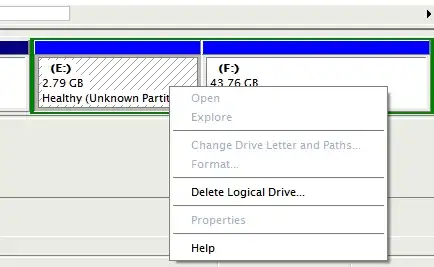
Unable to dismount through computer management

Other things I have tried:

  • The "Mountvol" command helpfully suggested in this question dissapears the drives nicely, but they reappear after a reboot.

  • The "fsutil" command, which refuses to perform operations on non-NTFS partitions.

  • KCotreau suggested trying diskpart, which was able to remove the drive letters, but they reappeared on the next boot.

Please note that I do not want to delete the partitions, as they are still used by Linux.

Any suggestions are welcome.

Fopedush
  • 2,002
  • 5
  • 20
  • 36

2 Answers2

2

You will probably have to use diskpart from an elevated command prompt.

diskpart
list disk
select disk 0 (I think this is your disk, but it is cut off)
list volume
select volume 3 (my guess is you have partitions 2+3 to worry about, but you have to use what you see to go by)
remove letter=F

Then do the same for the other partition.

This will remove the letters, but I am not sure you can keep them dismounted on the next boot, but the letters should remain gone.

KCotreau
  • 25,519
  • 5
  • 48
  • 72
  • Oddly enough, diskpart only shows two volumes: the NTFS partition of the hard drive, and my dvd-rom. E and F are not listed at all. – Fopedush Jul 25 '11 at 16:15
  • Try doing it with list partition, select partition and then remove letter. I am not sure about that one, but there is nothing lost if you try to do it that way. – KCotreau Jul 25 '11 at 16:22
  • Well, that removed the letters. However, after a reboot, they came right back. – Fopedush Jul 25 '11 at 16:28
  • I am not an EXT4 expert, but I have to wonder if the letters are not somehow tied to the partitions. I am at the extent of my knowledge on this one. I wish I could help more. – KCotreau Jul 25 '11 at 16:35
1

I hate to answer my own question, but I managed to get the drives to dissapear. I installed a later version of Ext2FSD (which includes EXT4 support), the Windows EXT driver that I used to mount these in the first place, and it was able to permanently unmount them.

Fopedush
  • 2,002
  • 5
  • 20
  • 36