3

I use the Windows Live Mail app (part of Windows Live Essentials) as my default mail app.

Unfortunately it doesn't notify me when I get a new mail. Are there any apps that can do this? The important thing is that it should use as little Internet as possible.

Gaff
  • 18,569
  • 15
  • 57
  • 68
Alireza Noori
  • 1,179
  • 4
  • 17
  • 30

4 Answers4

3

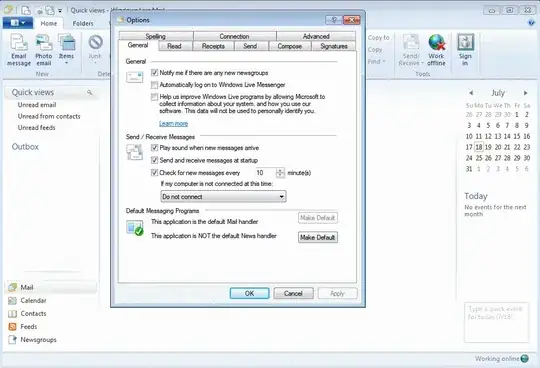
Windows Live Mail 2011 (and I believe every prior version) has this functionality by default. Click on the area in the screenshot that is dark blue (upper left corner), and click Options>Mail>General tab. Select "Play sound when new messages arrive". The envelope notification should always be on.

enter image description here

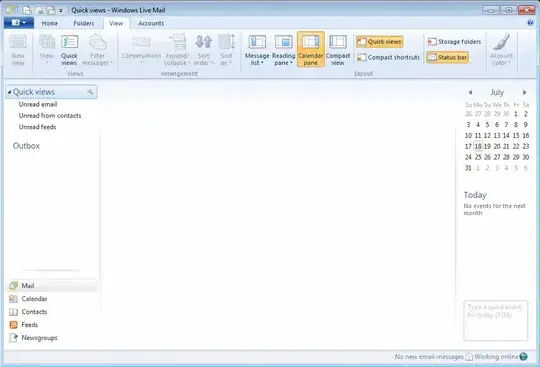
One more thing it may be: Make sure your status bar is enabled in View>Status bar.

enter image description here

KCotreau
  • 25,519
  • 5
  • 48
  • 72
  • Thanks for the answer. I checked and both of these were exactly this way. I don't know why they don't work. One thing is possible. I make the shortcut compatible with Vista SP2 to enable "Hide to notify area" option. I wonder why they haven't fixed this yet. Is this causing the problem? – Alireza Noori Jul 19 '11 at 02:42
  • I just checked. Without the compatiblity option still no sound will play. How can I fix this? – Alireza Noori Jul 19 '11 at 02:49
  • Just to make sure, I checked control panel's sound and it was enabled. – Alireza Noori Jul 19 '11 at 03:03
  • Not sure why it is not working then. You could go into the Programs and Features, and try to repair it. – KCotreau Jul 19 '11 at 03:19
  • I did, no luck... :( – Alireza Noori Jul 19 '11 at 04:40
  • Not sure what is going on with your install, but I doubt you will find a 3rd party tool to replace that functionality since it would replace something that ordinarily just works. – KCotreau Jul 19 '11 at 04:47
1

What do you mean "Doesn't notify"? I'm using Window Live Mail Desktop. Whenever an email arrives it:

  1. Makes a sound
  2. Changes it's taskbar icon to a one with an envelope on it
  3. Changes the system tray icon to a one with an envelope on it

2 and 3 do not go away until you read the email or mark it read. What more notifications can you ask for?

I'd go into the options screen in WLMD and check that you haven't disabled all those default notifications. Also, in the system tray, right click and configure the icons area to always show the WLMD icon - it could be that the notification icon is there, just hidden by default.

Traveling Tech Guy
  • 9,918
  • 8
  • 35
  • 40
1

you are missing the point that Windows Live Mail **MUST be active (turned on) for the notifier to work.**to keep it active you must only minimize it after use. not turn it off.

Gruber
  • 11
  • 1
0

If Status bar is not seen:

  • Right-Click Taskbar
  • Select cascade windows
  • This usually shows the e-mail page in reduced size but the status bar if selected on the View page can now be seen
  • Stretch the reduced picture if necessary back to full screen & you should be alright.
fixer1234
  • 27,064
  • 61
  • 75
  • 116