I am using foobar2000 music player. How can display the time elapsed of currently playing song?
Asked
Active
Viewed 1.4k times

1 Answers
7
CLick on File -> Preferences.
Expand Display -> Default User Interface. Under status bar add %playback_time_remaining% to whichever position you want.
This is how mine looks:
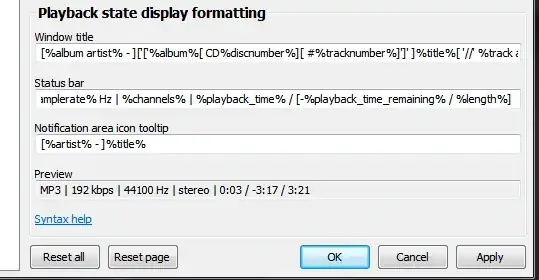
The status bar code:
%codec% | %bitrate% kbps | %samplerate% Hz | %channels% | %playback_time% / [-%playback_time_remaining% / %length%]

u1686_grawity
- 426,297
- 64
- 894
- 966

Sathyajith Bhat
- 61,504
- 38
- 179
- 264
-
I tried to use `%playback_time%` in `Display → Default User Interface → Playlist View → Custom columns`: it displays '?' sign in playlist. `%playback_time_remaining%` and `%played_length%` are not working as well. Foobar 1.1.7. Ideas? – dma_k Jul 12 '11 at 15:06
-
@dma_k if the length of the song is not available, both will not work. Try for few other songs – Sathyajith Bhat Jul 12 '11 at 16:11
-
It turned out to be `%_length%` macro. Damn, it's difficult to find right solution in Google, as each reference lead to different solution, which depends on something I can't understand (FooBar version? module? moon phase?) – dma_k Aug 08 '11 at 00:23
-
The dynamic values (as playback time) are not available in columns, nor in tray icon notification balloon. – Sep 13 '11 at 15:33