32

Formatting an external 500GB HDD took almost >6 hours that I started like:

D:\>format /FS:fat32 F:
The type of the file system is EXFAT.
The new file system is FAT32.
Enter current volume label for drive F: musix

WARNING, ALL DATA ON NON-REMOVABLE DISK
DRIVE F: WILL BE LOST!
Proceed with Format (Y/N)? y
Formatting 476810M

finally responded with the error:

The volume is too big for FAT32.

However according to MSFT there are no such limitations. (I used XP specs, while I am formatting in Win7, ok?) I am not formatting the drive during setup but on an installed version from the command prompt.

I want to use this disk with the maximum available capacity as en external HardDrive connected to an MDI interdface in my car to play music.

What are the proper settings for that and can I use/format the (almost) full 500GB?

Caspar Kleijne
  • 605
  • 2
  • 9
  • 14
  • How large are your clusters? If your clusters are 32kb, then you max out at 8TB. If your clusters are 4 kb, I would assume you max out at 1TB, etc – soandos Jun 06 '11 at 06:43
  • I do not know ;) clustersize is not my cup of tea, I formatted using default settings, but should they be much larger? – Caspar Kleijne Jun 06 '11 at 06:49
  • 5
    Windows XP can mount and support FAT32 volumes larger than 32 GB (subject to the other limits), but you cannot create a FAT32 volume larger than 32 GB by using the Format tool during Setup. **If you need to format a volume that is larger than 32 GB, use the NTFS file system to format it.** – soandos Jun 06 '11 at 06:50
  • Clusters cannot be bigger than 64kb in FAT32 – soandos Jun 06 '11 at 06:51
  • 6
    Any reason for reformatting away from exFAT? [exFAT](http://en.wikipedia.org/wiki/ExFAT) is a viable alternative to FAT32 on Vista and Win7 for large drives and goes beyond the limitations of FAT32, just be aware that Windows XP requires a [download](http://support.microsoft.com/kb/955704) from Microsoft and Linux support may be patchy. – Mokubai Jun 06 '11 at 07:39
  • @soandos volumes > 32 GB are valid in FAT32 and sometimes necessary; my automobile will *not* mount NTFS or exFAT USB drives in its audio system for example. – Jeff Atwood Dec 19 '12 at 21:11
  • @JeffAtwood That not "Windows XP can mount and support FAT32 volumes larger than 32 GB"? (unless I was implying that it could mount an support an invalid FAT32 volume, which case I'm sorry) – soandos Dec 19 '12 at 21:32
  • @soandos I meant when you said "if you need a volume > 32 GB, use NTFS" is not good advice for all applications. If I formatted this 64 GB USB key as NTFS or exFAT it would be unreadable to my automobile's music system, which is where I intend to use it. It *has* to be FAT32. – Jeff Atwood Dec 20 '12 at 08:50
  • Try gparted live ISO bootable. – cybernard Nov 30 '20 at 18:54
  • 1
    Hehe, according to Dave Plummer (the former Microsoft engineer who wrote the disk formatter for Windows NT), the FAT32 "limit" of 32GB is "because I said so" ([YouTube](https://youtu.be/bikbJPI-7Kg?t=42)). P.S.: He mentions [Rufus](https://superuser.com/a/799377/944173) or [Fat32 Format](https://superuser.com/a/521715/944173) as workarounds. – Chris Tollefson Jan 06 '21 at 03:41
  • 1
    @ChrisTollefson I had Rufus (portable) already, didn't know it can do it - indeed it works brilliantly. No installation, no fuss, open source. Why bother with all these supposedly free but maybe not ones which need installation? My Cowon J3 music player is more than 10 years old, I soldered in a new battery and keep using it, nice little device. It didn't see the exFAT-formatted 128 GB microSD card, but it works fine after I used Rufus to format it as FAT32. – Gene Pavlovsky May 22 '23 at 19:15

5 Answers5

35

What an annoying limitation! You can't format FAT32 volumes larger than 32GB from any version of Windows...

C:\Users\jeff>format e: /FS:fat32 /Q
Insert new disk for drive E:
and press ENTER when ready...
The type of the file system is EXFAT.
The new file system is FAT32.
QuickFormatting 58.9 GB
The volume is too big for FAT32.
Format failed.

... but they must exist because this Lexar USB 64GB drive right here is formatted FAT32! How?

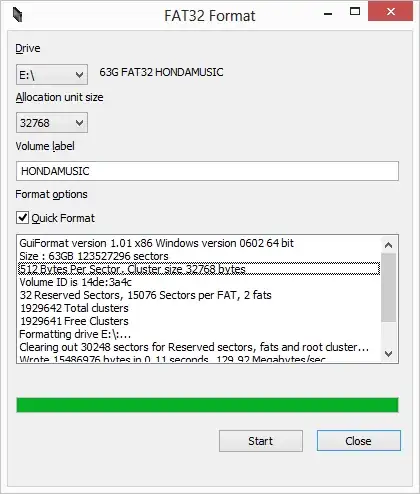
It is possible to do it, you just have to use some other tool. I used this one, FAT32 Format.

enter image description here

Jeff Atwood
  • 23,972
  • 30
  • 99
  • 120
  • 2
    For some reason I had trouble re-formatting a 64GB drive that was formatted to 32GB, I had to use `DISKPART` at the command line as indicated here: http://superuser.com/a/470663 – Jeff Atwood Apr 13 '13 at 18:07
  • Great answer! It worked for me! – mathreader Jul 01 '16 at 20:40
  • 3
    This should be marked as the answer – Philipp Munin Aug 07 '16 at 22:19
  • Note that, at least for really large drives > 2TB, ie the current 4TB external drives, you need to __prepare__ the drive by formatting them to NTFS with a large sector size, e,g, 4k; this should create a GPS partition and now GUIFormat.exe will do its job. – TaW Dec 03 '18 at 12:06
  • Also agree with that. This answer bhould be marked as the answer. – Jorge Luiz Apr 19 '21 at 12:15
  • Creator's Web site if you want to avoid adware: http://ridgecrop.co.uk/ ... Look for GUI tool download. – ingyhere May 24 '21 at 03:48
  • [fat32format](http://ridgecrop.co.uk/fat32format.htm) *The 32GB limit is a limit of the formatter in Windows XP. FAT32 itselft should be OK to 2TB* – simlev Feb 10 '23 at 10:17
28

Rufus can do this. Start it up, then:

  1. set Boot selection to Non bootable
  2. set File system to Large FAT32
  3. set Cluster size to 32 kilobytes
  4. click START

The Cluster size was an important step for me. On my system, only these options work:

32 kilobytes, 16 kilobytes

Zombo
  • 1
  • 24
  • 120
  • 163
  • 2
    This worked for me, but I also had to check "List USB Hard Drives" in "Show advanced drive properties" for my external drive to show up. – Marcel Burkhard Apr 11 '21 at 15:47
  • +1 Personally I'd trust Rufus which is extremely well known over the anonymous `Pendriveapps` suggested in the accepted answer. – Ohad Schneider Sep 22 '22 at 21:21
  • This also worked for me and was anecdotally a little better than using FAT32 Format in one situation - using a large 128GB flash drive on Windows XP. When formatted with FAT32 Format, XP's Explorer seemed to take longer to access the disk. Just an anecdote with no real testing or benchmark, though. – ssh2ksh Jun 18 '23 at 16:16
6

You cannot format a FAT32 volume greater than 32Gig from XP or Win7 but you can mount and use a bigger one.

However you must use an alternate tool to format the volume.

There are limitations as to bootable drives on your greater than 32gig Fat32 drive

Partition Tool

Also read this guys page for more technical info.

kingchris
  • 620
  • 7
  • 13
  • 15
    DON'T USE the partition tool in the link of this answer. It installs, shows advertisements, opens, but doesn't do provide the "free" service it promises, but tries to make you buy a full license in stead. – nl-x Jun 17 '14 at 15:33
  • At the time this question was answered it didn't do all the things that you say. But ultimately ,"all succumb to the might need for dollars". – kingchris Jun 18 '14 at 07:04
  • And generally i wouldnt mind. But come on... make me pay premium for just formatting a drive once? Messed up. Btw does linux do this without a hassle? – nl-x Jun 18 '14 at 07:10
  • I have never tried to format a FAT32 partition via Linux but it is suppose to be possible according to Google. But as always run your disk tools, copy a whole bunch of files across. verify their CRC or MD5 or byte by byte compare. Defrag drive then compare files again. Let the User Beware. – kingchris Jun 18 '14 at 07:28
  • as aditional infomation it doesnt allow filer over 4GB :) as i know – Francisco Tapia Sep 02 '15 at 14:44
5

It doesnt help when you want to use the maximum available capacity, but for those of you who need a fat32 disk under 32GB what I did was setup the primary partition as under 32GB.

Run these steps/commands
1. Open command prompt as administrator 
2. Diskpart
3. List disk
4. Select disk X (where x is the disk you want to partition/format)
5. Clean
6. Create partition primary size=30000   (where 30,000 is the size in MB you want the partition to be, under 32GB)
7. Select partition 1
8. Active
9. Format quick fs=Fat32
10.Assign
11.Exit
n00b
  • 853
  • 1
  • 10
  • 21
1

You can format your external hard drive in FAT32 using SwissKnife (freeware). It will let you bypass The volume is too big for FAT32 error.

Mehper C. Palavuzlar
  • 55,164
  • 49
  • 193
  • 250
  • 7
    note that unfortunately download.com has become an adware magnet.. the install process has literally 5 different "declines" you must issue to not get adware with your download :( – Jeff Atwood Dec 19 '12 at 21:09
  • [Official site](http://www.compuapps.com/index.php?option=com_docman&task=cat_view&gid=62&Itemid=164). – Karan Dec 24 '12 at 22:11
  • @Jeff: Thanks for the feedback. Their official page only publishes the premium version. Those who want to download the free version may google for "swissknife free windows 7". That search brings download sites like tucows, softonic, etc. but I have no idea if they are adware magnets. – Mehper C. Palavuzlar Dec 25 '12 at 06:09
  • 1
    Doesn't seem to work on W10. Not recommended. – TaW Dec 04 '18 at 16:35