I want to label the window tabs of terminal sessions. I'm using the zshell in iterm2 on OSX. Is it possible to change the label of a window tab dynamically in the terminal?
Asked
Active
Viewed 5.8k times

9 Answers
59
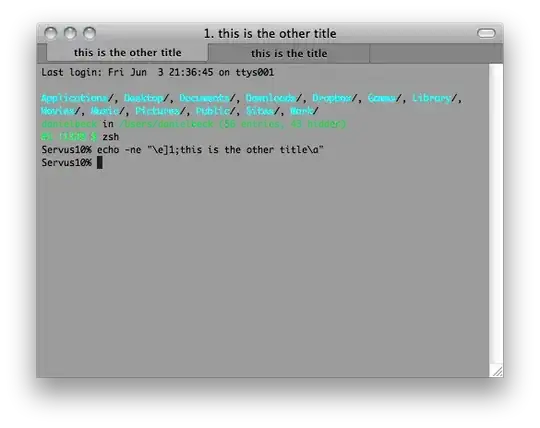
You can enter the following in zsh to set the window title of iTerm2:
echo -ne "\e]1;this is the title\a"
If you want to automate that to insert e.g. the current time or working directory, edit your zsh configuration files to set the title in the precmd() function to e.g. $PWD.
echo -ne "\e]1;$PWD\a"
You can read about the precmd function in man zshmisc in the section SPECIAL FUNCTIONS.

Daniel Beck
- 109,300
- 14
- 287
- 334
-
4when I execute the command echo -ne "\e]1;this is the title\a" the tab title does not change. Is there a setting I have to change in iterm2? – bneil Jun 04 '11 at 05:45
-
20Figured it out. I have to deselect all the options for window and tab titles in the iterm->preferences->appearance section. and in the .zshrc I have to uncomment/add export DISABLE_AUTO_TITLE="true" Thanks @Daniel Beck – bneil Jun 04 '11 at 05:49
-
6You also need to set `Profiles > Terminal > Terminal Emulation > Terminal may set tab/window title`. – vaughan Apr 15 '16 at 05:58
-
1THIS DOES NOT WORK (for me, at least) IN THE LATEST VERSION OF iTerm (3.3.0) – iconoclast May 02 '19 at 17:59
-
And doesn't work for me on latest stable version of `iTerm2` (3.2.9) – jalanb Jul 19 '19 at 15:59
-
Check my answer. I had the same issue and fixed it. Thanks. – Nuno Gonçalves Sep 12 '19 at 15:29
-
This doesn't work anymore in iTerm2 3.3.10, even when doing what @NunoGonçalves wrote. – azureai Jun 03 '20 at 11:31
-
That’s weird; it works for me in iTerm2 3.3.12. – Franklin Yu Sep 15 '20 at 19:47
-
I had to do `prompt_pure_set_title() true # disables pure setting the title`. Your own theme might have sth similar. – HappyFace Sep 30 '20 at 16:01
56
What works for me:
echo -e "\033];this is the title\007"
If you use Mac OSX and iTerm, iTerm2::
- iTerm → Preferences → Appearance → Window & Tab Titles → uncheck all
If you use Oh My Zsh, then you may need to edit your settings. Your settings are typically in the file ~/.zshrc. You want to add or edit your settings to make sure this line exists:
DISABLE_AUTO_TITLE="true"

Carl Walsh
- 393
- 3
- 16

joelparkerhenderson
- 743
- 6
- 9
45
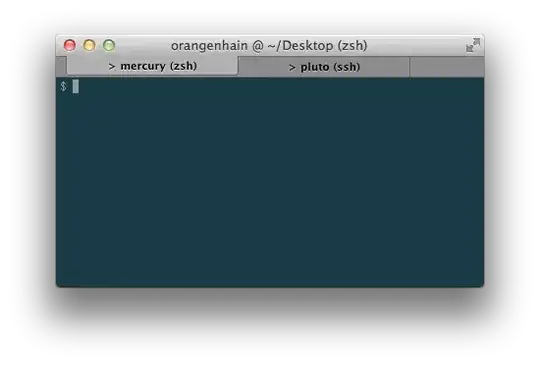
One of the amenities of using iTerm is the possibility of setting window title & tab title separately:
# $1 = type; 0 - both, 1 - tab, 2 - title
# rest = text
setTerminalText () {
    # echo works in bash & zsh
    local mode=$1 ; shift
    echo -ne "\033]$mode;$@\007"
}
stt_both  () { setTerminalText 0 $@; }
stt_tab   () { setTerminalText 1 $@; }
stt_title () { setTerminalText 2 $@; }
This way you can immediately see what host you're connected to in what window, and the window title for each tab shows user & CWD.

Orangenhain
- 743
- 5
- 12
-
2I just noticed that the Terminal.app version in OS X Lion supports this as well. – Orangenhain Oct 08 '11 at 16:50
-
-
Also appears that (in iTerm2 Build 1.0.0.20140629) until you change the Window Title... it tracks the tab title, no matter what. I'm sure that's a setting. Once the Window title is changed (2) it no longer tracks tab title. – Mei Jul 23 '14 at 15:16
-
I modified the function above to include the line `DISABLE_AUTO_TITLE="true"` that fixed the issue and this way if I don't set the title, I still get the automatic title feature – user15681 Nov 16 '15 at 14:42
5
A precmd does the trick. However, some oh-my-zsh themes mess around with the window title. Set PR_TITLEBAR to an empty string to fix it.
set-window-title() {
  # /Users/clessg/projects/dotfiles -> ~/p/dotfiles
  window_title="\e]0;${${PWD/#"$HOME"/~}/projects/p}\a"
  echo -ne "$window_title"
}

PR_TITLEBAR=''
set-window-title
add-zsh-hook precmd set-window-title
I would also recommend playing around with the tab settings of iTerm2 in Preferences -> Appearance.

Chris Gaudreau
- 151
- 1
- 3
4
None of the answers seemed to work for me, probably for the iterm2 version (3.3.3).
I found this out: https://gist.github.com/phette23/5270658#gistcomment-3020766
Essentially, you can do whatever is said in all other answers, but also need to set
Preferences > Profiles > General > Title -> Name (Job)
This worked for me.

Nuno Gonçalves
- 141
- 4
3
The accepted answer has worked for me for a long time but is now broken in the latest version of iTerm2. A workaround I found was to enable the Python API and create a script which sets the tab name like so:
#!/usr/bin/env python3.7
import argparse

import iterm2

def get_args():
    parser = argparse.ArgumentParser(description='Set the tab name')
    parser.add_argument('name')
    return parser.parse_args()

ARGS = get_args()

async def main(connection):
    app = await iterm2.async_get_app(connection)
    window = app.current_terminal_window
    if window is not None:
        tab = window.current_tab
        await tab.async_set_title(ARGS.name)
    else:
        # You can view this message in the script console.
        print("No current window")

iterm2.run_until_complete(main)
Saved as "tab_name.py", then invoked with:
~/Library/ApplicationSupport/iTerm2/iterm2env/versions/*/bin/python3 ~/Library/ApplicationSupport/iTerm2/Scripts/tab_name.py "new tab name"
It's not nearly as nice or elegant as the accepted answer, but it works.

Ian E
- 131
- 1
2
Don't forget to check Profile -> {yourProfile} -> General -> "Application in terminal may change the title"
If you don't do this, your session name will be locked unless you unlock manually.

Jason Liao
- 21
- 2
1
Adding export PROMPT_COMMAND='echo -ne "\033]0;$PWD\007"' into ~/.bash_profile worked for me.


michalzuber
- 167
- 1
- 5
-2
iTerm -> Preferences -> Appearance -> Window & Tab titles -> check Show profile name option

john sam
- 101
-
1Welcome to Super User! On this Q&A site we try to provide [good answers](https://superuser.com/help/how-to-answer) to questions people ask. Part of writing a good answer is providing context for the proposed solution. Please edit your answer and explain why your solution works, and what, *specifically*, it does. – Cas Nov 04 '16 at 12:05