215
C:\> cd \\somewhere
'\\somewhere'
CMD does not support UNC paths as current directories.

What I usually do to get around this is to map that directory to a network drive and then I could easily access it from the command prompt.

But is there an easier way on how to get around this?

Andreas Grech
  • 4,182
  • 8
  • 30
  • 33
  • 16
    which windows do you use? If it's Windows 7, you've powershell preinstalled on your system. Powershell supports unc-paths and cmd-commands (with few exceptions). – wullxz May 13 '11 at 11:27
  • You can always browse to the unc path through run. – Supercereal May 13 '11 at 11:45
  • 1
    @wullxz: cheers, I didn't know you could browse UNC paths with PowerShell. @kyle: That's actually a valid answer according to my question :) But I want to access it from a command line environment. Will modify my question to make this more clear. – Andreas Grech May 13 '11 at 12:09
  • If your problem is that you need to work just from the command line, you can map the network drive with the 'net' command: net use x: \\computer name\share name – Al Crowley May 13 '11 at 12:11
  • 1
    @Aleister Crowley: Yes I know, but I'm asking if there's an easier way that doesn't involve mapping a network drive. – Andreas Grech May 13 '11 at 12:12
  • @Andreas Grech: I thought that was likely the case, that's why I put it as a comment rather than an answer. – Al Crowley May 13 '11 at 12:13
  • Use powershell and it works – Kellen Stuart Jan 03 '17 at 18:38
  • Related: [How do you handle “CMD does not support UNC paths as current directories”?](https://serverfault.com/q/50085/4276) from Server Fault – Cristian Ciupitu Feb 14 '18 at 21:47
  • @wullxz That deserves to be an answer. Look at the answers below; "ContextConsole Shell Extension" and "Git Bash" get several upvotes. I think PowerShell is better than third-party solutions. – Franklin Yu Sep 10 '18 at 20:59
  • @FranklinYu added the answer – wullxz Sep 14 '18 at 14:33
  • If you mean to browse in Windows explorer you can start an Explorer instance pointed at the desired drive with: start \\servername\sharedpath – Steve Rindsberg Aug 03 '21 at 15:28

7 Answers7

292

If you use pushd and popd instead of cd you won't get that UNC error.

pushd <UNC path> will create a temporary virtual drive and get into it.
popd will delete the temporary drive and get you back to the path you were when you entered pushd.

Example:

C:\a\local\path> pushd \\network_host\a\network\path

U:\a\network\path> REM a temporary U: virtual drive has been created

U:\a\network\path> popd

C:\a\local\path> REM the U: drive has been deleted

C:\a\local\path>
Pacerier
  • 26,733
  • 82
  • 197
  • 273
evanmcdonnal
  • 3,088
  • 1
  • 15
  • 9
  • 14
    Using `pushd` creates a drive mapping to the network share and then changes into a path relative to the share it creates. `popd` disconnects the share. – Dov Sep 06 '12 at 15:55
  • 2
    This didn't work for me on Windows 10. `C:\WINDOWS\system32>pushd \\some\network\path` `' ' CMD does not support UNC paths as current directories.` – kayleeFrye_onDeck Apr 04 '17 at 02:43
  • 1
    It's just worked for me in Windows 10, how odd. I did `pushd \\ServerName\home\dir\dir2`. – Diziet May 20 '17 at 14:36
  • 3
    Native and elegant, just a wonder. Works for Windows 10. – WesternGun Jun 22 '17 at 07:55
  • Is there any trick to make it work when the share credentials don't match the machine's user credentials? – Perkins Mar 07 '18 at 00:51
  • works perfect. and I need check how to put these kind of directory into perl script. – Shicheng Guo Aug 10 '18 at 02:11
  • @Perkins: I was able to use runas.exe to run PowerShell as the other user – Jacob Krall Oct 18 '18 at 18:35
  • @JacobKrall That would work if another user has the proper credentials. If it's a totally different set of credentials, use cmdkey. – Perkins Oct 22 '18 at 20:54
  • Works perfect. I was using the sshfs, if it will automatically create a virtual drive (Z, in my case). And access normally to Z like the ones did in C or D. – Kimmi May 22 '19 at 17:37
  • I also noticed that if you pushd to the same location it will map a new network drive again and again and if you close the shell and open a new one calling popd will not, of course, be able to unmap them so one could end up having a bunch of unused network drives. – jackhab Jun 16 '21 at 07:18
  • 1
    @kayleeFrye_onDeck I receive that same error once every available drive letter has been reserved. I used PUSHD on the same folder several times and filled "This PC" with letters B & D-Z. (C was my local drive but I don't know what A was. Possibly, it's a hidden partition but I couldn't find it.) The next time I tried to exact command that had just worked 15 times in a row, I got the same error you posted: `' ' CMD does not support UNC paths as current directories.` – Engineer Toast Aug 03 '21 at 14:57
  • @EngineerToast thanks for the heads up! Very possible that was the problem for me. – kayleeFrye_onDeck Aug 31 '21 at 19:25
23

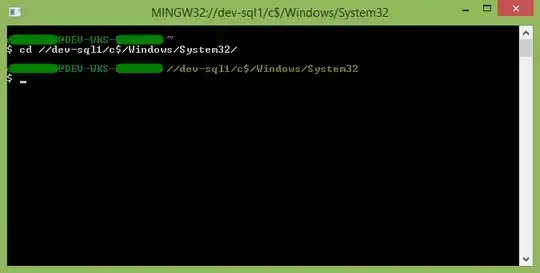
I use Git Bash to do this, since I already have it installed. As an added bonus, it also has better colors, lets me use ls, rm, etc., and uses the correct slash for paths.

enter image description here

reformed
  • 113
  • 7
Dan
  • 832
  • 8
  • 10
13

Kliu's "ContextConsole Shell Extension" (aka Open Command Prompt) says it, "can even open directories from network paths (UNC paths)" (from an Explorer window).

http://code.kliu.org/cmdopen/

enter image description here

therube
  • 1,446
  • 7
  • 6
11

I also hit the UNC problem with C:\> cd \\somewhere in a C program. Found this page and learnt about the net command: net use x: \\computer name\share name and used it successfully! Thanks to all who post their experiences for others to learn from. :-)

u1686_grawity
  • 426,297
  • 64
  • 894
  • 966
Peter Evans
  • 111
  • 1
  • 2
4

If you're using XP you can have a look at this site https://web.archive.org/web/20150518102450/https://support.microsoft.com/en-us/kb/156276

(In case the link breaks again: Under Software\Microsoft\Command Processor: add a DWORD value called DisableUNCCheck if it doesn’t already exist and set it to 1.)

There is a registry value that you need to add, log out, log in again ... and now your cmd.exe does support UNC-Paths. It seems to me that you still can't cd to the path, but you can use it in other commands like dir, copy ...

An alternative might be using the pushd command, that will let you switch to the share (i guess by assigning it a temporary drive letter) https://docs.microsoft.com/en-us/windows-server/administration/windows-commands/pushd

T S
  • 166
  • 9
BigBlackDog
  • 161
  • 1
  • 5
-2

imho, the most elegant solution is to use mklink /D to create a symlink for the network path. if you use in a script you'll not have to find out which drive letter has been assigned.

  • The most elegant way to change directories (a read-only operation) is to modify the filesystem?  And where do you create the link?  `\Temp`?  You might not have write access to the current directory.  And what do you call the link?  What if there’s already a `\Temp\somewhere` that isn’t already a link to `\\somewhere`?  What if it’s a file that’s in use?  Etc…  How is this more elegant than `pushd`? – G-Man Says 'Reinstate Monica' Jan 17 '20 at 03:22
-4

You can use the HttpFileServer application, it' over windows, very light and very easy to configure , it allow you to share a network folder UNC ( \server\share ) with HTTP protocol and the HTTP link can be used in any HTML page

http://www.rejetto.com/hfs/

it's amazing

Salman
  • 1
  • 1