175

I'm using Eclipse in Windows XP. One of my favorite shortcuts is CTRL+ALT+DOWN (or CTRL+ALT+UP) to duplicate a line.

I just found that on this machine (XP ThinkPad, with NVIDIA graphics driver), this is has the effect of fliping the screen upside down, which I will rarely use.

How can I disable this? Or, if that is difficult, is there a way to give Eclipse hotkeys precedence over any other hotkeys? I'm not sure if this is an OS 'feature' or a background utility, or a function of the graphics driver, but any suggestions that would help me track this down and eliminate it would be appreciated.

I've looked through the choices on the NVIDIA control panel, and I don't find any hotkey options.

Hennes
  • 64,768
  • 7
  • 111
  • 168
Eric Wilson
  • 7,868
  • 12
  • 41
  • 50
  • 1
    Are you sure it's and OS shortcut? Could there be a utility running in the background to control orientation? – Tog May 05 '11 at 19:32
  • @Tog - Good point. How would you investigate this? – Eric Wilson May 05 '11 at 19:33
  • Have a look in the programs list for oem utilities, check the task manager, check the startup list using msconfig – Tog May 05 '11 at 19:40
  • 1
    This is a very annoying setting for IntelliJ users since "ctrl+alt+left/right" are used to navigate code you were editing. – dance2die Apr 02 '16 at 12:56

4 Answers4

166

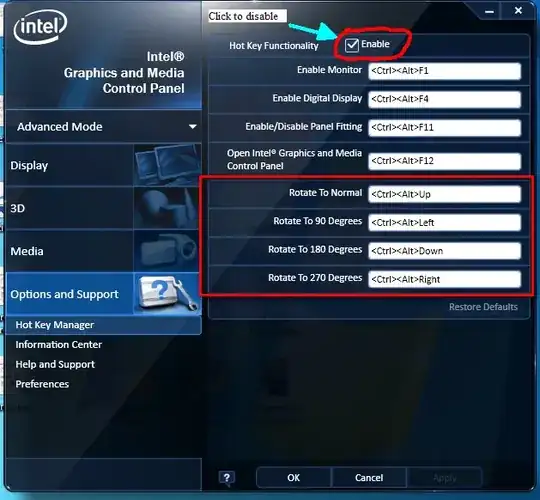
I have not tested on AMD/ATI graphics, but I know for a fact that all Intel drivers do this and some Nvidia drivers.

Simply go in to the configuration tool of your driver and look under a section called hotkeys and disable it.

For Intel:

Screenshot from the Intel specific display driver

Peter Mortensen
  • 12,090
  • 23
  • 70
  • 90
William Hilsum
  • 116,650
  • 19
  • 182
  • 266
  • 1
    I feel like a dunce, but I can't find the configuration tool of my driver. Where do I look? – Eric Wilson May 05 '11 at 19:55
  • Found it, but didn't find hotkeys, edited question. – Eric Wilson May 05 '11 at 20:04
  • Glad you found it... I think that nvidia listens on the driver level, therefore you won't be able to get software to listen "higher" than that - all you can do is change your graphics profile or the hotkey to something else... possibly control+shift+alt+direction? – William Hilsum May 05 '11 at 20:23
  • 16
    For those who can't find these settings - try following the route: Control Panel → Appearance and Personalization → Display → Screen Resolution → Advanced Settings → Graphics Driver – lyuba May 20 '12 at 15:13
  • 4
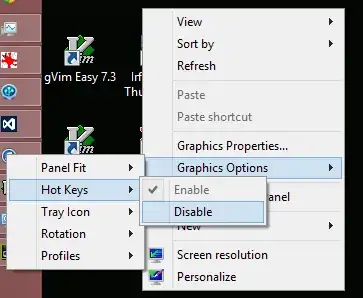
    I found the hotkey settings in the Context Menu of the Intel HD Graphics SysTray icon. Graphics Options > Hotkeys > Disable. – unhappyCrackers1 Jul 27 '12 at 13:29
  • Disabling worked for me, except that it means you can't use the particular shortcut combinations in any other program! I had to change the shortcuts to obscure shortcuts that I wouldn't need. – cbp Nov 12 '14 at 06:04
  • 1
    Whaao! That was super amazing. I just searched settings and found peanuts! Thanks! – sud007 Jun 03 '16 at 15:52
  • If you have Lenovo, don't forget to uninstall Lenovo Screen Reading Optimizer. – uranibaba Jan 02 '17 at 07:14
  • Unfortunately, it only works for all hot keys at one time. – neverMind9 Jul 25 '18 at 01:57
144

Looks like the answer is to right-click your desktop, select Graphics Options >>> Hot Keys >>> Disable.

disabling graphics hotkeys

Though see here, where someone describes doing this, having it work for a while, and then having an update borking it for them. Others have suggested in a worst-case like this to uninstall the configuration software installed with your driver but to keep the driver. I'm a little anxious that that's not an nVidia fix, though, since you have to use the above route to disable them in the first place, not some sort of control panel.

In any event, the Graphics Options route worked for me in a similar situation.

ruffin
  • 1,825
  • 1
  • 14
  • 17
  • *Graphics Properties* and *Graphics Options* are not always available (I checked on four computers, with Windows XP 32-bit, Windows 7 Enterprise 32-bit, and two with Windows 7 Enterprise 64-bit. Only one, one of the two with Windows 7 Enterprise 64-bit, had these two options). (Are these added by the specific display driver?) – Peter Mortensen Oct 30 '13 at 13:29
  • 5
    Perfect thanks. This was interfering with my favorite Visual Studio hotkey – Vazgen Oct 02 '14 at 17:55
  • 1
    THANKS! Same happened to me with intellij shortcut ovverriden by this stupid thing – Gaetano Piazzolla Nov 26 '22 at 11:41
6

If disable the Intel driver hotkey feature is not usefull, you can try to change the hotkey and then disable it. On my computer, this method works.

Bevoid
  • 61
  • 1
  • 1
  • 3
    the solution is to assign other shortcuts before disabling them. When I disabled the shortcuts, the screen didn't rotate but the keystrokes were not being recorded by visual studio (in my case) – Maximo Dominguez Apr 06 '15 at 00:31
2

That is a function of the display driver, not the OS. You will need to check the settings in the Display Driver to see if it can be disabled.

music2myear
  • 40,472
  • 44
  • 86
  • 127