2

In the past, I used iChat + Chax for instant messaging on my Show Leopard. Then I switched to Adium but iChat seems to be started automatically though I removed it from login items.

ps ax | grep iChat
  188   ??  S      1:21.91 /System/Library/Frameworks/IMCore.framework/iChatAgent.app/Contents/MacOS/iChatAgent -psn_0_94231
67977   ??  S      0:00.31 /System/Library/Frameworks/IMCore.framework/iChatAgent.app/Contents/MacOS/iChatAgent -psn_0_29355005

Why iChatAgent is still started? How to completely disable it?

Thanks

Stas
  • 123
  • 1
  • 6
  • I have the feeling this has something to do with FaceTime maybe? At least I think FaceTime starts automatically and uses iChat in the background. – slhck Apr 23 '11 at 10:02
  • 1
    @slhck: I don't think so. At least on my system (10.6.7), iChat or iChatAgent don't show up on the process list when using FaceTime. – ayaz Apr 23 '11 at 10:11

1 Answers1

3

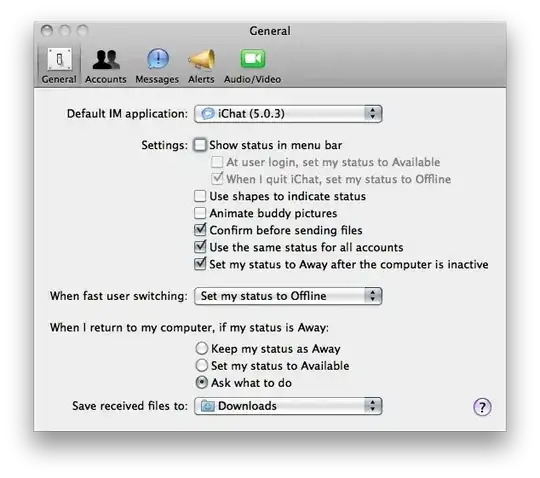
Make sure you also removed the iChat Menu Extra that looks like a speech bubble by Command-dragging it from the menubar. Activating this menu item does launch the iChatAgent. Alternatively, disable it in iChat's preferences:

enter image description here

You might need to log out and back in for iChatAgent to quit, or just kill it.

Daniel Beck
  • 109,300
  • 14
  • 287
  • 334