Looking for a tool to change a file's modified date which works from inside File Explorer context menu. I am aware of external tools like BulkFileChanger but I want to right click on a file and make the change.
Asked
Active
Viewed 2.5e+01k times
59


-
1since this question got closed, I reposted it on the software recommendation Stack Exchange website: [Change the file's modified date in Windows Explorer](http://softwarerecs.stackexchange.com/q/39163/903) – Franck Dernoncourt Jan 31 '17 at 18:01
4 Answers
72
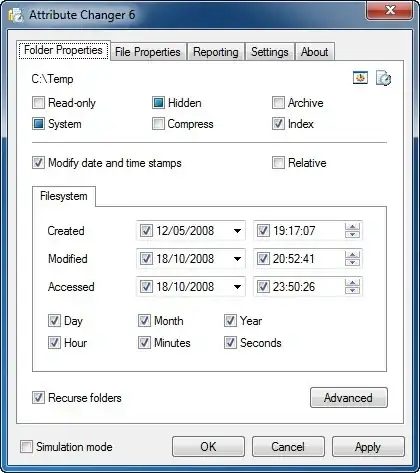
This one is freeware, and will change what you need plus various attributes that users don't normally have access to:
Attribute Changer
http://www.petges.lu/

Randolf Richardson
- 14,634
- 39
- 52
11
You can use File Date Touch - Windows version of UNIX touch command

neil
- 111
- 1
- 2
-
3Welcome to superuser.com, Neil! Does 'File Date Touch' really work from within the context menu, or is it a separate utility? Also, does it have different functionality / benefits over the suggestion in the accepted answer? – einpoklum Apr 04 '13 at 21:12
-
1@einpoklum I can answer that - yes it does have benefits - it DOESN'T show in context menu :) which I find great. Google has redirected me to this question, but on the other hand, I was looking for precisely this answer! Thanks Neil. – Aleks Oct 27 '13 at 16:01
11
I know its probably too late to answer this, but apparently this http://stefanstools.sourceforge.net/SKTimeStamp.html does exactly what OP wanted:
SKTimeStamp is a very simple shell extension which adds a new tab to the Explorer properties dialog. On that new tab, you can change the file/folder date and time.
Available for x86 and x64 Windows systems.


9
You can change the create date from the command line. You must first change the system clock date, then open a command prompt window at the current working directory, and issue the command:
copy /b [filename] + ,,
This uses the concatenation directive with the binary (/b) switch, basically copying the file to itself and incidentally setting the create date of the "new" file to the current system clock.

Colonel Panic
- 12,303
- 21
- 63
- 81

hafizullah
- 101
- 1
- 1
-
1This does not answer the question, which explicitly insists on an answer that works inside File Explorer. – Kazark Apr 22 '13 at 16:39
-
I was just looking for a way to change the mtime on a file and this method worked great for me. – stevepastelan Jan 14 '14 at 18:05
-
4This does not answer the question, but the OP might find it useful -- there are lots of reasons why a question might not be phrased in exactly the way that leads to useful information -- and others, like me, looking for answers, might also find it useful. – user184411 Oct 22 '16 at 22:40
-
For some reason this didn't quite work for me, but doing copy /b [filename] [new_filename] did. Also I had to use cmd instead of powershell. Thanks – Taran Nov 27 '17 at 10:39