Is there a way to make Windows 7 do this: "10 minutes from now, close all applications and shut down (or hibernate), no matter what input you get from the keyboard or the mouse"? It's OK if the user can revert the shutdown order during the 10 minute period, but once the shutdown begins there should be no turning back.
Asked
Active
Viewed 1.3e+01k times

6 Answers
22
The shutdown command line command is what you're after, with /t 600 you'll get a 600 second (10 minute) delay other options define the shutdown process. In your case I suspect you'll want shutdown /t 600 /s.

Cry Havok
- 3,516
- 17
- 13
-
1some apps MIGHT stop shutdown. notepad comes to mind. – Journeyman Geek Apr 02 '11 at 14:17
-
3@The Geek: It's not Notepad itself but the "Do you want to save?" dialog box. This is, AFAIK, common to all programs and does make sense. However, 1) IIRC, Windows 7 does not allow programs to stop shutdowns like that anymore; 2) `shutdown /f` – u1686_grawity Apr 02 '11 at 17:06
-
chrome browser can as well I believe – Alexey Shevelyov Feb 18 '19 at 09:46
-
is there a reason you are using /t instead of -t ? – Enrico Apr 12 '21 at 16:03
3
As Havok stated, you can just use the Shutdown switch from command prompt. See options below.
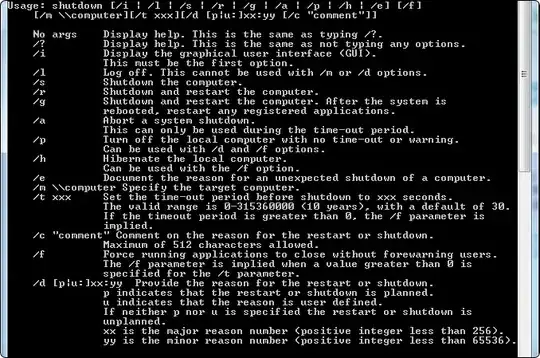
Run from cmd.exe or just put into a .bat script as below (and you could just add this .bat to Windows scheduler if you wanted to schedule) - remove the "pause" if you want it to run straight away:
@cd /
@cls
@echo #Shutdown 10min script#
@pause
@shutdown /t 600 /s

Journeyman Geek
- 127,463
- 52
- 260
- 430

James
- 1,195
- 6
- 15
-
you can use command > foo.txt to direct output to a text file for easy and pasting – Journeyman Geek Apr 02 '11 at 14:16
-
-
3
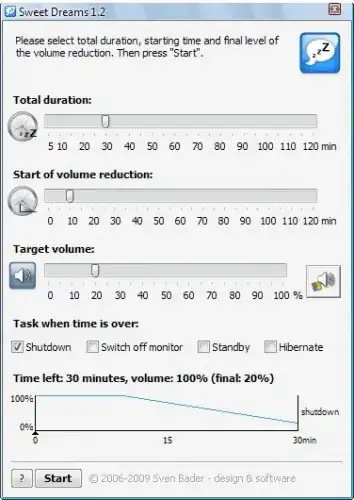
There are a number of automatical shutdown programs on the net. You can use one of them; for example: Sweet Dreams.

Mehper C. Palavuzlar
- 55,164
- 49
- 193
- 250
2
This can be done by following the simple steps below:
- Go to run (Win + r)
- Type
shutdown -s -t 600and hit enter
The computer will shut down in exactly 10 minutes (600 seconds).

Krish Munot
- 438
- 3
- 15


0
I made a script for myself to shutdown the computer after a time interval that I set. this is the code:
:shutdown_sequence
set /p TM="Enter a time to shut down:"
set /a TM1=TM*60
echo I will shutdown the computer in %TM% minutes and in seconds: %TM1%
shutdown -s -f -t %TM1%
pause
exit
goto:eof


-
1
-
Why do you have a useless `goto:eof` at the end of your batch file? – DavidPostill Jul 19 '16 at 00:45