49

I'm looking for a freely available utility I can run on Windows 7 to create CD/DVD ISO images from actual CDs and DVDs.

Any suggestions?

kinokijuf
  • 8,175
  • 9
  • 54
  • 97
Nick Kavadias
  • 2,008
  • 3
  • 21
  • 23
  • By 'create', do you really mean you want to extract an ISO image from an existing CD/DVD? 'create' implies 'author' (from scratch) for some. – Chris W. Rea Aug 16 '09 at 12:34
  • i meant 'extract' then – Nick Kavadias Aug 18 '09 at 05:48
  • @ChrisW.Rea Create is the correct word. A CD/DVD does not contain an ISO file. Yes, you can create an ISO from a folder too, and that is essentially the same process--taking a snapshot of the filesystem. – jiggunjer Dec 31 '15 at 05:48

7 Answers7

42

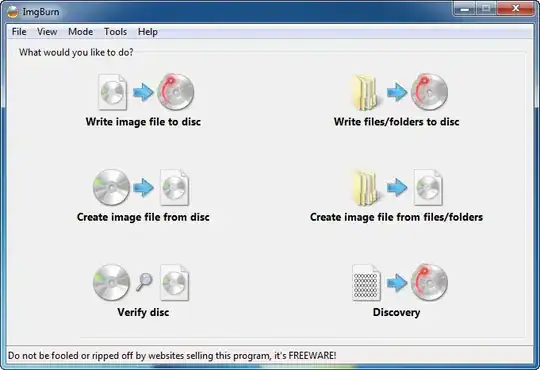
The program you could be looking for is ImgBurn.

From their home page:

ImgBurn is a lightweight CD / DVD / HD DVD / Blu-ray burning application that everyone should have in their toolkit!

It has several 'Modes', each one for performing a different task:

  • Read - Read a disc to an image file
  • Build - Create an image file from files on your computer or network - or you can write the files directly to a disc
  • Write - Write an image file to a disc
  • Verify - Check a disc is 100% readable. Optionally, you can also have ImgBurn compare it against a given image file to ensure the actual data is correct
  • Discovery - Put your drive / media to the test! Used in combination with DVDInfoPro, you can check the quality of the burns your drive is producing
enter image description here

Gaff
  • 18,569
  • 15
  • 57
  • 68
Chris W. Rea
  • 10,740
  • 16
  • 76
  • 95
  • 11
    Beware, the ImgBurn installer currently installs crap like "Search Protect" and "TuneUp utilities" by default, be sure to uncheck them during install... – Motsel Apr 17 '14 at 12:49
  • Their website is a disaster. Can't work out how to download the thing. – Mr. Flibble Apr 03 '15 at 09:09
  • +1 because this is the only mentioned software that can create an ISO from a **folder** source too. Apart from perhaps `dd`. – jiggunjer Dec 31 '15 at 07:50
  • Google Chrome now blocks www.imgburn.com, someone should report this to them. I could not find their email address on the website. – Rosdi Jun 01 '16 at 06:20
  • Beware: the downloaded installer Setup_ImgBurn_2.5.8.0_dlm.exe contains a virus 'PUA/InstallCore (Cloud)'. Detected by Avira. – Gerrit Brouwer Sep 18 '17 at 18:23
32

Infrarecorder is fantastic. Does all that and then some, it's free, and works great.

enter image description here

Gaff
  • 18,569
  • 15
  • 57
  • 68
Electrons_Ahoy
  • 2,561
  • 4
  • 30
  • 36
8

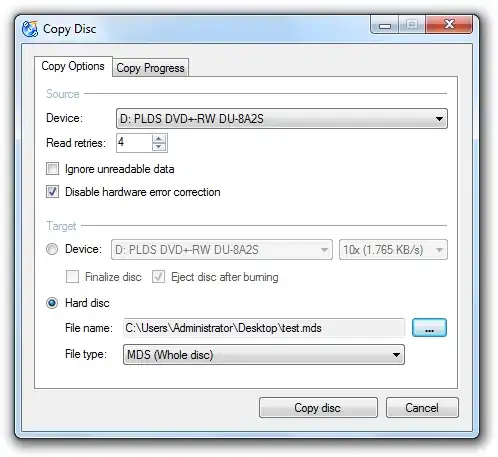
CDBurnerXP is also an excellent ISO creator as well as a complete CD/DVD burning application.

CDBurnerXP is a free application to burn CDs and DVDs, including Blu-Ray and HD-DVDs. It also includes the feature to burn and create ISOs, as well as a multilanguage interface. Everyone, even companies, can use it for free. It does not include adware or similar malicious components.
enter image description here

Gaff
  • 18,569
  • 15
  • 57
  • 68
dcharles
  • 289
  • 1
  • 5
  • 13
7

I just checked out InfraRecorder which worked out great for me but then I also needed to mount the ISO I created on a netbook and ran into WinCDEmu to do so. As it turns out WinCDEmu seems also to have ISO creation capability too so I may begin to ditch trusty daemontools in favor of this simplistic open-source and all inclusive tool.

If you haven't checked WinCDEmu out you should give it a try. Below is a feature list from their web page.

Features:

  • One-click mounting of ISO, CUE, NRG, MDS/MDF, CCD, IMG images.
  • Supports unlimited amount of virtual drives.
  • Runs on 32-bit and 64-bit Windows versions from XP to Windows 7.
  • Allows creating ISO images through a context menu in Explorer.
  • Small installer size - less than 1MB!
  • Does not require rebooting after installation.
  • A special portable version is available.
  • Translated to more than 20 languages.
  • Does not occupy drive letters when not used.
  • Supports data, DVD-video and BD-video images.
  • WinCDEmu is free for any kind of use - it is licensed under LGPL
jpierson
  • 307
  • 1
  • 4
  • 13
2

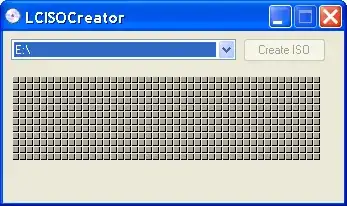
I would recommend you LC ISO Creator, as I've also done in these related questions:

How to make an image of a bootable dvd What is the best way to make an ISO file out of a DVD?

It's very small, lightweight, free and portable.
enter image description here

fretje
  • 10,692
  • 5
  • 40
  • 63
0

I think the Unix tools for Windows contains mkisofs

Stijn Sanders
  • 2,426
  • 3
  • 26
  • 25
0

ISO Recorder is simple choice that allows you to do this from the Explorer context menu.