Is there a list of characters which are not allowed in filenames and paths on OS X?
Asked
Active
Viewed 4,859 times
6

-
Useful references: Wikipedia article on [Filenames](http://en.wikipedia.org/wiki/Filename) and [Fixing Unix/Linux/POSIX Filenames](http://www.dwheeler.com/essays/fixing-unix-linux-filenames.html). – Dennis Williamson Oct 29 '10 at 03:21
4 Answers
6
? is allowed.
Only 0x00 (NUL) and : are forbidden for HFS+.
: however is switched in POSIX-based software to /:
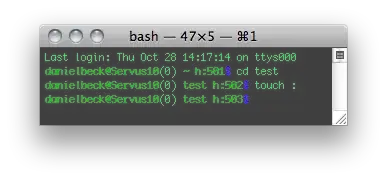

Thanks to Graham Lee who corrected me on this!

Daniel Beck
- 109,300
- 14
- 287
- 334
4
As Daniel Beck said, NUL and ":" (aka "/" in POSIX contexts) are forbidden; however, it's more complicated than that. HFS+ filenames must be stored in UTF-8 format, in fully decomposed form, with composing characters stored in canonical order (see tn1150). So the answer to your question depends on what you mean by "character":
If you're interested in the sequence of bytes that make up filenames, any sequence that isn't valid UTF-8 (or not properly decomposed) is forbidden.
If you mean unicode code points, that decomposition rule still forbids any point that represents an accented character (it must be stored instead as the base letter + combining accents) (see tn1150table).

Gordon Davisson
- 34,084
- 5
- 66
- 70
-
2This answer is misleading. On disk, HFS+ file names are stored as UTF-16, not UTF-8. – Chris Suter May 12 '12 at 02:23
-
2Also ':' characters are swapped with '/'. However, you don't really need to know any of this; the on disk implementation is irrelevant. All POSIX calls into and out of the Kernel use UTF-8 and in that context '/' is a path separator and ':' is allowed and it doesn't have to be decomposed. – Chris Suter May 12 '12 at 02:34
-
2The filenames are not fully decomposed (NFD) either. HFS+ uses a variant of NFD where some characters are in composed form (see [Text Encodings in VFS](http://developer.apple.com/library/mac/#qa/qa1173/_index.html) and [this answer](http://apple.stackexchange.com/questions/83935/unicode-normalization-for-filenames-and-copied-text-from-pdfs/84038#84038)). – Lri Jun 04 '13 at 13:28
1
According to wikipedia, http://en.wikipedia.org/wiki/HFS_Plus any unicode character is allowed, including NUL. But many applications will impose restrictions of their own, such as '/' and so on.

Edward Ned Harvey
- 1,420
- 2
- 12
- 14
-
2This does not fully answer the question like the other answers did. The file system may very well support every character, but the OS layer is more complicated. See Gordon's and Daniel's answers. – slhck Sep 14 '14 at 13:21
0
On MacOS at least HFS and exFAT mounted filesystems, appear to not support the following UTF-16 character sequence 0x61 ("a") 0x30a (ring over - https://www.compart.com/en/unicode/U+030A), looking at the byte sequence in the filename after byte swapping to little endian, it becomes like this:
"61 00 0a 03"
I guess the problem is that this byte sequence escapes to 0xE5 ("å") which appears to be some generic whiteout character in MacOS.
Unless the disk is write-protected, such files and directories are instantly deleted. People working in the law enforcement departments in Scandinavia, probably should read this carefully before shipping files and documents between departments!
When this problem started is unknown, but probably has been this way since the beginning of the 70's (remember the VAX :-)
These files and directory names are most easily created using Linux, FreeBSD or Windows computers. Simply open up the file explorer and create a document or directory containing the above mentioned character. Then connect the portable disk to a MacOS computer and see what happens.
For your convenience I've tried to paste the broken character here and some more examples of these "umlauts" as it is called in German:
å b̊ c̊

