5

When I click "reply-to-all" in Outlook, my address is automatically put in the TO line. Since I usually don't modify the TO line when I reply to all, I just end up receiving any mail that I send.

It was not always this way. What can I do to fix this?

ripper234
  • 11,323
  • 39
  • 89
  • 112
  • Interestingly, I used to get this all the time in '07 but since moving to '10 I haven't had it happen once. I'll play around with it some. – Shinrai Oct 26 '10 at 18:40
  • same behaviour in Opera.. I guess the take the 'all' literally. Sometimes annoying, sometimes handy, I would not know which one to choose if it were an option. – stijn Oct 26 '10 at 20:08
  • are you clicking reply-to-all for a mail in the sent items folder or somewhere else? because they are different behaviours. latter is a bigger issue – spinodal Jan 05 '11 at 11:52
  • @spinodal - I don't know, now I can't reproduce it. Both in my sent and other folders, reply-to-all now doesn't include my name. I haven't changed anything though... Perhaps this is configured at the Exchange server level? – ripper234 Jan 05 '11 at 12:10
  • ooh, ok then. I heard about this bug a lot of times, and the answer is "after restart it is fixed"... :) – spinodal Jan 05 '11 at 12:23

3 Answers3

2

Deleted oab files solved problem.


Edit

An offline address book (OAB) is a copy of a collection of address lists that has been downloaded so that a Microsoft Outlook user can access the information it contains while disconnected from the server.

Offline Address Book (OAB) files, by default, are located in subfolders in the following Outlook folders:

In Windows 7 or Windows Vista: \Users\<username>\AppData\Local\Microsoft\Outlook\Offline Address Books

In Windows XP: \Documents and Settings\<username>\Local Settings\Application Data\Microsoft\Outlook\Offline Address Books

Referenced from this technet page

JoshP
  • 2,272
  • 3
  • 22
  • 28
2

I found another cause for this problem: entering an incorrect e-mail address in the Account Settings dialog:
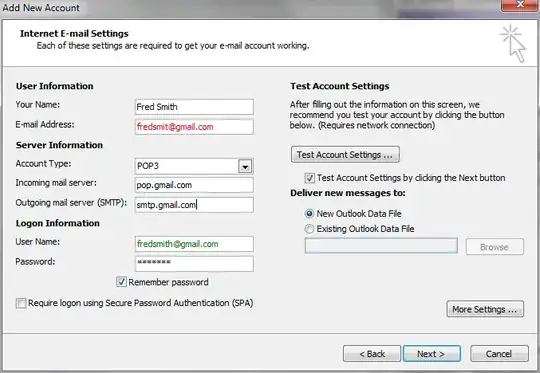
enter image description here

Note the missing h in the first fredsmith. The address entered in that field isn't used to identify you to the mail server, but it is used as the From address on your outgoing mails. When replying to a received mail, Outlook will add you to the To field if this address doesn't match an address the original mail was sent (or cc'd) to.

If that address is correct, click More Settings... and check the Reply To address. Exactly the same applies there.

Mark
  • 382
  • 1
  • 3
  • 14
0

I personalized the users copy of the outlook client by entering their name in 'personalize your copy of microsoft office' in outlook options > general > 'personalize your copy of microsoft office'

This simple fix resolved the issue for this strange problem for us. The issue was within outlook 2016

Mobott
  • 1