Is there a generic way to find out if a DVD burner can burn dual layer DVD’s without trying and potential waste a disk?
Right now it’s this drive I’m wondering about but I'd like a solution that works for all/most DVD drives out there.
Is there a generic way to find out if a DVD burner can burn dual layer DVD’s without trying and potential waste a disk?
Right now it’s this drive I’m wondering about but I'd like a solution that works for all/most DVD drives out there.

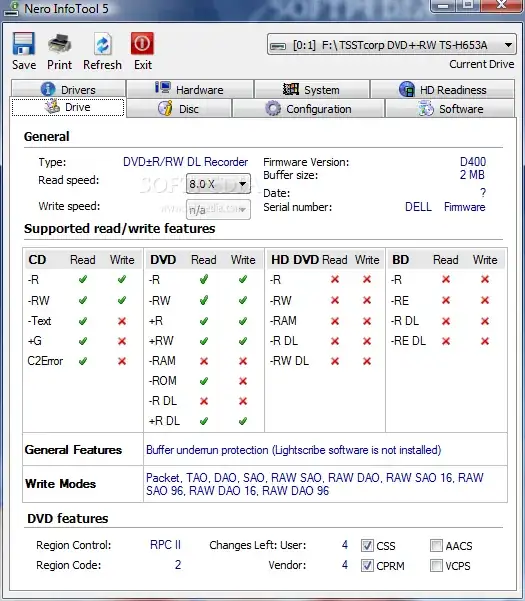
Nero Info Tool can show you the capabilities of your DVD drive. Look for the DVD +R DL and DVD -R DL options.


The first thing to check is the front bezel of the drive: more often than not you will find some indication under or next to any logo that is on there.
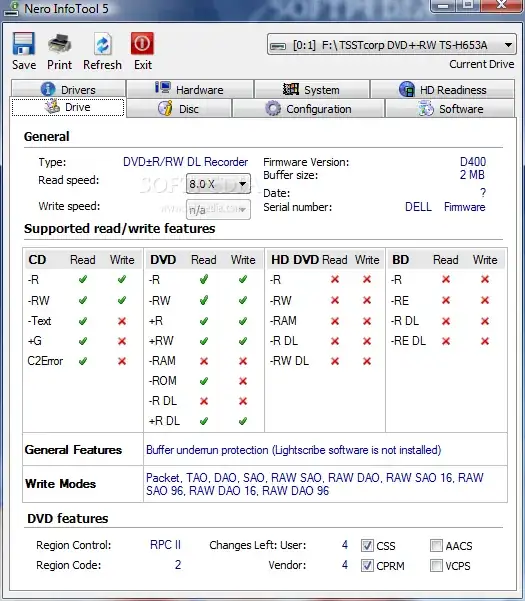
There are a number of tools out there that interrogate your drives to see what capabilities they have. Nero's infotool is one of the better freely available ones (it is included as part of their paid for apps, but can be downloaded separately for free). It gives this sort of output: