Is there some easy and fast way to toggle mute on Windows XP?
Asked
Active
Viewed 1.2k times

5 Answers
2
Go to http://www.nirsoft.net/utils/nircmd.html
Then create a shortcut and put
“C:\Path\To\nircmd.exe” mutesysvolume 2
into the shortcut path. this will create a shortcut somewhere which by double clicking will mute sound. If you want, right click, properties and assign a shortcut key to it.
Double clicking it again will unmute the sound. Theres a whole list of stuff you can do with nircmd, just go to the website link and scoll down:-)

Nathaniel Saxe
- 538
- 2
- 6
- 14
1
I use a little program from NirSoft called Volumouse. This allows you to make shortcuts with your keyboard and mouse to change the system volume.
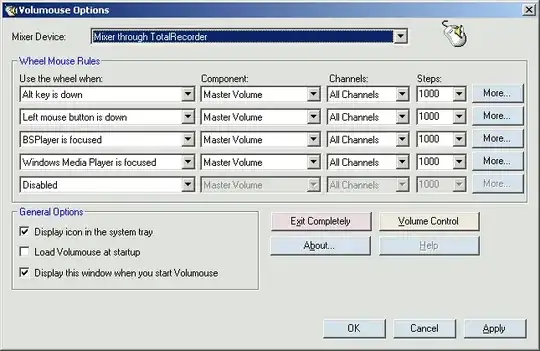
I think you can use just the keyboard if you want to.
The other NirSoft program NirCmd is perhaps a better option. Volumouse uses the mouse wheel to raise / lower the volume. Here's how to mute the sound with NirCmd:
nircmd.exe mutesysvolume 1


1
A far as I know you can't on a standard keyboard. However a lot of keyboards these days have a mute switch that can be used to mute the sound(eg Keyboards with media controls)
All you have to do for the keyboard mute to work is install the driver/software for it.

mikek3332002
- 171
- 5
1
Try AutoHotkey.
It's a program that runs in your system tray and, through scripts that you write, allows you to re-map keystrokes.
Scripts for controlling volume are located here: http://www.autohotkey.com/docs/commands/SoundSet.htm

