5

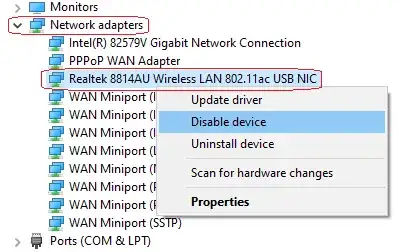
Currently, when I need to disable/enable network adapter I'm performing the following steps:

  1. Opening the device manager (⊞ Win+R, devmgmt.msc and Enter).
  2. Searching for the required network adapter.
  3. Click right mouse button on it.
  4. Select Disable (or Enable) from the popup menu: enter image description here
How I can disable/enable network adapter from the command line?

Thanks

Jackdaw
  • 1,087
  • 2
  • 6
  • 19

2 Answers2

6

Open up Command Prompt as Administrator and type the following command line:

netsh interface set interface 'INTERFACE NAME' disable

References:

How to enable or disable Wi-Fi and Ethernet network adapters on Windows 10

Jorge Luiz
  • 655
  • 4
  • 11
4

Open up PowerShell as Administrator and run the following:

Get-NetAdapter

Get-NetAdapter will list the Network adapter properties

Get-NetAdapter Documentation

Disable a network adapter by name

Disable-NetAdapter -Name "Adapter Name" -Confirm:$false

Disable-NetAdapter Documentation

Enable Network Adapter by Name

Enable-NetAdapter -Name "Adapter Name" -Confirm:$false

Enable Net Adapter Documentation

Antony
  • 1,473
  • 12
  • 14