I have a giant file with thousands of lines, I want to delete only the lines which have the word "Foo" in them.
How would I go about doing this? I'm on a Mac, so I could use some command line utility, but I'd prefer to use TextWrangler.
I have a giant file with thousands of lines, I want to delete only the lines which have the word "Foo" in them.
How would I go about doing this? I'm on a Mac, so I could use some command line utility, but I'd prefer to use TextWrangler.
Use a regular expression to find the lines, then replace them with an empty string.
Here's a page that explains how to construct the regular expression:
http://www.regular-expressions.info/completelines.html
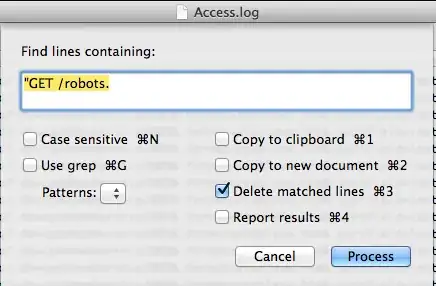
To do this in TextWrangler:

Most graphical programmer's editors do not allow you to delete lines like this, but only change their contents. This can be done by replacing ^.*Foo.*$ with nothing.
If you're willing to look towards an external tool then this can be done by filtering through sed "/Foo/d".

If you search-and-replace ^.*Foo.*\r with nothing (with "Use Grep" enabled), it'll completely get rid of lines with "Foo" in them, not just blank them out. The only limit is that it won't work on the last line in the file. (Replacing \r.*Foo.*$ with nothing would work on the last line, but not the first.)

This perl command line will do the trick!
perl -ni -e "print unless /Foo/" large_file.txt
you could also do multiple files:
perl -ni -e "print unless /Foo/" *.txt

Bare Bones TextWrangler http://www.barebones.com/products/textwrangler/
Text Menu Process Lines Containing… Menu Item
Enter text to delete Then choose delete lines
Confirm