I'd like to turn off Windows 7 (video) thumbnails displayed in Explorer. I found this solution for Windows XP but it doesn't work for Windows 7 ("The module shmedia.dll failed to load").
Asked
Active
Viewed 1.3k times


2 Answers
10
There are a couple of potential options.
Open
Explorer/Tools/Folder options/Viewand check the first boxAlways show icons, never thumbnailsYou can customize the way way each folder controls the display of the objects within. Right click on a folder and choose
PropertiesthenCustomizeIn the drop down list forOptimize this folder for, selectGeneral itemsChanging the
Viewtype will work too.


-
Thanks, the second option worked great (first option would remove other functionality I want to keep, image thumbnails). – Sam Jun 16 '10 at 14:33
-
Hmm... I just tried this in Windows 7 and it didn't remove the thumbnails from the video files contained in the folder. – Dave Jul 30 '15 at 05:59
10
To disable video thumbnails only, download and run ShellExView (a great system tool from NirSoft). Disable the "MF XXX Property Handler" lines. Close and restart explorer windows. You are done :)
screenshot: 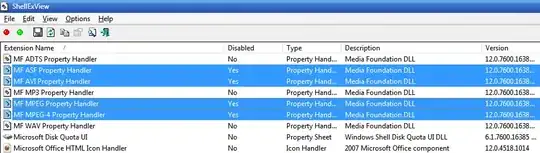

Garrulinae
- 1,821
- 15
- 25

pierre67
- 116
- 1
- 2
-
Thanks for the heads up on ShellExView. I used it to disable thumbnail preview for another file type (LibreOffice ods file) by disabling "
Thumbnail Viewer" and restarting the explorer.exe process. – reflexiv Nov 08 '14 at 16:44