28

I have an 8th generation Core i5 processor, and it always worked great until these last two days where it doesn't go over 0.4 GHz. I've updated the chipset drivers, removed Intel thermal management, installed it again, ran Intel CPU testing (everything passed), ran stress tests with other tools, tried ThrottleStop, changed advanced power options, created my own profiles, checked the battery (it's working as usual), and tried it plugged in.

I'm kind of desperate for options at this point. Even the fans are not spinning while the CPU temperature doesn't go over 60 degrees Celsius even on stress tests. Any suggestions?

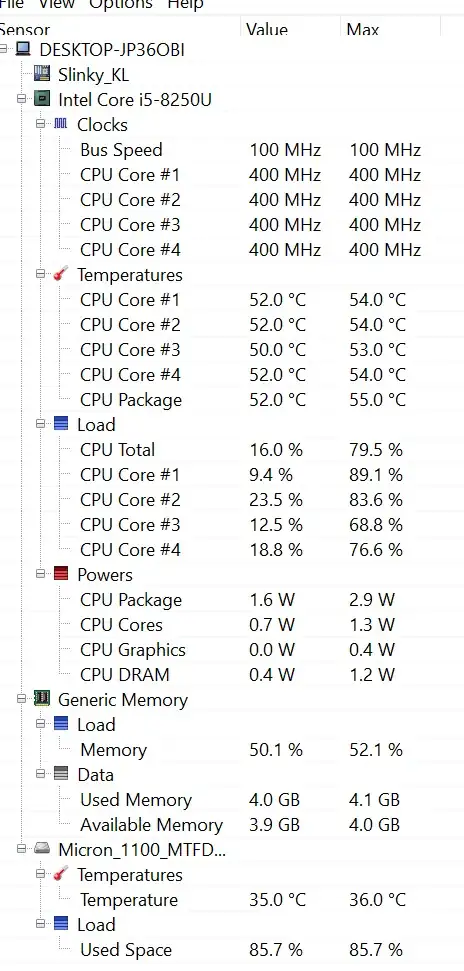
Screenshot from OpenHardwareMonitor:

Screenshot

Peter Mortensen
  • 12,090
  • 23
  • 70
  • 90
Hey'Youssef
  • 411
  • 1
  • 4
  • 8
  • 13
    I would recommend you try booting Ubuntu or similar from a USB drive to see if you get the same behaviour. It's possible that a Windows update or something has caused the problem – James P Apr 02 '19 at 08:27
  • 6
    I had this problem with my wife's laptop. Fix that I found was to completely power down the system - pull the cmos battery, etc. Then hold down the power button for a solid minute so that everything discharges as far as possible. Not posting this as an answer because it's really just a shot in the dark. if you try this and it works feel free to ping me to post as an answer or to post it yourself, idk. – Monica Apologists Get Out Apr 02 '19 at 12:56
  • 11
    Googling "_i5-8250u 400mhz_" turns up other folks reporting a similar issue. – Nat Apr 02 '19 at 13:13
  • 3
    @Adonalsium unfortunately, many laptops have the CMOS battery soldered to the board these days :( On the bright side, a UEFI reset may help. – Baldrickk Apr 02 '19 at 13:57
  • @Baldrickk: Well, then, unsolder the battery. – Vikki Apr 02 '19 at 16:21
  • In this [post](https://h30434.www3.hp.com/t5/Notebook-Boot-and-Lockup/Bios-turbo-profile-creates-cpu-drop-to-400-Mhz-which-makes/td-p/6554042) someone reports a similar problem relating it with turbo options enabled (spikes in the turbo/frequency/temperature so abrupt to limit the cpu freq before the fan changed the spinning speed). What about your bios? Is it updated? Did you check each option related? Did you tried with a different OS to understand if the problem is in the OS? – Hastur Apr 02 '19 at 16:43
  • 2
    You may wish to try an application that allows you to manually control fan speed, such as SpeedFan or NoteBook FanControl - if you can set the fan to 100% and it never makes a sound, that is a close indication the fan is malfunctioning. As a poor man's alternative, try running a simple game of at least opening a few browser windows with youtube videos playing and wait for the temps to rise and the fan to kick on. If neither happens, again that's a huge tip that the fan or related sensors/wires have malfunctioned - especially if you get the same behavior with a Linux Live USB boot – BrianH Apr 02 '19 at 19:18
  • 1
    Is it a Dell Computer? Dell will intentionally throttle down the CPU if it detects that you aren't using a genuine Dell power pack. – Larryc Apr 02 '19 at 23:44
  • See my question here: https://superuser.com/q/1340216/48624 This is a power limit issue. Use Intel Extreme Tuning Utility to log this effect on your own machine. – Brad Apr 03 '19 at 03:20
  • some laptops have a powersaver mode which reduces clock speed, can you check if it is enabled ? – Nigel Fds Apr 03 '19 at 04:04
  • Had this problem randomly this morning on a relatively modern Thinkpad. Solution was to pull out the power and plug it in again. Instant fix. – thomasrutter Mar 15 '22 at 22:59

14 Answers14

39

I suggest you check your CPU fan: maybe it died and the chipset is smart enough to detect it and throttle down the CPU, but not smart enough to tell you what the problem is.

Dmitry Grigoryev
  • 9,151
  • 4
  • 43
  • 77
  • That’s my first guess too. In the Bios it might be possible to see the fan state somewhere, even if you get no indication in the OS. – Tonny Apr 02 '19 at 08:25
  • I thought about that too, but on hardware monitor software it shows clearly that the chipset clock speed max is wrong, I'm editing my question to add a screenshot of it. – Hey'Youssef Apr 02 '19 at 08:35
  • 7
    Yes, if your BIOS detects a problem with the CPU fan, it will throttle you down to protect itself. The question here is, is the fan not spinning because it is not necessary, or is the speed reduced so much because the fan is not spinning? You can also try to reset the BIOS to its defaults. – LPChip Apr 02 '19 at 08:36
  • The BIOS settings I have access to don't show anything, it's a very basic ACER BIOS that has like 2-3 options I can change, and they're all useless. Maybe I need to flash a different one – Hey'Youssef Apr 02 '19 at 08:39
  • 19
    @Hey'Youssef On most computers, the fan always starts for a short time after a cold reset. Does your fan ever spin? – Dmitry Grigoryev Apr 02 '19 at 11:35
  • Don't modern CPUs run so hot that they _literally cannot_ avoid overheating within seconds if the fans are nonfunctional, even throttled down as far as possible? – Vikki Apr 02 '19 at 16:23
  • 1
    @Sean If you have no cooler installed, then yes. But even without a fan, most CPU coolers have a passive component. Depending on your cooler, it might very well be possible. – Sudix Apr 02 '19 at 16:59
  • 4
    @Sean According to the [Intel website](https://ark.intel.com/content/www/us/en/ark/products/124967/intel-core-i5-8250u-processor-6m-cache-up-to-3-40-ghz.html) that CPU has a TDP of 10W when running at 800Mhz. According to [this](https://celsiainc.com/heat-sink-size-calculator/) calculator you only need a 0.5x4x4 inch heatsink to keep it under 60C without a fan, given favorable room temperature and airflow (I used 23C ambient, and Rv=500, then converted to inches). OP's CPU is throttled to 400Mhz so it is potentially generating even less heat than that. – SamYonnou Apr 02 '19 at 17:17
  • 13
    @SamYonnou Yes, OP's CPU is also 52C idle at 400MHz - that's pretty telling of a thermal issue. – J... Apr 02 '19 at 19:02
  • 1
    @J... In fact I missed the max power usage of 2.9W in the screenshot. That would require a heatsink a third of the size in my original comment to keep under 55C (which is the max heat in the screenshot). That's well within the range of even low power laptop cooling systems with just a single fan/heatsink combo. So OPs fan/fans are clearly not running. Whether it's a dead fan, a loose connection, a power problem or something else is another question – SamYonnou Apr 02 '19 at 20:47
  • 4
    This is the correct answer, the CPU is being thermally throttled, likely the only reason it’s not overheating is due to the fact there is minimal other cooling in the device. You also have a processor designed to work with very little cooling. – Ramhound Apr 03 '19 at 12:15
  • 1
    @Sean: no, that was true in like Pentium 4 days, but years of power usage being a critical factor for peak clock speed and for laptop energy efficiency has got us to a point where modern CPUs at *idle* can dissipate little enough heat that even with no heatsink they might survive. Even waking up briefly to service interrupts running an OS, package-wide dissipation might be under 1 Watt, with almost all of the time spent in whole-package deep sleep https://www.thomas-krenn.com/en/wiki/Processor_P-states_and_C-states. (But even an "idle" modern GUI desktop might not be idle enough :P) – Peter Cordes Apr 03 '19 at 17:55
  • 1
    @Sean There are *fanless* laptops on the market these days you know. Not with Core i5 of course, but still, a modern CPU is absolutely capable of running with a light load without a fan. – Dmitry Grigoryev Apr 04 '19 at 06:50
3

If you have recently changed power adapter, it might not be providing enough power for the CPU to ramp up, which could cause the throttling you're experiencing.

That was at least the case for me last time I experienced these symptoms.

Atnas
  • 147
  • 2
  • 2
    _checked the battery (it's working as usual), tried it plugged in_ If the battery is charged (can charge even with a weak power supply if off) then there should be plenty of power. – Baldrickk Apr 03 '19 at 07:07
  • Due to a snafu at work, some people got the wrong power adapter. Their laptops were fine on battery, but ground to a halt when the adapter was plugged in. – minnmass Apr 03 '19 at 18:26
  • How do I force it to run at a reasonable speed anyway, even if it uses more battery than the charger is providing? I am using a phone charger because it's all I have, I only need to stop it from running down so quickly and I don't actually need to charge it – Heath Mitchell Nov 15 '22 at 10:32
3

From everyone's feedback I questioned my hardware, and my fan more specifically, and that was indeed the problem. What I've done was pretty simple "have you tried turning it off and on again" hardware manipulation: I've opened the laptop, unplugged the fan, turned it on for some seconds, turned it off, plugged the fan again, and it was spinning. I've also moved manually the fan before that when it was still turned off, just in case it was stuck for some reason. Don't know what did the trick, but it worked, and yes the motherboard was detecting the fan issue and throttling the cpu, as now it's working perfectly even without the fan spinning on low load work. Thanks for all the suggestions, as this issue has risen after I've played with the power options CPU limitations, I thought it might've been a software thing, and maybe that played a role, who knows. Bottom line, this worked for me, hope it works for others as well!

Hey'Youssef
  • 411
  • 1
  • 4
  • 8
  • Hope you cleared out all the dust at the same time. I had a fan issue and when I opened up the machine, there was a half inch block (8 years' worth) of dust in front of the fan. – cup Feb 02 '21 at 15:40
2

Try updating your BIOS / firmware. I had a similar problem with an Acer Spin 15: The CPU ran at 0.8 GHz, which was the slowest speed it could run at.

The issue coincided with one of the big Windows 10 updates which made changes to power management. A firmware update was required to allow Windows to scale the CPU speed.

Peter Mortensen
  • 12,090
  • 23
  • 70
  • 90
ligos
  • 385
  • 2
  • 6
2

I experienced this a few months ago on an older Dell laptop. Tried a new power adapter, updated BIOS, drivers, Windows, etc.

Try taking out the battery and boot it with just the power adapter. This is assuming it is a laptop since it's a U series CPU. A bad battery will also cause the ridiculous throttling. The battery can be bad even if the machine doesn't report it as such.

1

Some laptops have a quiet mode feature. It tries to reduce how much heat your computer produces and disables fans. On some laptopts it's controlled using the keyboard. It's easy to accidentally enable if it's one of the function keys alongside volume control, screen brightness, keyboard backlight, etc.

If it's not controlled by the keyboard then it's possible that it's a BIOS setting.

Your CPU is capable of running at variable clock speeds. The frequency is usually some multiple of 400 MHz or 800 MHz on consumer Intel machines. This mode locks the clock speed to its minimum value. It is supposed to make the computer draw less current and thus run cooler. (Of course with the fans disabled it won't stay very cool.)

I'm not sure if the setting can be disabled by software. From my experience with this issue on Windows 7/8 the only way I could disable it was using the keyboard.

You should also restore other power settings to their default values after toggling "quiet" or "fan-less" mode. There are power settings in Windows that will similarly throttle CPU speed to reduce power consumption. (Such as the "system cooling policy", which can be set to either active cooling (fans) or passive cooling (throttling). I think in active cooling mode both fans and throttling are used but throttling is only enabled if your computer runs hot even with fans active.)

You can see similar throttling (normally temporary) if your fans are broken or don't work well. Assuming the clock speed is stuck at one frequency (even immediately after booting when the computer is still cold) and that the CPU temperature sensors seem to work, then it's probably because quiet mode is enabled.
Peter Mortensen
  • 12,090
  • 23
  • 70
  • 90
  • 1
    IMO 400 MHz is way too low even for the quiet mode.My i5 laptop only starts the fan if the CPU has been running @1.6GHz or more for a while. – Dmitry Grigoryev Apr 03 '19 at 09:48
  • 400 mHz is 400 millihertz, 0.4 Hz. That is extremely slow. [Babbage's machine](https://en.wikipedia.org/wiki/Charles_Babbage#Computing_pioneer) might have been able to compete with that. 400 MHz (400 megahertz) is more likely. – Peter Mortensen Apr 03 '19 at 12:04
1

Same problem here on a new x270 with Debian 10 and Windows 10. But only with one particular battery. So I'll leave a comment/answer here for others experiencing the same issue.

On Windows, I created my own power plan and that seems to kick it into action.

On Debian 10 using cpupower to set the governor made no plan. Only when I plug into ac power and then unplug (or leave it plugged in) does it speed up.

This small script boosts it out of the 400Mhz speed but it's not ideal. On ac no problem at all.

# Determinate CPU capabilities
MAX_CPU=$(cpupower frequency-info -l | tail -n1 | cut -d' ' -f2)

# Disable "BD PROCHOT" 
wrmsr -a 0x1FC 262238;

# Set and apply frequencies
cpupower frequency-set \
  -d $(expr $MAX_CPU / 2) \
  -u $MAX_CPU \
  -r \
  -g performance; 
RichieHH
  • 131
  • 4
0

I recently had a similar situation on a work laptop. The issue occurred immediately after the power flickered off for a moment. This may have caused something to 'trip' in the charging unit itself(Dell 65W charger). I did multiple restarts over the next 2 days with a remote 'tune up' from the IT department. CPU was still locked at .40GHz. When i travelled to work i had to unplug my power adapter and i believe i shutdown the laptop rather than restart. Either way....it did the trick for me and laptop went back to normal. Unit is a DELL latitude 7400 with I5-8365U. Hope this helps someone out.

Chuck
  • 11
-1

For anyone with this issue, I can almost guarantee this issue is caused by the center contact pin in the charger not being sound. I cut mine apart to find a blue data wire had broken from the soldering in the plastic that housed it. Get a new charger or if you're handy enough fix yours. You can pick both by replacing the half the wire from the adapter to the computer. Other causes of this same contact issue could arise from the internal charger port becoming loose and thus sliding in when you put the charger in, causing the pin not to fully conduct the power ID. This is a fail-safe for the computer in the event you plug a similar charger with incorrect power specifications/outputs/wattage.

-1

I hade several problems like this in my work with Lenovo notebooks.

And the solution was, do downgrade in your BIOS until you find a version that don't have this problem, I noticed that the problem normally starts after a Windows upadate.

Nathan
  • 1
-1

I have similar issue and just happened. I open this page to check the answer and during reading all the comment and answer, my problem solved. I m trying from open bios and disable the battery save mode, Then just boot your laptop as usual. It will take less longer to boot than usual but not really slower than before. Fyi I'm using AMD RYZEN 5 3550u, with 2100mhz base clock. And just stuck at 400mhz lately.

-1

I have AMD 5900HX and it was stuck at 0.4Ghz. It fixed itself as I unplugged and replugged the power adaptor.

  • Your answer could be improved with additional supporting information. Please [edit] to add further details, such as citations or documentation, so that others can confirm that your answer is correct. You can find more information on how to write good answers [in the help center](/help/how-to-answer). – Community Jul 11 '22 at 07:02
  • How stupid. I commented my personal experience. What "additional supporting information" and "citations or documentation" !!? – Vaibhav Garg Jul 28 '22 at 08:32
-2

This is normal. After the Battery runs flat, the notebook shuts itself down and throttles the cpu clock to 400 MHz. Just plug in the charger for the device and reboot it. There is no malfunction or stuff. Thats a normal behavior to protect the battery from over discharge.

-2

I had the same problem, but only occured in battery mode. With charger pluged, worked perfeclty fine. Try starting up the pc without internet connection, beacause my problem was having programms and games looking for updates every time i started up the pc.

  • Just so you know, this question is kinda old. While you could try to answer this question, it looks as though it hasn't had much activity in a while and you may get more reputation answering newer questions. – Salocor Feb 05 '21 at 16:03