0

Any thoughts? I've already tried whatever I found on web, still no luck.

Problem: While trying to create a new Ubuntu Guest VM on my Windows 10 Laptop using Virtual Box (v5.2.6 r120293), I see no option for a 64 bit guest OS. Problem


Symptoms:

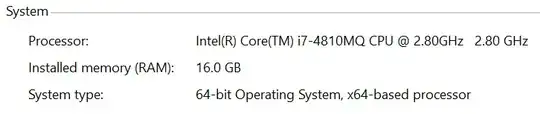
  • It's a 64-bit Host OS: enter image description here
  • My CPU supports Intel VT-x
  • Intel Virtualization is enabled in BIOS.
  • Microsoft Hyper-V is disabled: enter image description here
  • Windows defender (which controls Credential and Device Guard AFAIK) is disabled: enter image description here

  • Anti-virus is Trend Micro Office Scan: enter image description here
  • When I booted from an Ubuntu 64 bit ISO, it said hardware only supports i386, the OS you're booting to requires x86_64. Or something like that

I read these:

Kashyap
  • 101
  • 1
  • 5
  • So you read the duplicate. What security software do you have installed. – Ramhound Jan 25 '18 at 23:15
  • @Ramhound Trend Micro. It's my office laptop. VT-x is enabled in BIOS. – Kashyap Jan 25 '18 at 23:20
  • Security software is notorious for using VT-x. “Trend Micro” isn’t specific enough I can do any research. – Ramhound Jan 25 '18 at 23:22
  • **The usual culprits are system level debuggers, other VM platforms, and some resident anti-virus applications.** - Update your question. – Ramhound Jan 25 '18 at 23:29
  • @Ramhound I added the "About" of anti-virus if that helps. I did have "VMWare Horizon Client", which I uninstalled before installing VirtualBox. Don't know if there are any system level debuggers, I didn't start any. – Kashyap Jan 25 '18 at 23:31
  • Your screenshot doesn’t indicate which Trend Micro product you have. What version of VirtualBox? You are going to have to determine if you have debuggers installed. It’s your system, ask whom ever you have to ask, to determine the answer to that question. Visual Studio has a debugger. If you had docker installed in the past, that’s been an issue for some, update your question. – Ramhound Jan 25 '18 at 23:32
  • (If your screenshot indicates which Trend Micro product your using I don’t see it). I prefer you just write what product you have installed as text – Ramhound Jan 25 '18 at 23:43
  • Did you try booting the device with a 64bit ISO in the virtual drive? – Michael Frank Jan 25 '18 at 23:53
  • [Intel® Processor Identification Utility](https://www.intel.com/content/www/us/en/support/products/5982/processors/processor-utilities-and-programs/intel-processor-identification-utility.html) download tool and submit the results. Securable might be helpful also – Ramhound Jan 26 '18 at 00:03
  • @Ramhound It's Trend Micro Office Scan. Didn't have Docker, did have VS, which I'm trying to remove. Did try 64 bit ISO in generic VM, it threw compatibility error. Will post more tomorrow I think. – Kashyap Jan 26 '18 at 00:12
  • i386 indicates VBox was trying to boot a 64-bit OS within a 32-bit VM – Ramhound Jan 26 '18 at 00:29
  • [Office Scan appears to have the ability to scan VMs, if I were a betting man, it’s incompatible with VirtualBox](https://success.trendmicro.com/solution/1056376) – Ramhound Jan 26 '18 at 00:34
  • hmm. I'm onto removing the last VS component, lets see what happens after that. Anti-virus can't be removed as it's work laptop. :-( – Kashyap Jan 26 '18 at 01:18
  • @Ramhound So I removed the VS, but it's the same situation. So I guess it might be the anti-virus. Thanks for the effort/inputs! – Kashyap Jan 26 '18 at 15:03

0 Answers0