18

Mac OS X has a fantastic feature that enables you to play window effects in slow motion by holding down the Shift key while playing the animation (like minimize, maximize, Exposé, etc...)

As a matter of fact, I don't like it! :)

How can I disable it?

Daniel Silveira
  • 544
  • 3
  • 11
  • 20
  • 1
    Cool - didn't know about that. And +1 for asking in a positive way. – Andrew Grimm Feb 10 '11 at 11:44
  • 1
    Looks like you should have just waited 8 years where it’s now disabled and people want it back on! (https://apple.stackexchange.com/questions/303106/how-to-enable-slow-genie-effect-in-macos-10-13-high-sierra) – user535673 Oct 30 '18 at 20:14

2 Answers2

9

Open up Terminal.app

Type:

defaults write com.apple.finder FXEnableSlowAnimation -bool false

If you want to go back, use:

defaults write com.apple.finder FXEnableSlowAnimation -bool true

You'll need to restart the Finder after running the command.

Chealion
  • 25,408
  • 8
  • 67
  • 75
Loïc Wolff
  • 2,044
  • 15
  • 14
1

At least for me, in Yosemite 10.10.3, the following answer from our friends at Ask Different worked: https://apple.stackexchange.com/a/115698


You can disable the hotkeys for slow motion effects by following these instructions:

  1. Open Terminal

  2. Go to ~/Library/Preferences by typing cd ~/Library/Preferences.

  3. Write open com.apple.symbolichotkeys.plist and press Enter.

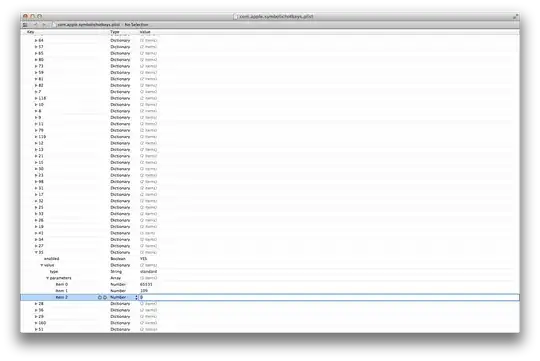
  4. A window similar to this will open:

XCode PList Editor

  1. For items 34, 35, and 37, set enabled to NO.

  2. Restart your system.

  3. Enjoy.

Source

  1. MacWorld
  2. In Translation
SCdF
  • 303
  • 2
  • 8