2

I want to create simple playing instructions for a child to be played on an eight-note xylophone where each tone has a unique color. The instructions should be color coded too. They should be recognisable for smaller children. Is there some tool or template that turns something like E E E E E E E G C D E into assigned colors?

Thank you.

lejonet
  • 138
  • 5
  • Sounds a lot like jingle bells! Don't know of any programs, but should be easy to do on computer. Rainbow idea has been used many, many times. Awkward part is timing. – Tim Nov 24 '16 at 11:14
  • Whilst you *could* use software, since this is really simple music you could do this by hand pretty quickly. Using color to represent pitch is OK but how were you going to notate rhythm? I think boomwhackers use color-coded music. Would you be able to use that? – Brian THOMAS Nov 24 '16 at 12:39
  • 3
    I guess, you are refering to an instrument with colored metal bars, so it is a kind of metallophone, most likely [Glockenspiel](https://en.wikipedia.org/wiki/Glockenspiel). So the *xylophone* tag is probably not the closest choice... – guidot Nov 24 '16 at 13:22
  • Have you been to a toy store in the last 50 years? – Carl Witthoft Nov 25 '16 at 19:46
  • @guidot you are right – lejonet Nov 25 '16 at 20:14

3 Answers3

4

If you've got a copy of Sibelius (I know that's a big if), there's an inbuilt function to colour pitches. In Sibelius 8, it's under Note Input > Plugins > Color Pitches. In older versions, it'll be in the plugins somewhere.

You can select a colour for each pitch, and the plugin applies them to the music you select.

Results look something like this:

Coloured Pitches

endorph
  • 9,549
  • 3
  • 26
  • 51
  • 3
    Something similar [can be done](https://stackoverflow.com/questions/1902526/coloring-notes-in-lilypond-by-pitch) with LilyPond. It's probably _a tiny bit_ less comfortable, but free. – linac Nov 24 '16 at 16:46
2

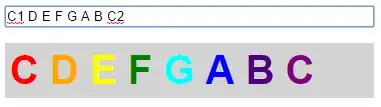
Save this as a .html file, and open it in a browser:

<script>
var colors = {
    'C1': 'red',
    'D': 'orange',
    'E': 'yellow',
    'F': 'green',
    'G': 'cyan',
    'A': 'blue',
    'B': 'indigo',
    'C2': 'purple'
};
function colorize() {
    var notes = document.getElementById('notes').value.split(' ');
    var output = '';
    for (var i = 0; i < notes.length; i++) {
        output += '<span style="color: ' + colors[notes[i]] + '">' + notes[i].replace(/[0-9]/g, '') + '</span> ';
    }
    document.getElementById('display').innerHTML = output;
}
window.onload = colorize;
</script>

<p><input id="notes" onkeyup="colorize()" style="width: 100%" value="C1 D E F G A B C2"></p>

<div id="display" style="background-color: lightgrey; font: 40px Arial; font-weight: bold; padding: 5px;"></div>
  • You can adjust the notes and colors as needed
  • Put a space between each note
  • You can add line breaks like this: "A B C <br> D E F"

Screenshot:

colored notes

J.T.
  • 36
  • 2
  • Wow, this is great! I adjusted the colors and changed the output a little bit and it is just what i needed. Thank you very much! – lejonet Nov 26 '16 at 13:36
1

Microsoft Excel has a large number of possibilities under the Conditional Formatting menu.

  1. Paste your tune (as alphabetic notes) into a single cell.
  2. Reduce the width of the cells in your sheet so the result of the next step is not excessively wide.
  3. Use Data -> Text to Columns to distribute each note into different cells. There are various options for splitting the data by fixed width or by delimiting characters such as spaces.
  4. Use conditional formatting to colour the cells.

There are two conditional formatting options you could try.

One is colour scales, where the cells can be given for example a rainbow of background colours (I use this at work to prioritise items by colouring by due date.) It auto-normalises so if all notes are present the A would be red and the G would be blue (or vice versa if you prefer) leaving the D in the middle in green, but if you only had the notes A to E, the E (as the last item in the available alphabet) would be blue and the middle note C would now be green.

I can't see an easy way of starting this colour scheme at C, so I hope your kids like the scale of A minor.

The other is custom rules, where you can set all kinds of stuff for each cell (background colour, text colour, bold, underline, etc.) according to its content. If you have a xylophone with an existing colour scheme, you could build a spreadsheet to match it, and paste all your different tunes into it.

Level River St
  • 1,864
  • 11
  • 13