3

I have a low-quality MIDI keyboard that doesn't allow changes in its velocity output. So, since I do all my recording with Reason, I want to set the velocity specs there.

Actually, with setting a max for the velocity is enough. But, of course, it has to be done in real time, since I need to listen what I am playing.

Is this feature possible in Reason somehow?

Andrew T.
  • 265
  • 3
  • 12
pfernandez
  • 47
  • 1
  • 5

3 Answers3

2

One easy fix here: In your track, throw in a "RPG-8 Monophonic Arpeggiator", which is included in both Reason Full and Reason Intro. Turn Off the arpeggiator by clicking on the big red "ON" button. You can control your velocity at the top left corner, set a fixed velocity from 0 - 127. There you go~~

1

OK, so I have a vague answer to this question - only because I've been searching for a very long time (since reason 4) and FINALLY found a solution.

First of all - as of February, 2015, Propellerhead Reason Support (via facebook) says that this CANNOT be done directly in Reason according to their response here: Facebook thread link I found on Google
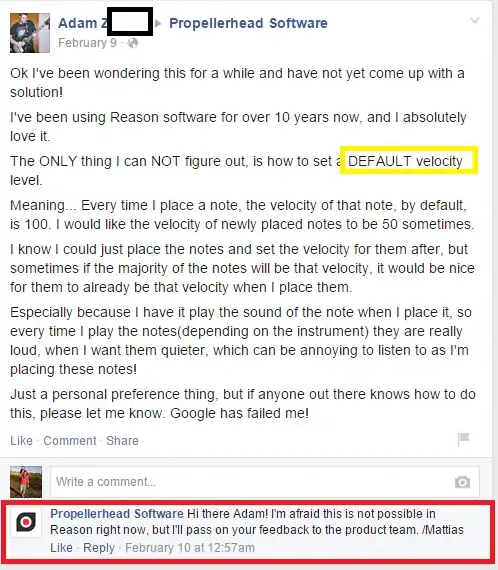
Facebook screenshot

Now, that being said, I DID find a workaround. I recently found a free (for personal use) program called MIDI-OX, which lets you look in the MIDI-OX monitor at the value of the velocity registered when you play the keyboard (from 0-127 range), and then "Map" new Velocity-Waves as MIDI-OX output, then you set your Reason input to MIDI-OX.

In order to set a DEFAULT VELCOITY for ALL MIDI input, you would set up a "NoteOn" filter, which checks for a min and\or max velocity (from 0-127) and then remaps midi OUTPUT velocity from the virtual MIDI-OX device, to a specific OUTPUT velocity. See the example screenshot below
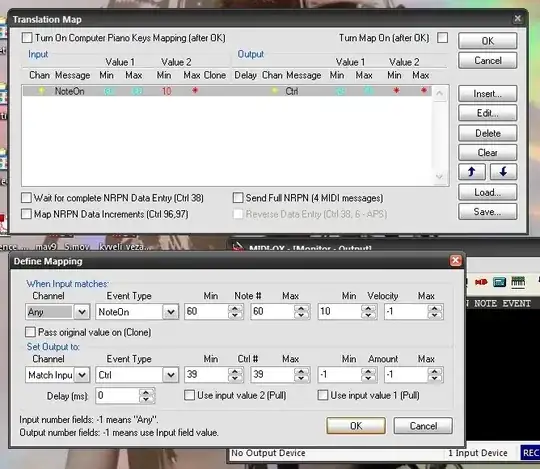
enter image description here

You would then set your MIDI-INPUT device in reason to "MIDI-OX"

You can find more information here: MIDI-OX.com

Hope this helps!

turkinator
  • 111
  • 5
1

I have found another way, the one I am using right now.

The sampled sound I have for the piano in Reason has 4 sounds per key (it is 5 meter gran piano), the sounds are like soft-medium-hard-veryHard. Each one is assigned to a velocity period (very hard for example is assigned to velocity 100-127, and hard to 80-99).

Using Reason, I have deleted the sounds of soft, hard and very hard, and have expanded the velocity range of "medium" to cover the whole spectrum (1-127).

The sound sounds kind of correct. Works for me.

pfernandez
  • 47
  • 1
  • 5